
How to check student charges and payments before going live
Check course prices, attendance, discounts, previous balances and payments against one student's invoice before starting live billing.
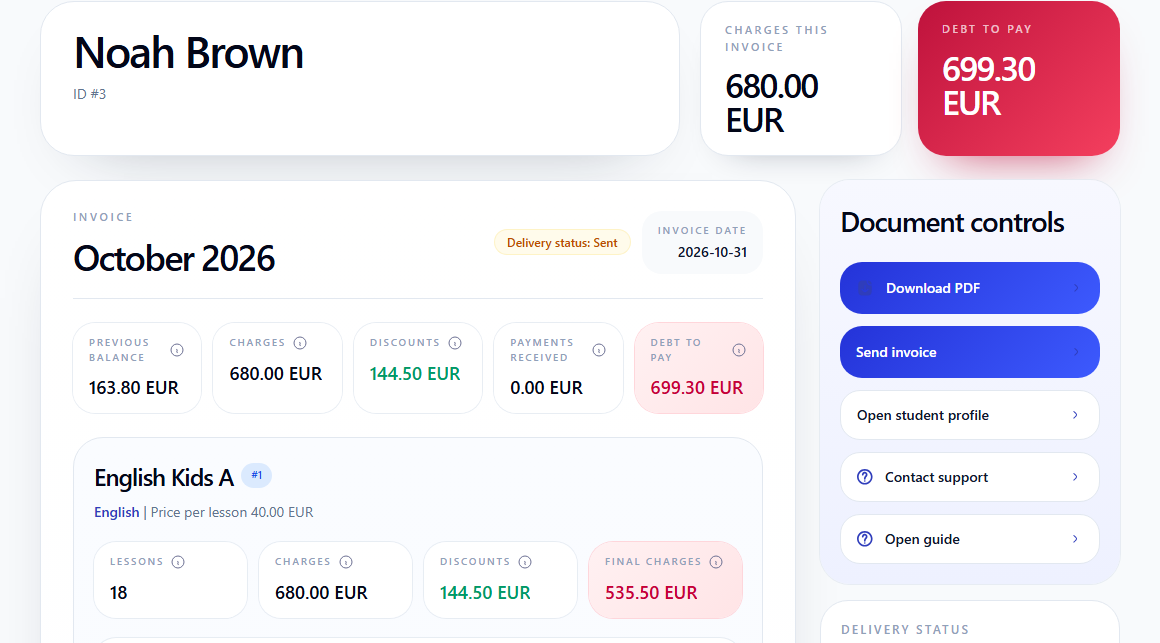
Start with one student and one month whose prices, absence rules, discounts and payments you know. Open Finance → Invoices, select the month and open the student's invoice.
Use demo data or a separate practice company for a trial. Publishing the schedule creates the initial lesson charges. Attendance and billing treatment can then adjust those charges. An invoice marked Draft can already affect the balance. Sending the invoice is a separate action; it does not record a payment.
Before entering prices and payments, check the currency and time zone in company settings. Then prepare and publish the schedule.
1. Check the student, month and price effective on the lesson date
The example follows Noah Brown's October invoice, group English Kids A, course English. The course price is 40 EUR per lesson from 1 September 2026.
Check that the invoice belongs to the right student and month, that its lessons belong to the expected group, and that each lesson uses the price effective on its date. Open Programs & Pricing → Courses & Prices, select the course and open Pricing.

For an ordinary chargeable lesson in this example, the row shows 40 EUR before discounts and 31.50 EUR after an 8.50 EUR discount. The lesson price and final charge are different amounts.
2. Check attendance and billing treatment separately
Noah has 18 October lessons. 17 are chargeable; the lesson on 22 October is an excused absence without a charge.
Click Edit attendance in that lesson's invoice row. Check the two independent choices:
- P / A records whether the student was present or absent;
- R / Regular charges the lesson; E / Excused removes the charge.
An absence with R remains chargeable. An absence with E is free. A present student can also have a free lesson: attendance alone does not determine the charge.
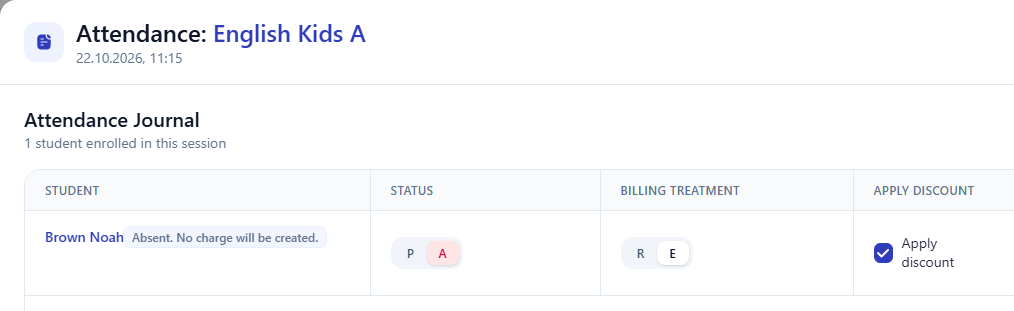
When the relevant features are enabled, T / Transferred marks a transferred absence; its charge follows the company's transfer policy. Apply discount controls whether the lesson participates in the discount calculation. Check these settings together with attendance.
The E option requires the excused-absence feature. If you change a mark, save attendance, wait for recalculation and check the invoice row again. This example's 22 October lesson has a 0 EUR charge. See the attendance manual.
3. Check discounts and final charges
Open the lesson rows and check the student's assigned discounts, their effective dates and conditions. For a discount that depends on timely payment, check both the payment date and whether the condition was met.
The October example has:
- charges before discounts: 17 × 40 = 680 EUR;
- discounts: 17 × 8.50 = 144.50 EUR;
- final charges: 680 − 144.50 = 535.50 EUR.
The invoice's Charges field shows 680 EUR before discounts. Either start with that amount and subtract the discount, or use the final 535.50 EUR. Do not subtract the discount twice. See the discounts manual.
4. Trace the previous balance and the payment
A positive previous balance is debt and increases the amount due. A negative balance is credit and reduces it. Open the same student's previous invoice to check where the balance came from.
Noah's September final charges were 409.50 EUR. His 245.70 EUR payment on 17 September was allocated to September. The remaining debt was:
409.50 − 245.70 = 163.80 EUR.
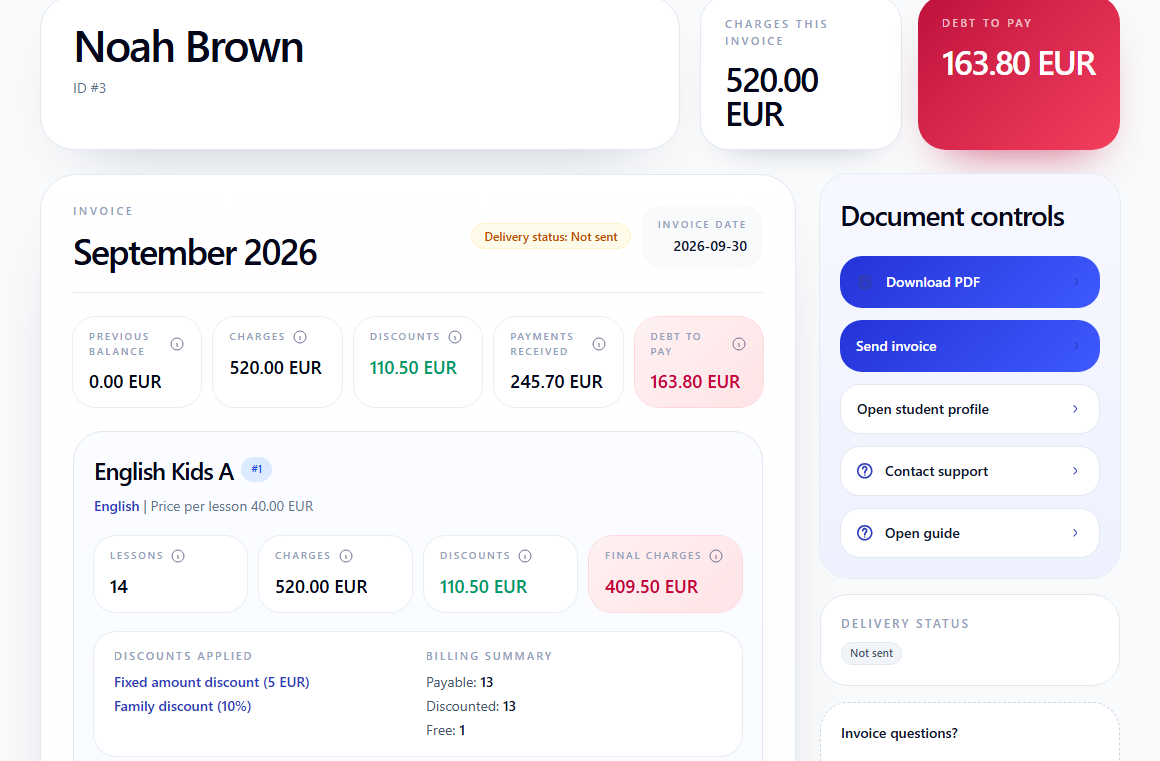
That debt becomes October's previous balance. Do not subtract the September payment again from October: it is already included in the carried-forward 163.80 EUR.
Check the student, amount, currency and date in Finance → Payments, then check the allocation in the invoice. A payment in the history does not reduce every invoice. No payment has been allocated to Noah's October invoice, so Payments received is 0 EUR. See the payments manual.
5. Reconcile the amount due
For this example, with no additional adjustments:
Previous balance + charges before discounts − discounts − payments received = amount due.
Noah's October invoice:
163.80 + 680 − 144.50 − 0 = 699.30 EUR.
Using final charges gives the same result:
163.80 + 535.50 − 0 = 699.30 EUR.
Compare the result with the amount due in the application. If the invoice contains adjustments, include them with their displayed signs.
6. Check the invoice before sending it
Check the due date, student's email address and payment instructions in the PDF. Download the document and verify that its amounts match the invoice you checked.
Delivery status only tells you whether the invoice was sent. A sent invoice can still be unpaid; the school records the actual payment separately. Noah's October invoice is already Sent, but still has 0 EUR in payments received.
See sending student invoices by email and the invoices manual.
The check is complete when you can explain every lesson price, free lesson, discount, previous balance, payment and the final amount due. A balance carried between invoices in this example comes from existing transactions in Intelligence Cloud; it is not an instruction to import a balance from an old system.
Related resources
How to send student invoices by email
Check the amount, recipient and payment instructions, send the invoice PDF and find the result in delivery history.
How to configure company settings
Set the school name, country, currency, time zone, date format, invoice due dates, and payment instructions before daily work begins.
Student Billing Software for Training Centers
Learn how training centers and language schools can create student invoices, record payments, track unpaid balances, and connect billing with lessons and attendance.