
Absences are hard to explain
If attendance is recorded later, it is unclear whether the student was absent, excused, transferred, or simply forgotten.
Create reliable attendance records for every lesson and connect them with billing treatment, student invoices, balances, and reports.
No card required. No migration needed to test the attendance flow.
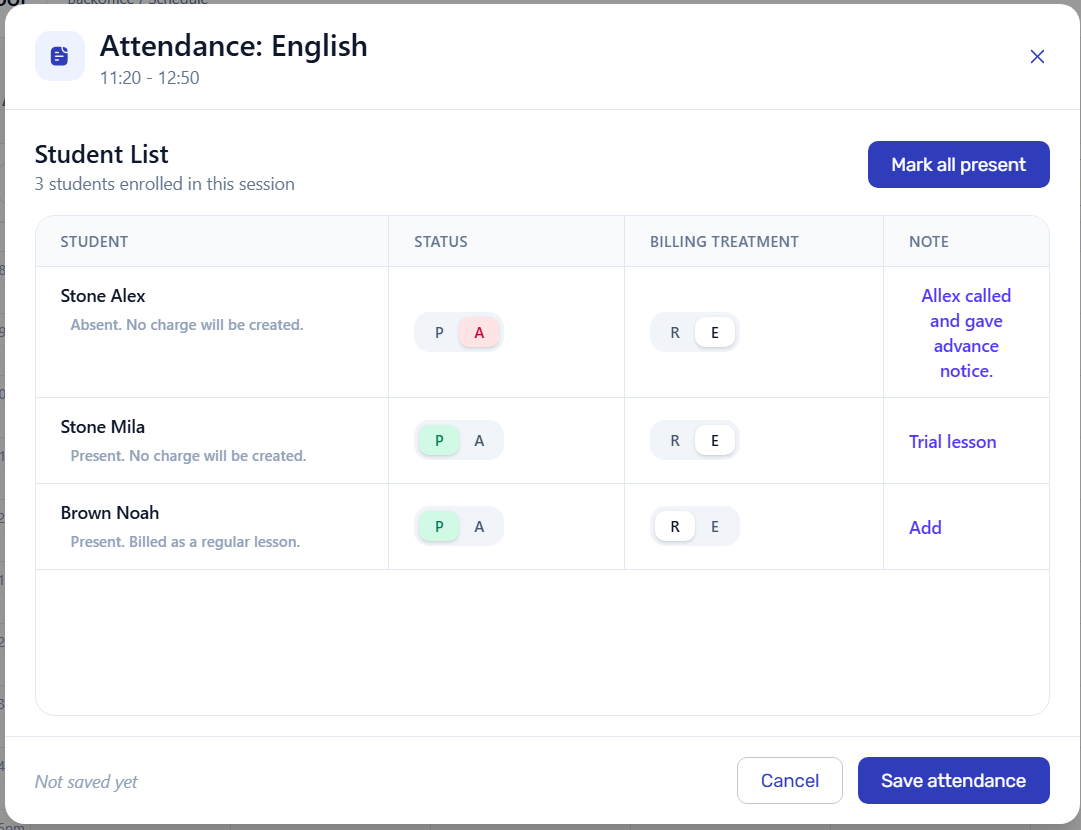
The mark itself is not enough. Schools need to know which lesson it belongs to, why it changed, and how it should affect the rest of the workflow.
If attendance is recorded later, it is unclear whether the student was absent, excused, transferred, or simply forgotten.
Administrators have to rebuild what happened from notes, chats, calendars, and teacher messages.
Missed lessons and attendance trends become visible only after billing or reporting is already behind.
Attendance should be recorded where the lesson happened.
Open the lesson, mark each student, keep absence reasons and billing treatment visible, and let the rest of the workflow use the same record.
Watch how a scheduled lesson becomes an attendance record, how billing treatment is selected, and how the result stays connected to invoice lines and student balances.
This workflow is different from employee time tracking or billable-hour software. Training centers, tutoring centers, and language schools need lesson attendance records that can explain student invoices, balances, and teacher payouts.
The record is about a scheduled lesson, the students expected in that lesson, and what happened for each student.
Present, absent, excused, transferred, or canceled outcomes can be reviewed before invoice lines are finalized.
Attendance records remain connected to student invoices, balances, reports, and teacher payout calculations.
Attendance is recorded once in the lesson context, then reused for billing, balances, and reports.
Record attendance inside the lesson, with group, teacher, students, and schedule already known.
Mark present, absent, excused, or transferred before billing starts.
Use the same attendance record for invoices, balances, and operational reports.
See which lessons already have attendance, where marks are missing, and which records may need attention before billing.
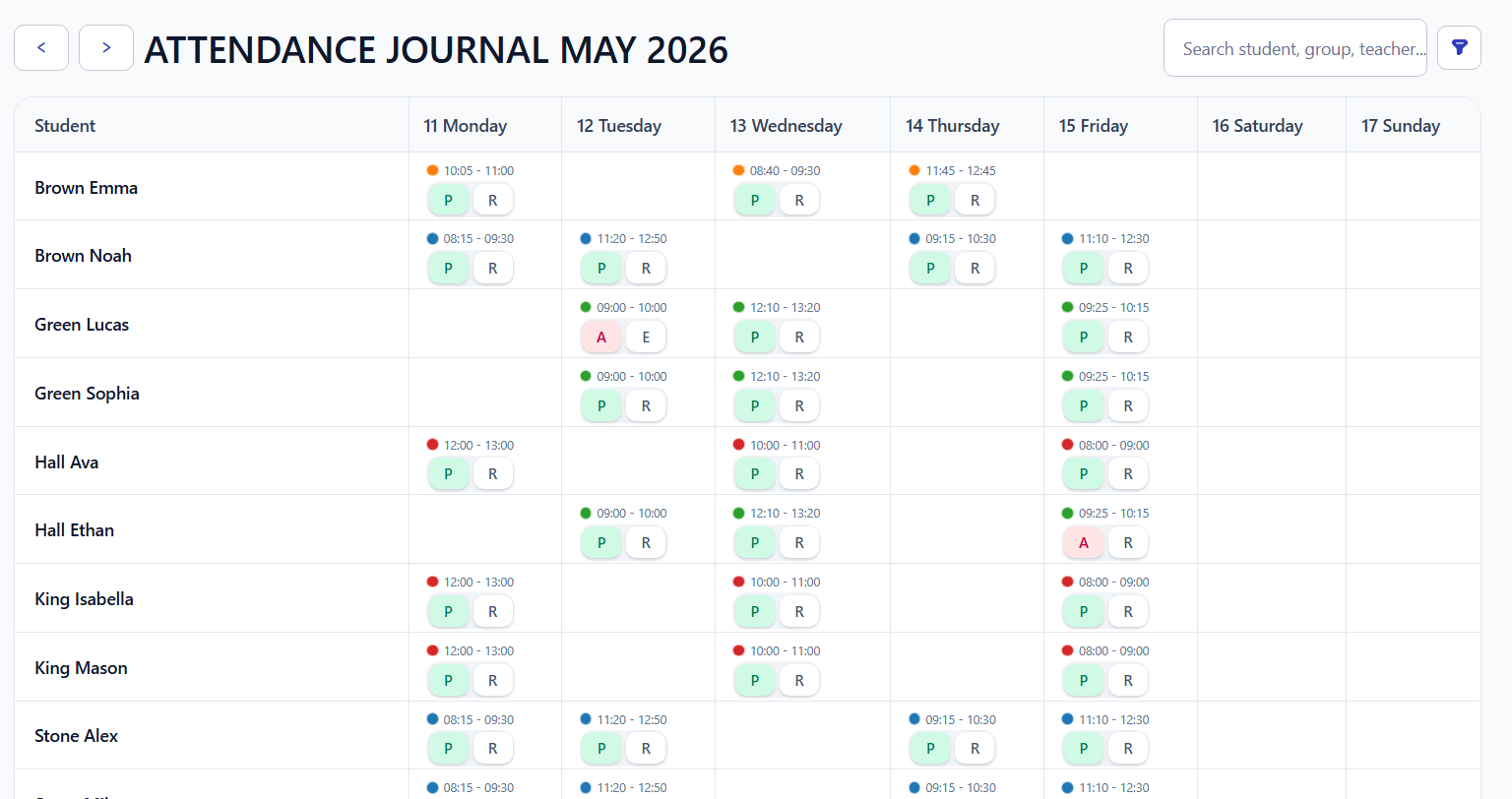
Administrators do not need to recreate the lesson manually. Students, lesson time, and billing treatment are already attached to the record.
Typical admin question
Choose the attendance result while the lesson context is still clear, so billing does not need to be reconstructed later.
When a student is absent, excused, or transferred, the invoice can reflect that decision automatically instead of being corrected later.
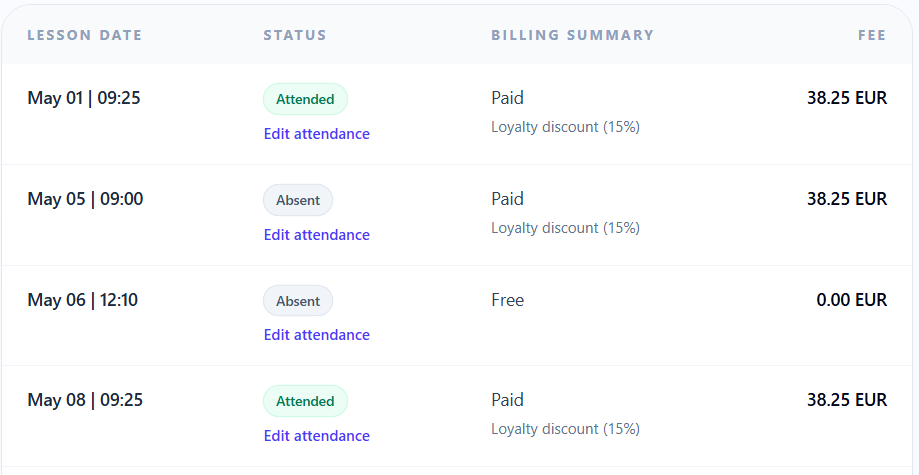
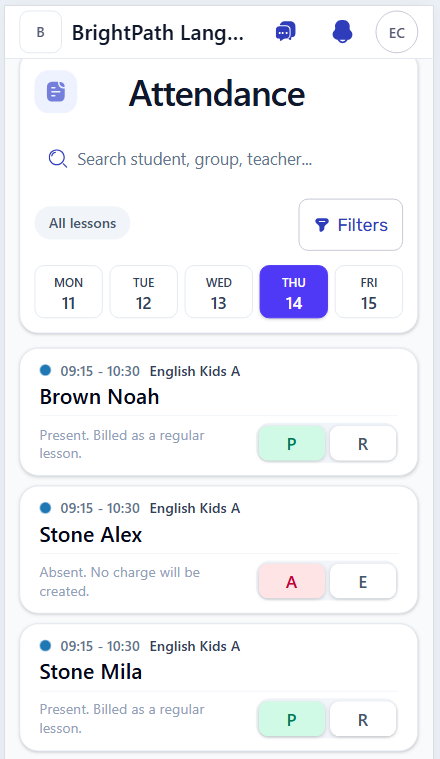
Administrators can mark attendance during the day, while the lesson is still fresh and before billing depends on it.
Schedule creates the lesson, attendance confirms what happened, and billing, reports, and payouts can use the result.
Teacher, group, time, and students are already known before attendance is marked.
Invoices and balances can reflect what actually happened, not a reconstructed month-end spreadsheet.
Attendance risks, activity, revenue, and operational summaries can start from the same lesson history.
Student portal software
Invited students can access their own lessons, attendance, sent invoices, payment details, current balance, and profile through the connected student portal.
Workflow guides
Use these guides to connect attendance decisions with scheduling, invoices, and teacher payout calculations.
For lesson-based education businesses, attendance tracking and billing software records what happened in each lesson and keeps that record connected to billing treatment, student invoices, balances, reports, and teacher payouts.
Attendance can help decide whether a lesson should be charged, excused, transferred, canceled, or shown as a free line. That makes the invoice easier to explain from the lesson history instead of a separate spreadsheet.
No. Employee time tracking usually records work hours for payroll or client billing. Intelligence Cloud focuses on lesson attendance: students, groups, teachers, absences, billing treatment, invoices, balances, and education reports.
Attendance records do not replace payment records, but they can affect which lesson lines are billed. After invoices and payments are reviewed, the student balance can reflect the connected lesson and billing history.
Start with demo data or mark a few real lessons to see whether attendance statuses, absences, and billing treatment match your school process.