Record attendance where billing decisions begin
In many schools, attendance is recorded separately from billing, which creates manual corrections, disputed absences, and unclear invoice totals. Intelligence Cloud keeps attendance and billing decisions connected from the beginning.

How attendance connects lessons to invoices
In Intelligence Cloud, attendance is recorded inside the lesson context. The scheduled lesson provides the course, teacher, group, student list, date, and time; the attendance mark records the student result and billing treatment. This lets language schools, tutoring centers, and other lesson-based education centers explain why a lesson was paid, free, discounted, or excluded from billing. The same confirmed attendance data can also support teacher payout calculations when payout rules depend on delivered or confirmed lessons.
When to use this workflow
Use the attendance workflow whenever a lesson outcome must be clear before billing, reporting, or month-end review.
Example workflow from attendance mark to invoice result
Use this as the basic attendance-based billing workflow. More advanced attendance rules can be documented separately in Product logic articles.
Review attendance across the teaching week
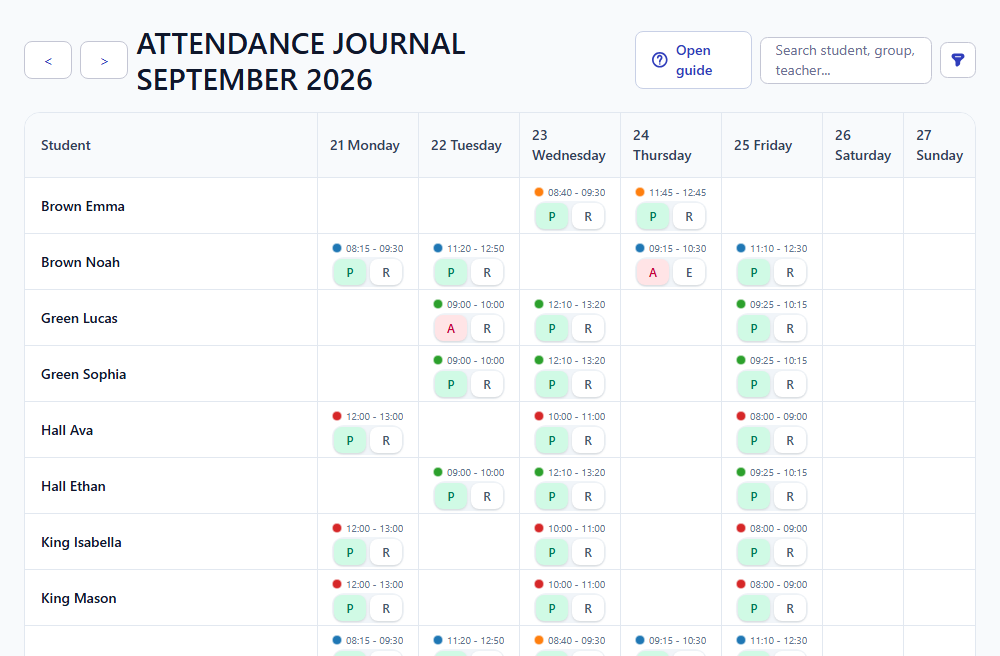
The attendance journal shows students, lesson dates, lesson times, and quick status controls in one weekly view. Administrators can see which records are already marked and which lessons may need attention before billing starts.
- Use the journal to review attendance by student and lesson date.
- Quick controls help mark common present or absent outcomes.
- Missing or inconsistent marks can be found before invoices are generated.

Mark attendance inside the lesson context
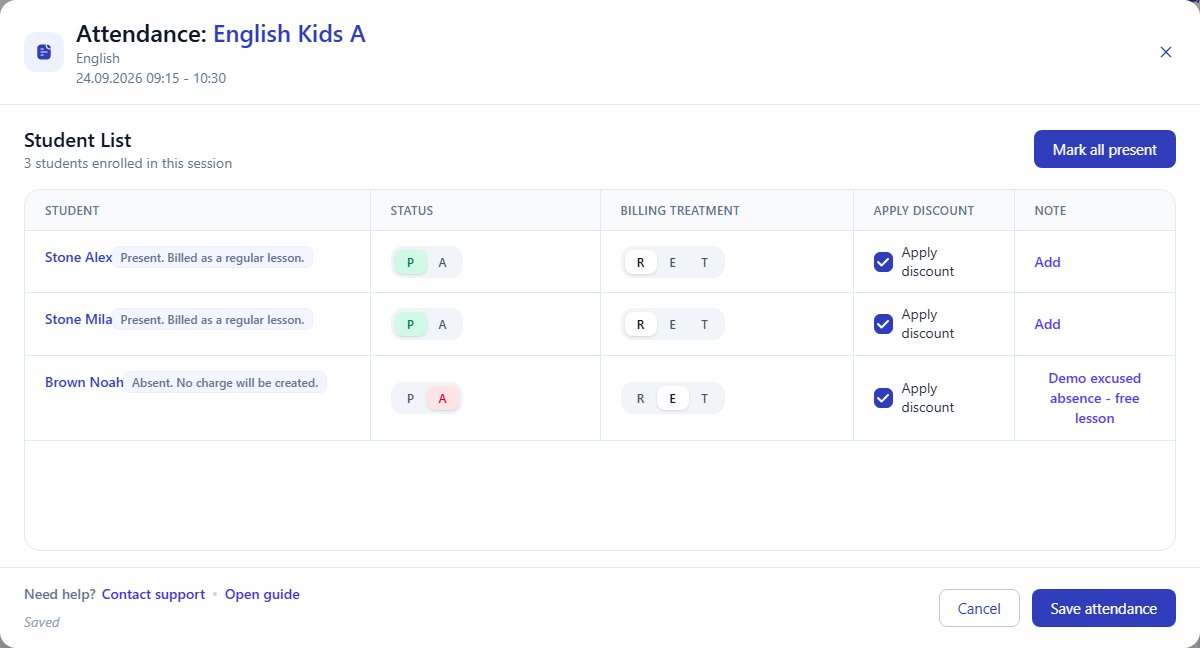
Open a lesson to mark each student's result while the course, teacher, lesson time, and student list are still visible. The same screen keeps the basic billing treatment next to the status, so the absence decision is not reconstructed later from notes.
- Status records whether the student was present or absent.
- Billing treatment records whether the lesson should be charged as regular or treated as excused.
- Notes keep the explanation next to the student record.

Decide billing treatment before invoice generation
The important decision is not only whether a student missed a lesson. The school also needs to know whether that missed lesson should create a charge, be free, or be handled by another enabled workflow. Recording this before invoice generation keeps the invoice explainable.
- Regular treatment can keep the lesson billable.
- Excused treatment can make the missed lesson free.
- Some schools can enable additional treatment options, but the basic workflow works without them.
Verify how attendance changed the invoice result
The invoice keeps the connection between the lesson, attendance result, billing treatment, and final amount visible on lesson lines. In this example, attended lessons are paid, while an absent excused lesson is free and creates a 0.00 EUR fee.
Attended lesson -> Paid -> lesson fee included Absent excused lesson -> Free -> 0.00 EUR Invoice total = payable lesson fees - discounts + previous balance and other adjustments

Use mobile attendance during daily operations
Administrators can work from the daily mobile view when they need to update attendance during the day. The mobile cards keep the lesson time, course, student, status, and billing treatment close to the action, while updates still follow the same approved schedule and billing rules.
- Use the mobile view when attendance is updated away from a desk.
- The status and billing treatment remain tied to the same lesson record.
- Daily updates reduce month-end reconstruction from chats or paper notes.

Why attendance should be recorded before billing
Attendance turns the approved scheduled lesson into a billing-ready fact. If the attendance result is missing or unclear, invoice rows, balances, reports, and payout review can become harder to explain.
Do not wait until month-end to decide how missed lessons should be charged. Record the attendance result while the lesson context is still fresh.
How attendance logic works
These notes explain why attendance is a billing input, not only a classroom checklist.
Common attendance outcomes
The guide does not list every advanced attendance rule, but the basic outcomes explain how most lesson-based billing decisions start.
- Present / regular: the lesson is counted and can be billed.
- Absent / excused: the lesson can be excluded from billing.
- Absent / chargeable: the lesson can still be billed if school policy requires it.
- Other treatment options may appear only when the related workflow is enabled.
Attendance status and billing treatment are separate decisions
A student can be absent, but the financial result still depends on the billing treatment selected by the school. Keeping these decisions visible separately makes invoice lines easier to explain.
- Status answers: was the student present or absent?
- Billing treatment answers: should this lesson be charged or treated as excused?
- The invoice can show the resulting paid or free lesson line instead of hiding the reason.
Missing attendance creates billing risk
If attendance is not marked before invoices are prepared, administrators have to reconstruct the lesson outcome from chats, teacher messages, or memory. The journal helps find missing marks earlier.
- Review the teaching week before invoice generation.
- Check students with unexpected absent or free lessons.
- Use notes when a lesson needs explanation later.
Some attendance options depend on enabled workflows
The basic workflow records status, billing treatment, and notes. Additional attendance controls may appear only when the related paid workflow or school option is enabled.
- Keep the guide focused on the base present, absent, regular, and excused flow.
- Use enabled options only when your school actually needs that billing rule.
- Check pricing or available workflows before relying on advanced controls.