
Explain every student invoice from lessons, discounts, and balances
Student invoices in Intelligence Cloud are calculated from the operational history of a training center: approved lessons, attendance results, course prices, discounts, payments, and previous balances. This guide follows Alex Stone to show why the invoice says 136.00 EUR is still due.
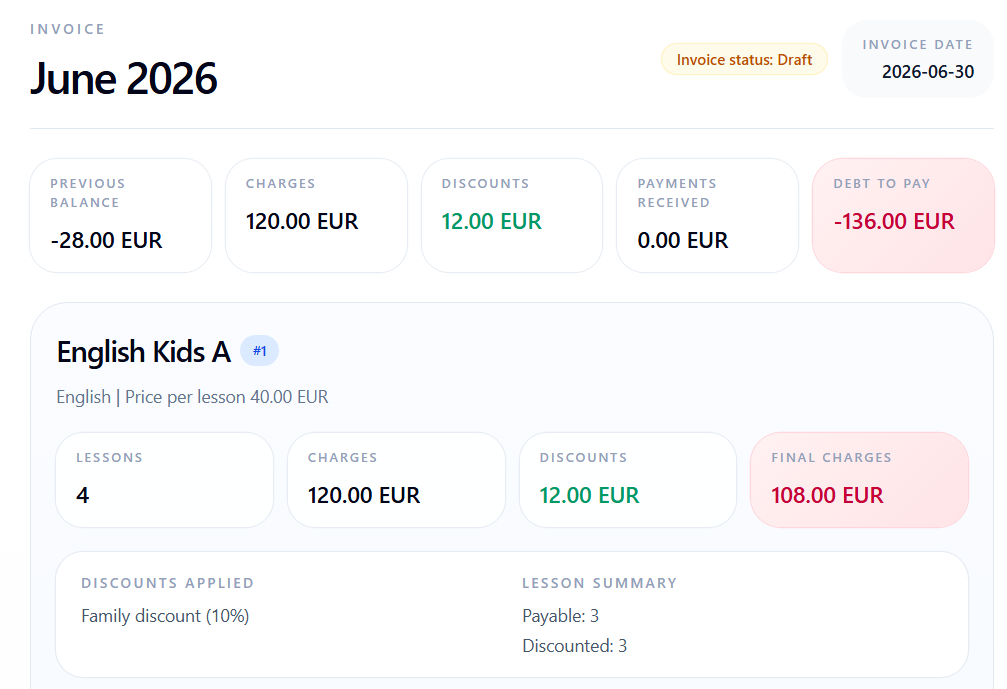
How the invoice amount is calculated
An invoice is not a manually typed total. It combines the student's previous balance with current lesson charges, applies discounts, subtracts received payments, and keeps lesson-level details visible. Attendance decisions explain why some scheduled lessons were charged, excluded, discounted, or adjusted before the invoice was generated. For language schools, tutoring centers, and other lesson-based education businesses, this makes student billing easier to check before the invoice is shared.
When to use this workflow
Use the invoice workflow when the school needs to verify monthly charges, explain a balance, or prepare a readable invoice for a student or parent.
Example workflow from invoice list to amount due
The example follows Alex Stone. The invoice starts with a previous unpaid balance, adds June lesson charges, applies a family discount, and shows the final amount due.
Find the student with an outstanding balance
The invoice list gives administrators the month-end view across students. In this example, Alex Stone has a previous balance of -28.00 EUR, 120.00 EUR in current charges, 12.00 EUR in discounts, no received payments, and a closing balance of -136.00 EUR.
- Use the list to compare accrued charges, discounts, payments, and closing balances.
- A negative closing balance marks the outstanding amount the student still needs to pay.
- Open the invoice when a balance needs explanation.
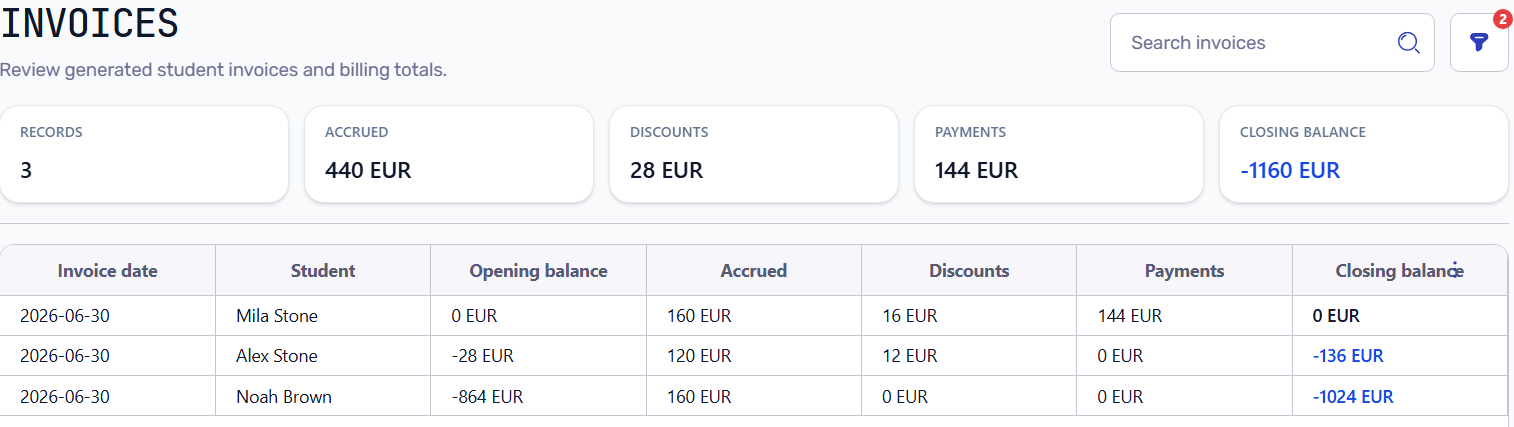
Invoice list showing Alex Stone with previous balance, accrued charges, discounts, payments, and closing balance
Read the invoice summary before checking lesson rows
The invoice profile shows the high-level calculation first. Alex had 28.00 EUR of previous unpaid balance, 120.00 EUR of new lesson charges, a 12.00 EUR discount, and no payments in the period.
Previous unpaid balance 28.00 EUR
+ current charges 120.00 EUR
- discounts 12.00 EUR
- payments 0.00 EUR
= debt to pay 136.00 EUR
Student invoice profile summary with previous balance, charges, discounts, payments, and debt to pay
Trace each charge back to its lesson
Lesson rows explain where the 120.00 EUR in charges came from. Each invoice row should point back to the lesson date, attendance result, billing decision, discount, and fee that produced the charge. The English Kids A course has a 40.00 EUR lesson price. Three attended lessons are billed at 36.00 EUR after the 10% family discount, while the absent excused lesson is free.
- Attended lesson: 40.00 EUR base price with 10% discount becomes 36.00 EUR.
- Absent excused lesson: free and does not increase the invoice.
- The invoice keeps attendance status, billing result, discount, and fee together.
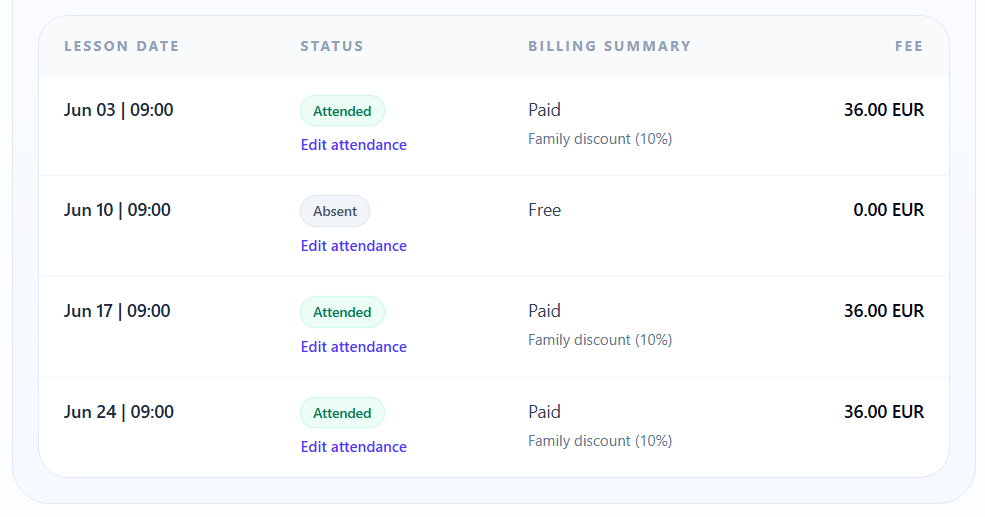
Invoice lesson rows showing attended paid lessons, an absent free lesson, discount details, and lesson fees
Share a readable invoice PDF
The PDF statement gives the same calculation outside the admin panel. A student or parent can see the recipient, invoice period, opening balance, charged amount, discount included in charges, paid amount, total due, and lesson details.
- Use PDF when someone asks why this amount is due.
- The statement should show both totals and lesson-level details.
- The document can be reviewed without giving access to the admin system.
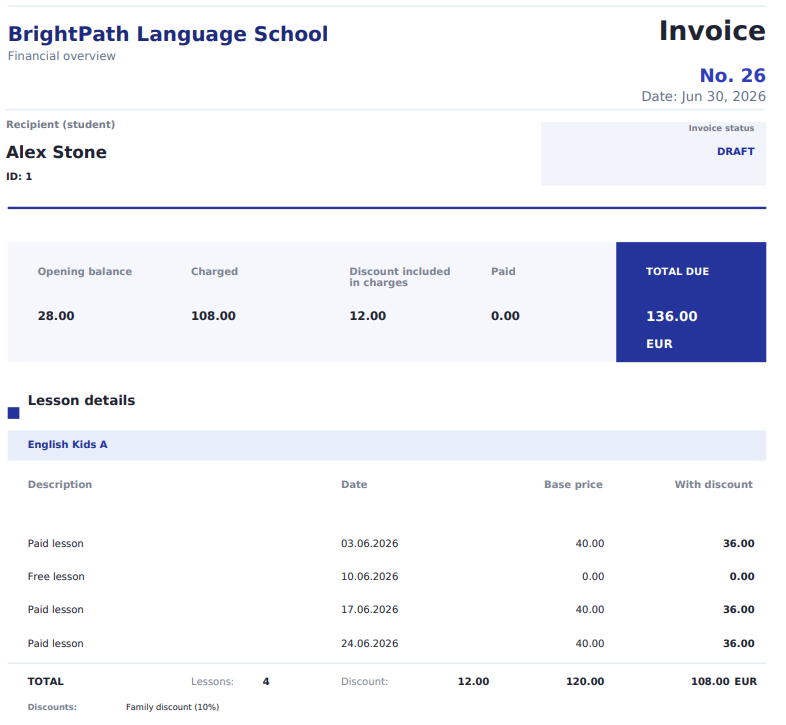
PDF invoice for Alex Stone showing total due, opening balance, charged amount, discount, paid amount, and lesson details
Review the same invoice on mobile
The mobile invoice view keeps the same story available during daily operations: invoice summary, debt to pay, course block, discount, lesson summary, and individual lesson rows.
- Mobile summary shows accrued charges, discounts, payments, and debt to pay.
- Mobile lesson rows keep status and billing result visible.
- The same invoice can be checked without rebuilding the numbers in a spreadsheet.
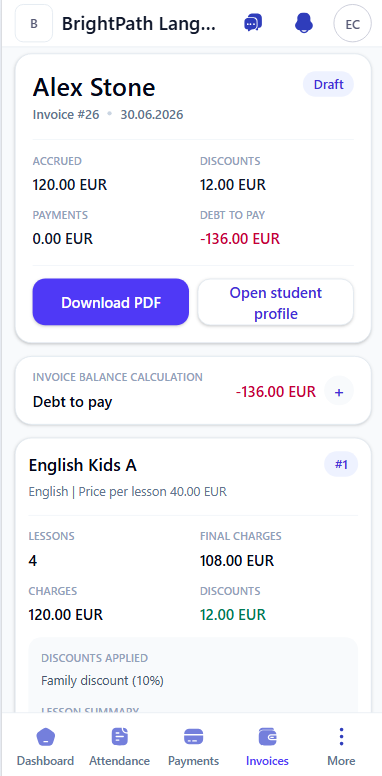
Mobile invoice profile showing Alex Stone invoice summary, discount, and debt to pay
Verify a fixed discount without hiding gross charges
Noah Brown's September invoice demonstrates the fixed-amount calculation. Sixteen payable lessons receive a 5 EUR reduction, producing an 80 EUR discount total. The invoice keeps 640 EUR in gross charges and 560 EUR in final lesson charges visible.
16 discounted lessons x 5 EUR = 80 EUR discount
640 EUR gross charges - 80 EUR discount = 560 EUR final charges
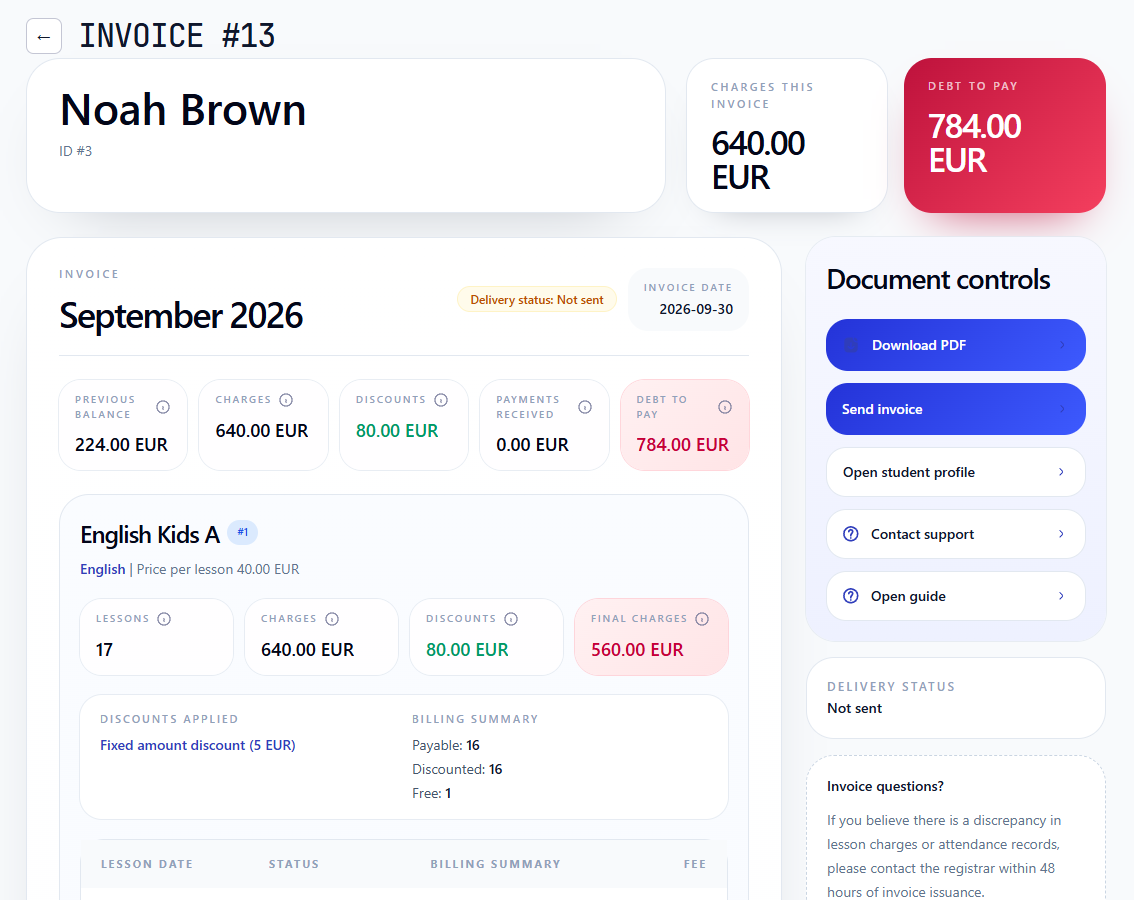
Student invoice showing a 5 EUR fixed discount, 80 EUR total discounts, and 560 EUR final charges
Review lesson rows when a total needs explanation
The mobile detail view shows the same lesson-level explanation: paid attended lessons, the free absent lesson, discount labels, and the final charge per row.
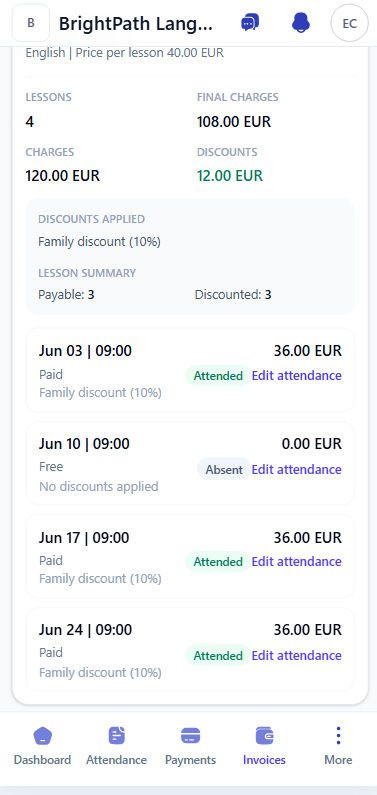
Mobile invoice lesson rows showing paid lessons, a free absent lesson, and family discount details
A student invoice should be explainable, not guessed
The final invoice balance is produced from source records. If the number looks wrong, the administrator should be able to trace it back to previous balance, lessons, attendance, discounts, payments, and corrections.
Do not send invoices until lesson rows, attendance results, discounts, payments, and previous balance have been reviewed.
How invoice calculation works
These notes explain how the invoice connects lesson history, discounts, payments, and balance.
Key invoice terms
Use these terms when checking an invoice with a student, parent, or administrator. They separate the current lesson calculation from the student's wider financial history.
- Previous balance: unpaid amount or credit carried from earlier periods.
- Lesson charges: charges generated from billable lessons in the invoice period.
- Discounts: reductions applied by rules or manually before the final charge.
- Payments: money already received and allocated to the student balance.
- Amount due: final unpaid amount after previous balance, charges, discounts, and payments.
Previous balance changes the amount due
A student may enter the month with debt or credit from a previous period. That balance is part of the new invoice result, even if the current month lesson charges are clear.
- Alex starts June with 28.00 EUR of previous debt.
- The current course block adds 108.00 EUR after discount.
- The total due becomes 136.00 EUR because no payment was received.
Discounts reduce charges but should remain visible
A discount should not hide the original lesson price. The invoice should show the base charge, the discount amount, and the final lesson fee so the calculation can be checked later.
- English Kids A has a 40.00 EUR lesson price.
- Family discount 10% reduces a paid lesson to 36.00 EUR.
- The invoice total keeps both the discount amount and the final charge visible.
Attendance explains why some lessons are free
A missed lesson can have a different billing result depending on attendance and billing treatment. Keeping the status on the invoice prevents later disputes about why a lesson was charged or excluded.
- Attended lessons are paid and discounted.
- The absent excused lesson is free.
- The invoice line keeps the attendance result next to the billing summary.
Payments and invoices should stay connected
Payments can change the final balance without changing the original lesson charges. The invoice should show the payment amount separately from charges and discounts.
- No payment was received for Alex during the period.
- If a payment is recorded later, the balance can change while lesson history remains traceable.
- Payment allocation is covered in the payments and balances workflow.