
The system automatically applies student payments to the right invoices and balances
When a student payment does not match exactly one invoice, Intelligence Cloud automatically allocates the amount across open billing periods so old debt, current invoices, overpayments, and remaining balances stay clear.
How payment allocation affects student balances
A payment is not only an amount received from a student. In a lesson-based billing workflow, the same payment may close an older invoice, reduce the current period, or create an overpayment. This process is often called payment allocation: the system decides how the received amount should be distributed across invoices or billing periods and keeps that context visible.
When to use this workflow
Use this workflow when payments do not map cleanly to one invoice or when a student pays after several billing periods already exist.
Why does Alex still have 308 EUR outstanding after paying 520 EUR?
Because 216 EUR of the May payment was used to close the previous April invoice, while 304 EUR reduced the May invoice. The May invoice amount after discount is 612 EUR, so 612 - 304 leaves 308 EUR outstanding.
Example workflow from received payment to invoice balance
The example uses Alex Stone. Alex has an unpaid April balance and a new May invoice. When Alex pays 520 EUR in May, the system automatically uses part of that payment to finish April and applies the rest to May.
Start from the payment history
Alex Stone has two recorded payments: 324 EUR on Apr 05 and 520 EUR on May 13. Together they explain the 844 EUR total payment amount shown in the invoice list.
- Payment 1: 324 EUR on Apr 05
- Payment 2: 520 EUR on May 13
- Total received from Alex: 844 EUR
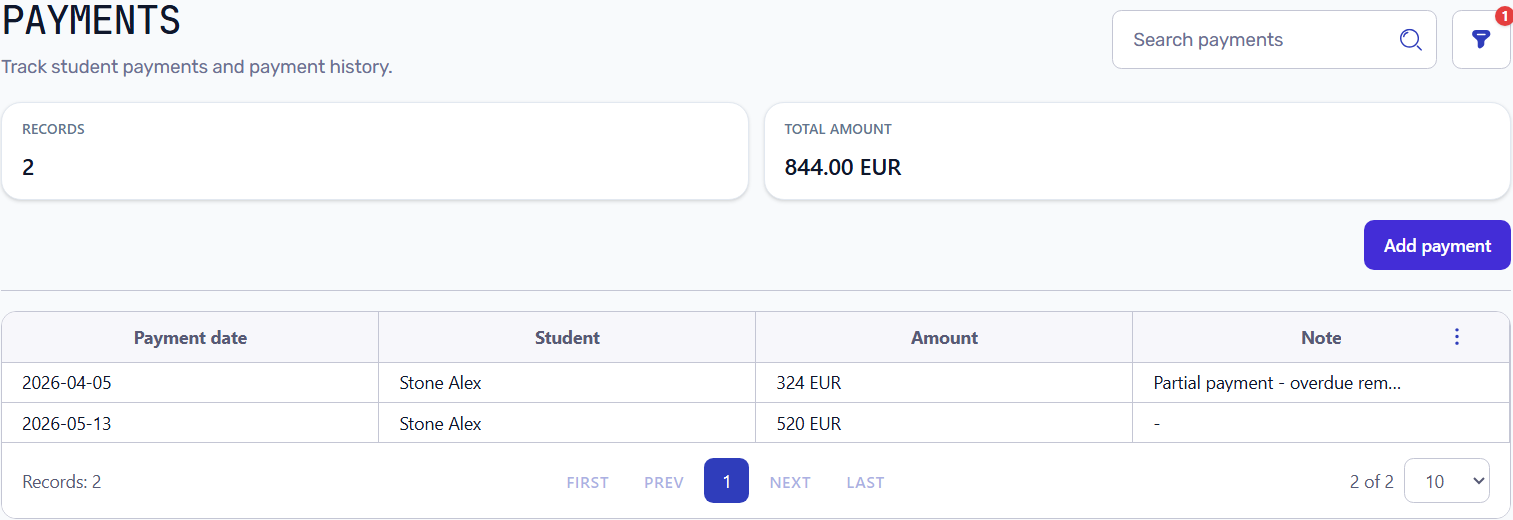
Payments list filtered to Alex Stone showing two payments totaling 844 EUR
Allocate one payment across billing periods
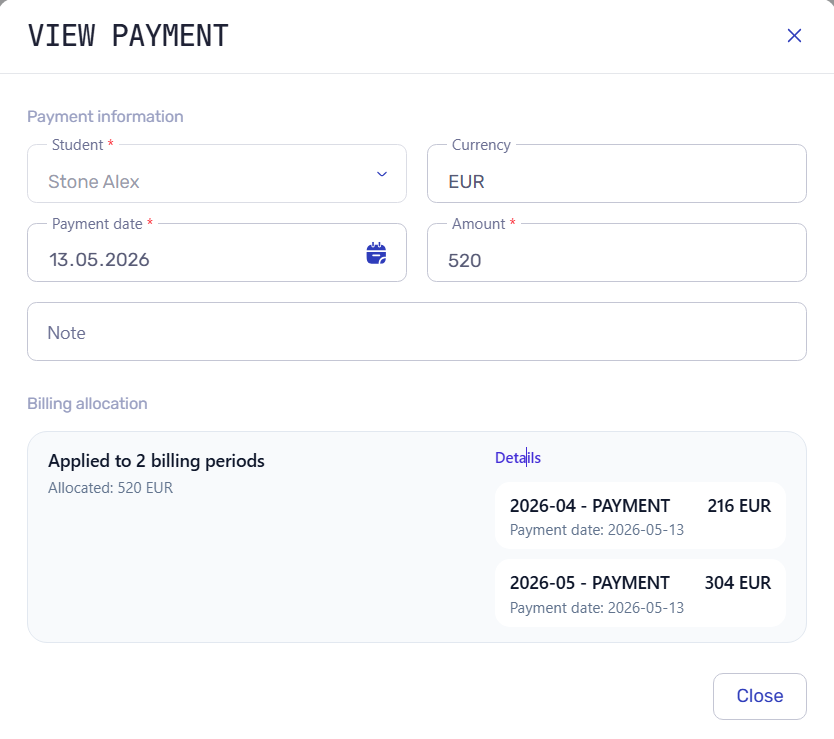
The 520 EUR payment is applied to two billing periods. Intelligence Cloud keeps the allocation details instead of leaving the administrator with only a raw payment amount.
- 216 EUR is allocated to the April billing period.
- 304 EUR is allocated to the May billing period.
- The allocation total matches the saved payment amount: 216 + 304 = 520 EUR.
May 13 payment = 520 EUR
Allocated to April = 216 EUR
Allocated to May = 304 EUR
216 + 304 = 520 EUR
Payment allocation modal showing a 520 EUR payment split into 216 EUR for April and 304 EUR for May
Verify the invoice list after allocation
The invoice list shows the result by billing period. April is fully settled because the April invoice after discount equals the total payments allocated to April. May remains outstanding because only part of the current invoice was paid.
April invoice after discount: 600 - 60 = 540 EUR
April payments: 324 + 216 = 540 EUR
April closing balance: 0 EUR

May invoice after discount: 680 - 68 = 612 EUR
May payments: 304 EUR
May closing balance: 612 - 304 = 308 EUR outstanding
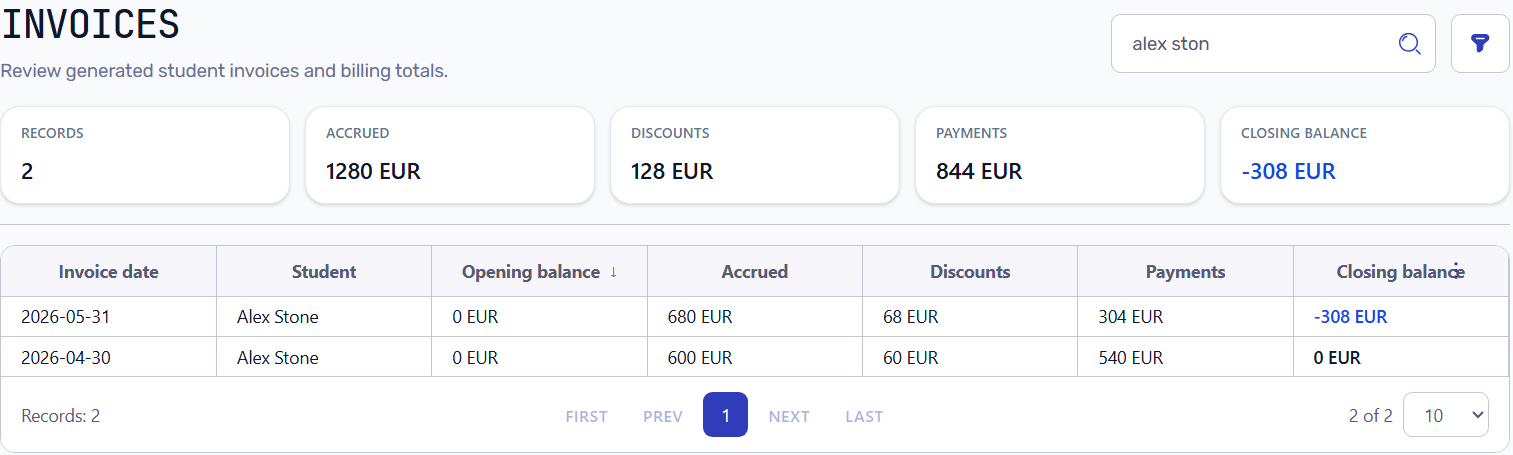
Invoice list filtered by Alex Stone showing April settled and May with 308 EUR outstanding after payment allocation
Payment allocation makes balances auditable
Without allocation history, a school may know that money was received but still struggle to explain which invoice period it covered. Allocation connects the payment to the billing periods, invoices, and final student balance.
Closing balance = invoice amount after discounts - payments allocated to that period, with previous balances and corrections included when they exist.
Payment logic notes
These notes explain why payment allocation matters for invoices, balances, and reports.
What changes after the payment is allocated
After allocation, each billing period receives its own payment total. A previous invoice can become fully paid, while the current invoice can still show the exact amount due.
- The April invoice receives enough allocated payments to close the period.
- The May invoice receives only the part of the payment that remains for May.
- The invoice list shows payment totals and closing balances by period.
How to explain an old balance from payment history
When a student still has an outstanding balance, the administrator can review payment history instead of guessing. The balance can be traced to unpaid lessons, partial payments, previous periods, or overpayment corrections.
- Closed periods should show zero balance when allocated payments cover them.
- Open periods should show the remaining unpaid amount after allocation.
- Reports can reuse the same received payment and outstanding balance facts.
Before and after payment allocation
Without allocation, a school only sees that 520 EUR was received and that several invoices exist. With allocation, it is clear which part closed April, which part reduced May, and why the remaining invoice balance is still 308 EUR.
- Before allocation: one payment amount, several invoices, and an unclear remaining balance.
- After allocation: each invoice period shows which payment amount was applied.
- The student balance becomes easier to explain to a student, parent, or administrator.