
How to review monthly revenue and teacher payouts
Choose a month and open your school's revenue overview and group report. Compare charges with allocated payments, then check a teacher's payout statement.
Start with a full calendar month
Reports include billing periods that overlap the selected dates. To review September, choose September 1–30. A shorter range within that month still includes the overlapping billing period; it does not limit the report to lessons on those days.
Review September 2026
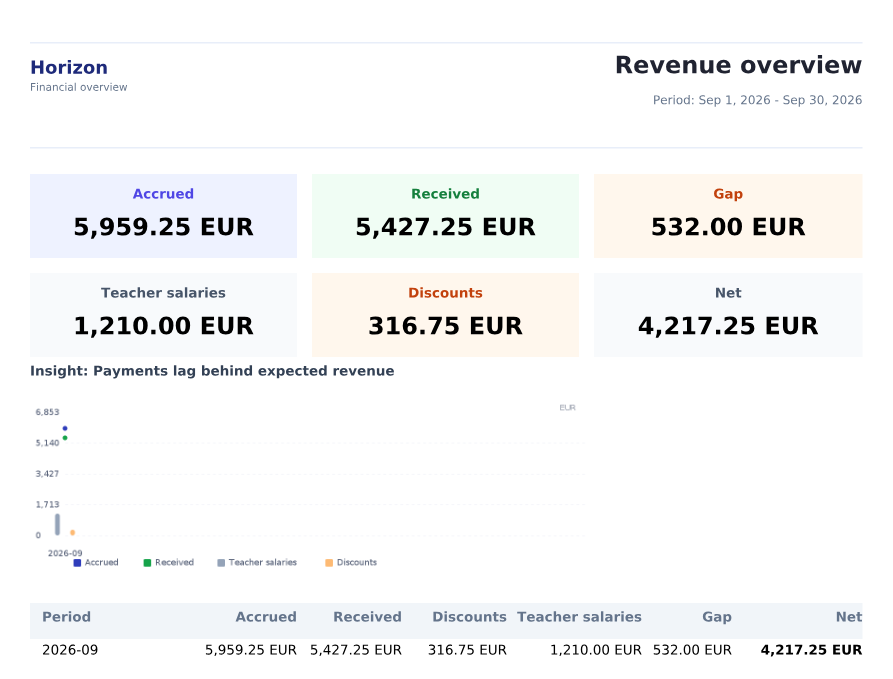
This example shows 5,959.25 EUR accrued, 5,427.25 EUR in allocated payments, and 1,210 EUR accrued to teachers. Every report below uses the same September period.
Open Revenue overview and set the period
Expand Reports in the sidebar and choose Revenue overview. Set From to September 1, 2026 and To to September 30, 2026, then click Apply. Wait for the preview. Download PDF saves the report for the selected dates.
- To review another month, change both dates and click Apply again.
- Reset restores the default range. Check both dates before comparing reports.

The selected period is one complete month: September 1–30, 2026
Compare accrued charges with allocated payments
For September, Accrued is 5,959.25 EUR and Received is 5,427.25 EUR. Received includes payments allocated to this billing period, even when the payment date falls in another month. For example, Liam White paid on October 7, but 660 EUR of that payment was allocated to September. Discounts of 316.75 EUR are already included in the net accrued amount; do not subtract them again.
- Gap, 532 EUR, is accrued minus received for this period. It is not the students' full outstanding balance, which also includes opening balances and adjustments.
- Teacher salaries, 1,210 EUR, shows teacher accruals from lessons. It does not confirm that the school transferred this money.
- Net, 4,217.25 EUR, is allocated payments minus teacher accruals. Rent, taxes and other school expenses are not included; this is not net profit.
5,959.25 − 5,427.25 = 532 EUR — Gap
5,427.25 − 1,210 = 4,217.25 EUR — Net
September 2026: charges, allocated payments, discounts and teacher accruals
Open Revenue by groups for the same month
Choose Revenue by groups under Reports, set the same dates and click Apply. The PDF preview is titled Consolidated by groups. It breaks lesson charges and teacher accruals down by group. Daniel Harris's English Teens A group shows 1,960 EUR accrued, 324 EUR for the teacher and 1,636 EUR gross margin.
- Gross margin is lesson charges minus teacher accruals, before other school expenses.
- Received includes payments attributed to that group. Its total can differ from the revenue overview.
- In this example, September payments were assigned to students without a group allocation. The group rows therefore show 0 EUR received and a cash margin of −1,210 EUR, although the revenue overview includes 5,427.25 EUR in payments.
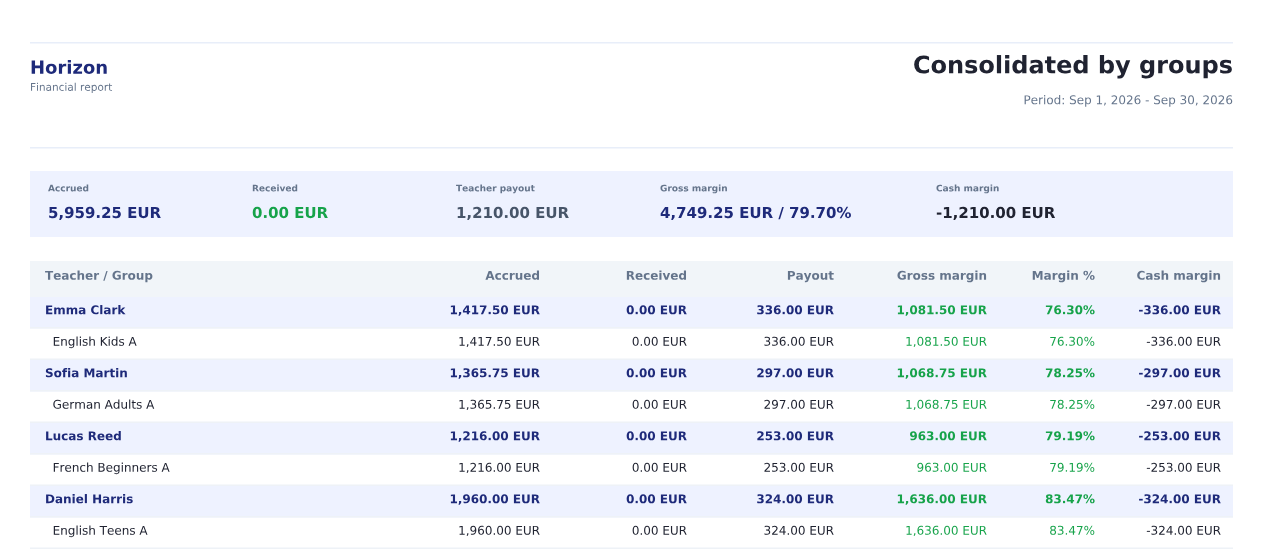
September by teacher and group; receipts depend on the payment's group allocation
Check the source before comparing two totals
For a student's outstanding balance, open their invoice: it includes the opening balance, charges, adjustments and payments. For group receipts, check the payment's assignment and allocation. For a teacher's amount, check the statement, lessons and rates.
Expected this month on the dashboard adds positive invoice amounts due, including opening balances. It is not the report's accrued charges for the period. Dashboard receipts also depend on the payment date; the revenue overview follows the billing period to which a payment was allocated. Compare dates and definitions before treating a difference as a missing payment.
Check the teacher's amount in the payout statement
Under Finance, open Teacher payouts. Find Daniel Harris for September 2026 and open the statement. Check the lesson dates, applicable rate and total. This example has 11 rows: nine lessons at 36 EUR and two cancellations with zero accrual, totaling 324 EUR. That matches the teacher's amount in the group report.
- A zero row keeps the canceled lesson in the history without adding to the total.
- Downloading or emailing a statement does not confirm a bank transfer to the teacher.
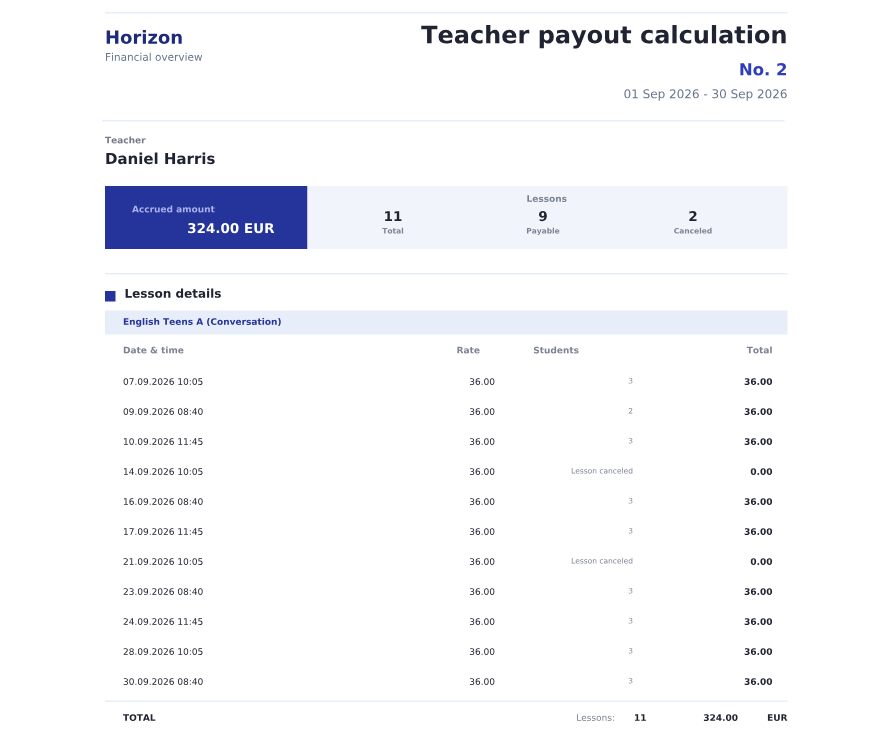
The same September: nine accruals at 36 EUR and two zero rows