
Less attendance follow-up
Teachers record student attendance from their assigned lesson instead of sending a separate message for an administrator to copy.
Give each teacher a restricted workspace for assigned groups and lessons, student attendance, and their own payout details. Teachers enter lesson facts where they happen; administrators keep control of invoices, payments, and school-wide finance.
Teachers see their own work. School-wide billing stays with authorized staff.
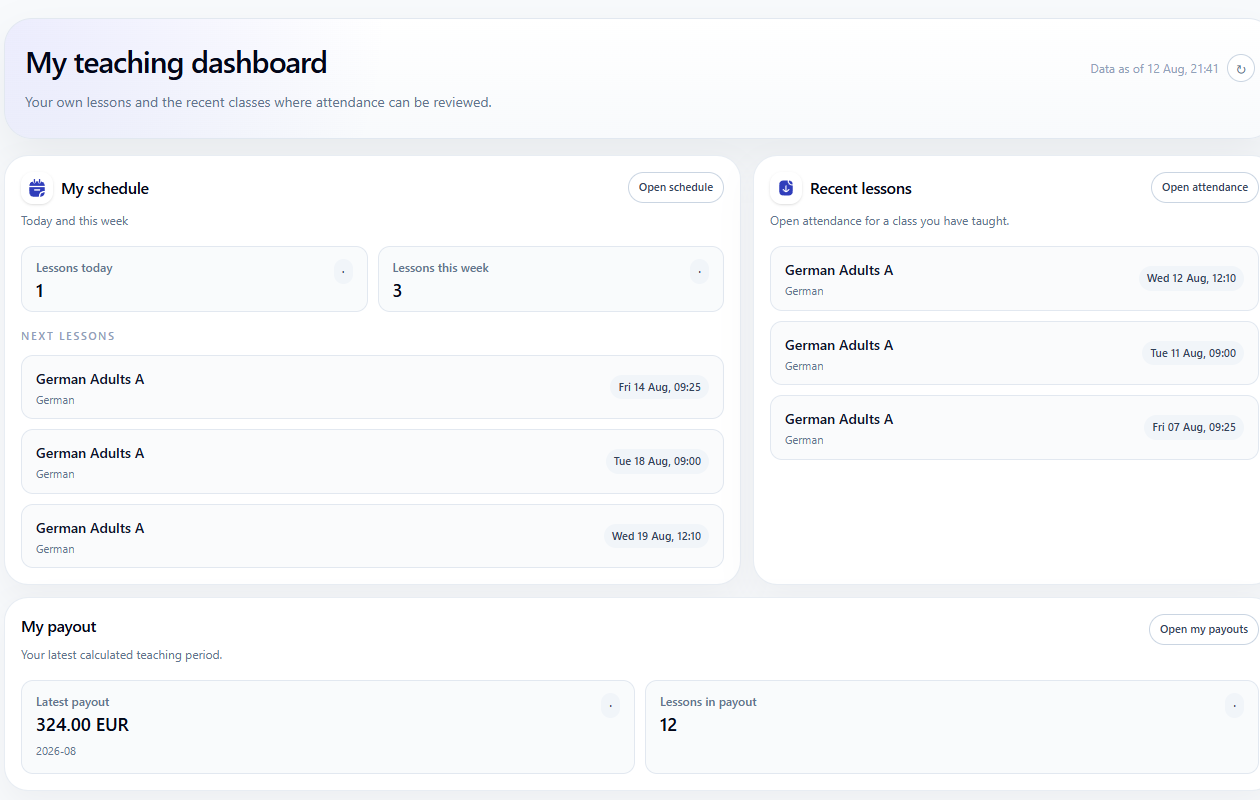
Teacher workspace
The teacher already knows who attended and whether the lesson was completed. A restricted workspace lets that information enter the connected school workflow without giving away administrative control.
Teachers record student attendance from their assigned lesson instead of sending a separate message for an administrator to copy.
Excused and chargeable absences stay connected to the lesson record used by student billing.
Teachers can review their own completed lessons, rates, payout rows, and total without seeing another teacher's statement.
Student invoices, payments, unrelated records, and school-wide reports remain with authorized employees.
Sofia records an excused student absence. The student's lesson charge becomes zero while the completed lesson remains payable to the teacher, with each role seeing only the information it needs.
How Teachers Record Attendance and Review Payouts | Tutoring Center Software
Restricted teacher workflow
Teacher access is connected to an existing teacher record, assigned lessons, attendance outcomes, and personal payout details.
The administrator links access to a teacher already stored in the school directory and sends the staff invitation.
The teacher signs in and sees only the groups, schedule, and lessons assigned to that account.
The teacher marks present or absent students and selects the billing treatment while the lesson context is clear.
Completed lessons appear in the teacher's own payout statement with the rates and rows behind the total.
Real product proof
The screens below come from the same restricted account used in the commercial workflow.
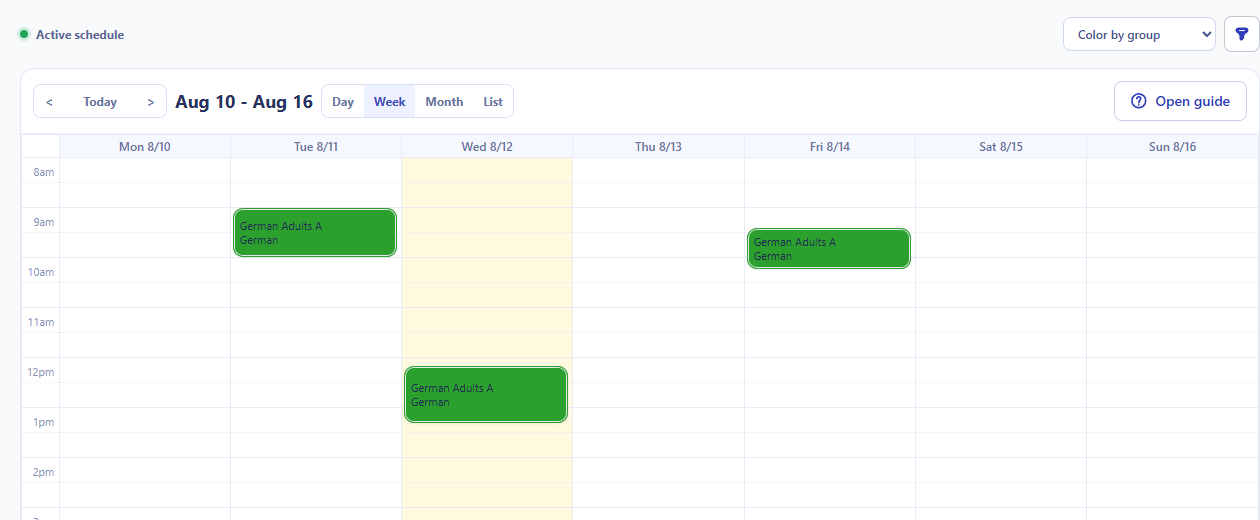
Teachers review their own upcoming lessons without opening the school-wide schedule editor.
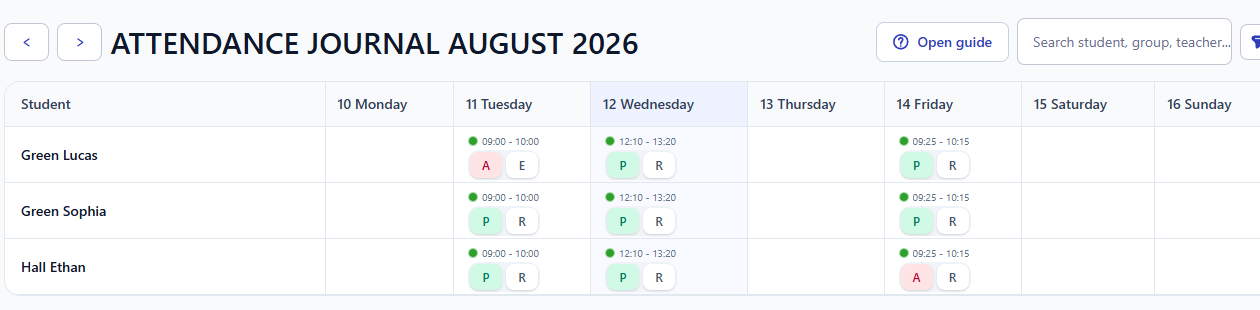
Attendance is recorded inside the assigned lesson with student status and billing treatment visible.
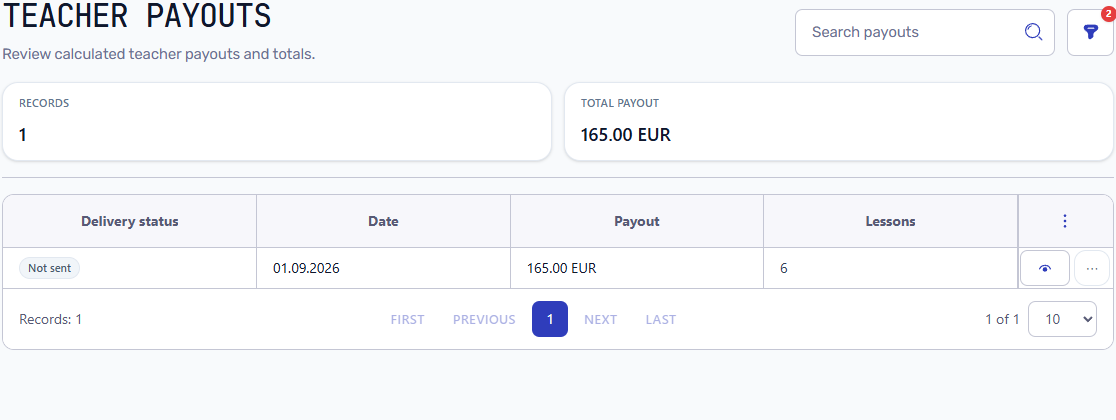
The teacher reviews personal payout totals and completed lesson rows without school-wide financial access.
Access boundaries
Teacher access is not a generic employee role with every menu enabled. It is a deliberately restricted operational workspace.
Guides and connected features
Use the focused manuals for setup and daily work, while the feature pages explain the connected attendance and payout model.
Select the existing teacher, send the invitation, and manage the access lifecycle.
Activate the account, open assigned lessons, record attendance, and review payouts.
See how lesson attendance affects student invoice treatment and balances.
Understand the calculation from completed lessons, rates, cancellations, and payable rules.
See how tutor access connects scheduling, attendance, student billing, and tutor payouts in one tutoring center workflow.
A teacher can access assigned groups and lessons, record attendance, and review personal payout details. The account does not expose unrelated students or school-wide financial data.
Yes. Teachers can open an assigned lesson and record student attendance and billing treatment while the lesson context is still clear.
No. Student billing, invoices, payments, and school-wide financial control remain with authorized school employees.
Yes. The teacher can review personal payout totals and the completed lesson rows and rates behind the amount.
Yes. An administrator can block or remove the account without deleting the teacher's operational lesson and attendance history.
Invite a teacher, open an assigned lesson, record attendance, and check how the same record supports student billing and the teacher payout.