
Dance school and studio management software
Group classes and private lessons on one invoice, with less manual checking. Intelligence Cloud connects class scheduling, attendance and student billing, creates invoices automatically and calculates teacher earnings.
First month free, no card required. The demo includes sample school data, with no registration.
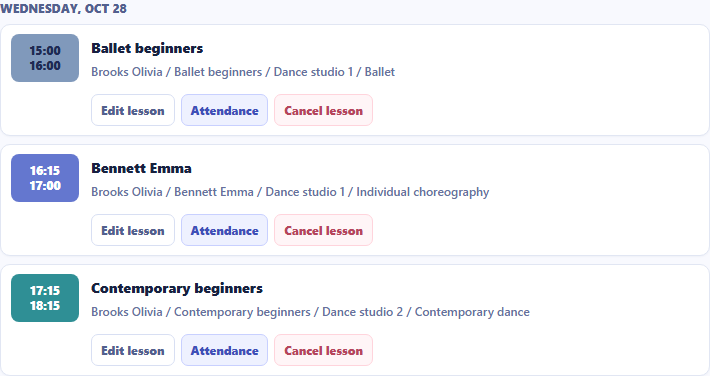
Group classes and private lessons on one invoice
A student takes regular group classes and works one-to-one with a dance teacher. The system includes both on her invoice, so the office can explain what she owes without piecing together separate spreadsheets.
Once the schedule is published, Intelligence Cloud creates the initial lesson charges using your school's prices. The invoice shows lessons, discounts, payments received and the remaining amount to pay. When a student misses a lesson, your school decides whether to charge. The invoice reflects your school's decision.
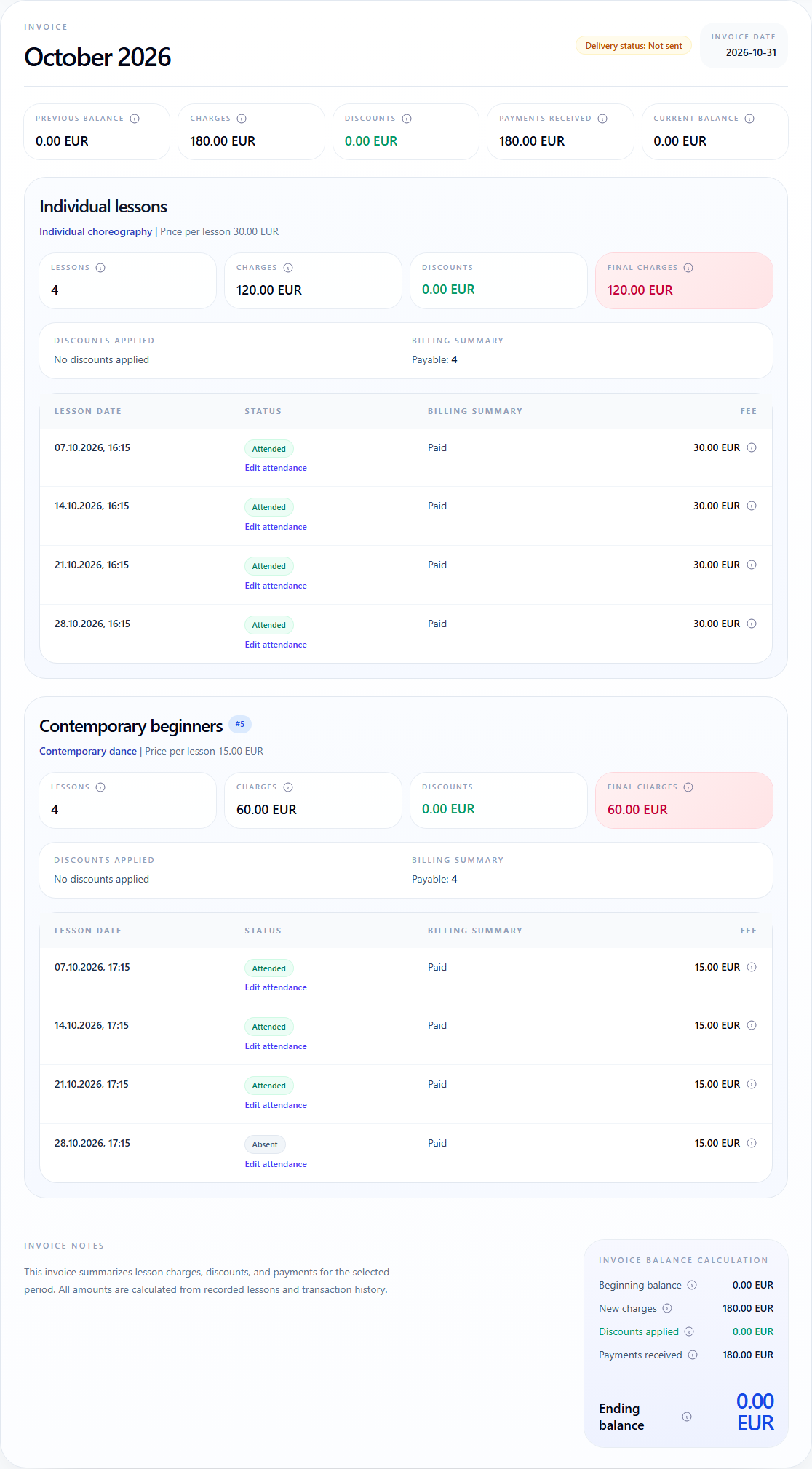
In their student portal, students can see their own lessons and any invoices your school makes available to them. They can check their schedule and amount to pay without contacting the office.
Dance class scheduling
Group classes, private lessons, teachers and rooms share one timetable. Your school can prepare recurring classes in advance and see who is teaching where throughout the day.
- Copying recurring lessons helps prepare next week's or next month's timetable.
- The system shows teacher and room conflicts before publication, so staff can resolve them before classes begin.
Class attendance tracking
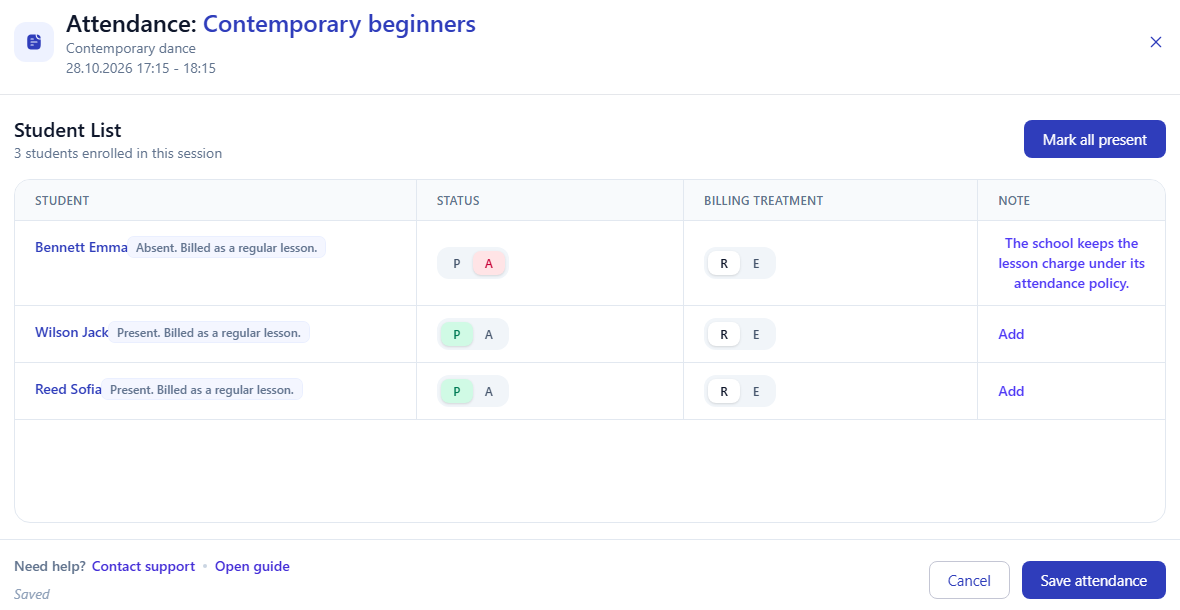
Teachers mark attendance in their own lessons, and your school has one shared register. A missed lesson stays connected to the school's decision about its charge.
- Your school decides whether to keep or remove the charge for a missed lesson.
- When staff save a change to a lesson charge, it is reflected in the student's invoice. The same invoice does not need to be recalculated in a spreadsheet.
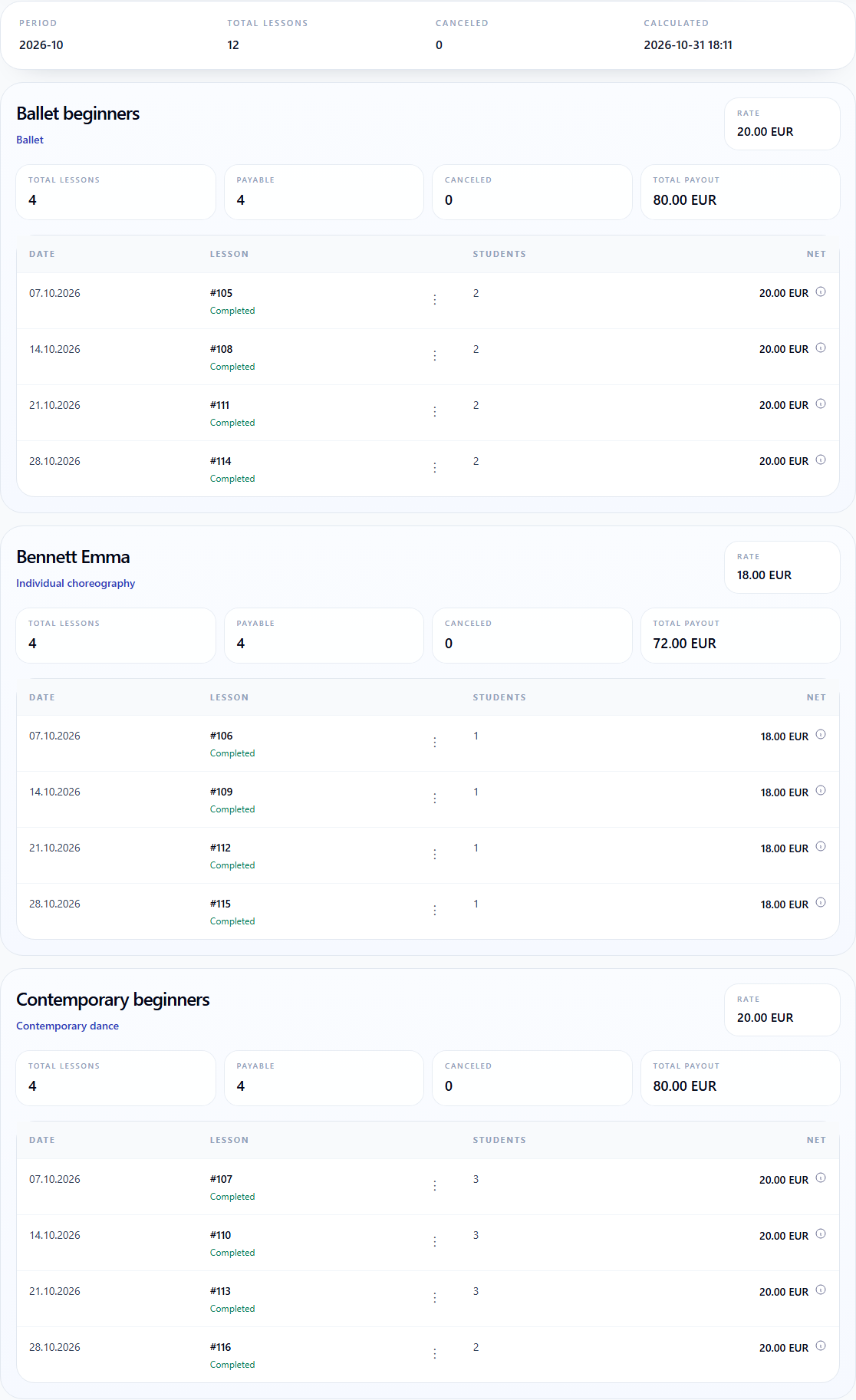
Dance teacher earnings
Intelligence Cloud calculates each teacher's earnings from lessons and agreed rates. The studio owner can see which lessons are included and how the total was calculated.
- The statement shows the lessons, dates and rates behind the total.
- Student charges and teacher earnings are calculated separately using the selected rules.
A missed dance class: what happens to the invoice?
In this dance studio, Mia's missed class remains chargeable under the studio's policy. Her invoice explains the charge, and Olivia keeps her agreed fee for teaching the group class.
Explore the product
Explore Intelligence Cloud's features
Take a closer look before setting up the system for your studio.
Class scheduling
Recurring groups, private lessons, teachers and rooms in one timetable.
Explore schedulingAttendance tracking
Attendance, missed lessons and the school's decisions about lesson charges.
Explore attendanceStudent billing and payments
Lesson charges, discounts, payments received and student balances.
Explore student billingTeacher earnings
The lessons and rates behind a teacher's total for the period.
Read the earnings guideQuestions about dance studio software
Can I manage group classes and private lessons together?
Yes. The timetable includes group classes and individual lessons with their teacher, time and room. Both formats are included in student billing and teacher earnings calculations.
How are student invoices created?
Once the schedule is published, the system creates the initial charges using your school's current prices. The invoice shows lessons, discounts, payments received and the amount to pay. When staff save a change to a lesson charge, the invoice updates automatically.
How are missed lessons handled?
Attendance and lesson charges are recorded separately. Your school decides whether a missed lesson stays chargeable or its charge should be removed. The invoice reflects your school's decision.
How do I record student payments?
A staff member records a payment the school has received. The system includes it in the student's invoice and shows the amount still to pay.
What can teachers see?
Teachers can see their assigned lessons, attendance records and their own earnings. Staff access to school data is controlled by their roles and permissions.
Can students view their invoices?
Yes. Your school invites students to their own portal and chooses which invoices to make available. Students see their own lessons, attendance and the invoices shared with them.
How can I try the software?
Open demo takes you to a sample school with no registration. Start free creates your own account, where you can set up your school's lessons and billing. The first month is free, with no card required.
See scheduling, invoices and teacher earnings in action
Explore scheduling, attendance and billing with sample school data, or start setting up your own dance school.