
Keep classes organized
Manage students, teachers and groups. Plan recurring group and individual lessons, check teacher and room conflicts, then publish the approved schedule.
Intelligence Cloud for language schools
Manage group and individual lessons, attendance and student finances in one system. Check student invoices and teacher payouts against lesson records.
Try demo data first. No card or full-school migration required.
Your school's daily work
For language school owners and administrators managing recurring groups, individual lessons and different prices. Answer payment questions using lesson, invoice and payment records.
Manage students, teachers and groups. Plan recurring group and individual lessons, check teacher and room conflicts, then publish the approved schedule.
Use the price for each lesson date and valid student discounts. A missed lesson can remain chargeable under your school's rules, and the invoice shows the result.
Review lessons, discounts and earlier debt or credit before sending an invoice. Record the money received and see what it covered and what the student still owes.
Check teacher payouts against payable lessons and agreed rates. Reports separate lesson charges, payments against them and unpaid balances. Teachers see assigned work; invited students see their own records.
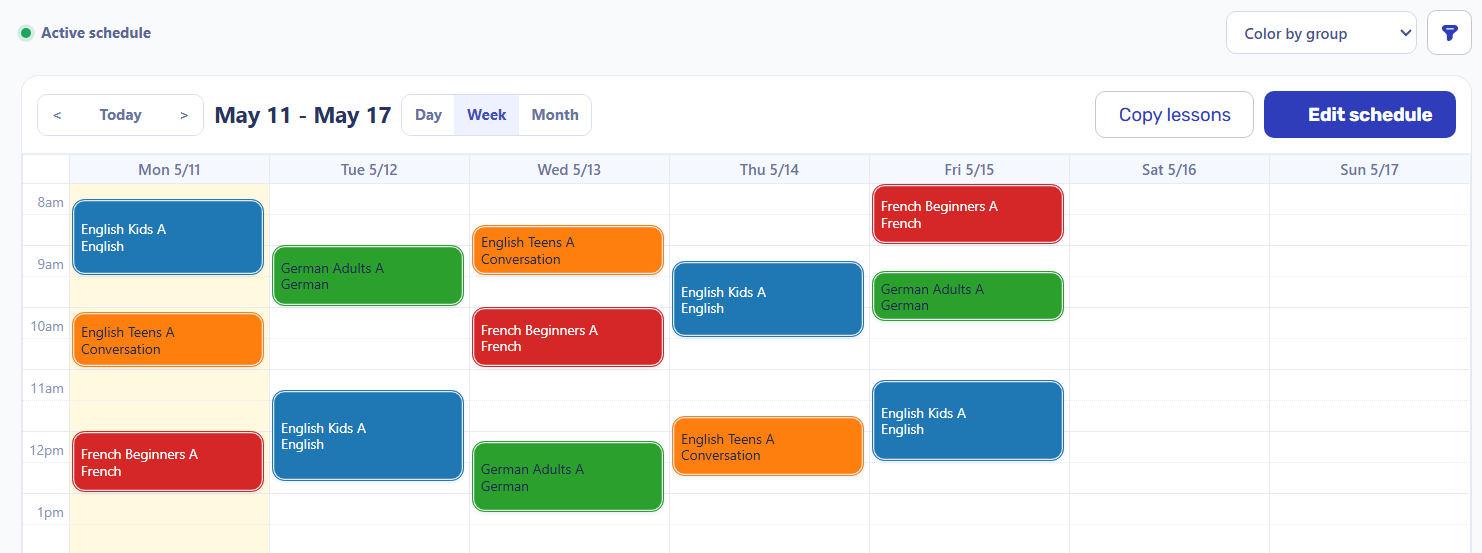
Prepare group lessons in a draft, resolve teacher and room conflicts, then publish the checked schedule.
Class scheduling, conflicts and connected billing in Intelligence Cloud
Connected school operations
Review planned and completed lessons, student charges and teacher payout calculations. The records you need for each check are linked to lessons.
Check teachers, rooms and lesson dates before making the timetable active. The same lesson records support attendance and student invoices.
Attendance and charge conditions stay separate. Check the school's charge rule, course price and student discounts valid on the lesson date.
Send checked invoices, record money received by the school and see unpaid amounts or credit without counting the same payment twice.
Follow teacher pay back to lessons and rates. Reports show lesson charges, payments against them and what remains unpaid.
Invoices and teacher statements
The student invoice separates charges, recorded payments and the balance. A separate teacher statement explains payable lessons and rates.
Chloe Bennett paid €200 for eight September lessons at €25. One excused absence removes its charge: €175 charged, €200 received, −€25 credit. In October, €200 in new charges minus that credit leaves €175 to pay. It is a money balance, not a visit package.

In a separate September statement, Daniel Harris has €324 calculated for nine payable lessons. The total links to lesson rows and rates. It is a payout calculation, not a bank transfer or statutory payroll.
 Inspect the teacher payout calculation
Access and product fit
Keep teaching content and specialist financial systems separate while your school manages lessons and their financial results.
Inspect the work that matters
Use real screens and focused guides to check how your school would work.
Yes. You can manage group and individual lessons, assign teachers and record attendance. Test your recurring timetable, room constraints and prices with demo data before adding the whole school.
Yes. Compare a chargeable absence and an absence without a charge. Check prices, fixed or percentage discounts, partial payments and previous balances, then compare the total with your school's payment terms. A discount can be limited to a course or group.
No. Start with the prepared demo or a trial workspace, then one real group when you are ready. Check a student's invoice and payment allocation, then review a teacher statement separately before expanding.
Try one recurring group, one missed lesson and one payment. Check the student's invoice and balance, then review a teacher statement against your school's rules.
Check billing before going live