
Advance Billing Software for Language Schools: Payments and Credit Balances
Bill planned lessons before the month begins, record advance payments, and adjust charges for absences. Follow a €200 payment through to a €25 credit and the next month's invoice in Intelligence Cloud.
- Advance payment receivedEight lessons at €25
- €200
- September chargesOne absence with no charge
- €175
- Student credit€200 received − €175 charged
- €25
A student pays for eight lessons at the start of the month. She then misses one lesson for a reason the school accepts without a charge. The school has already received the money, but the month's charges have changed. How do you keep track of the difference and account for it on the next invoice without leaving a reminder in a spreadsheet?
Intelligence Cloud connects student billing with the published schedule, attendance and recorded payments. Staff can see what the student has been charged, how much the school has received and what remains to pay. If payments exceed charges, the credit is included in the next period's balance.
Here is how advance billing works for eight lessons at €25 each, a €200 payment and two absences with different payment rules.
Calculate advance charges from the published schedule
Chloe Bennett has eight September lessons scheduled in the English Fluency B1 group. Each lesson costs €25, and she has no previous debt or credit.
Once the schedule is published, the September charges are:
8 lessons × €25 = €200.
The school uses this amount for the advance payment. There is no need to wait until the month ends or all attendance has been recorded: the initial calculation uses the published lessons. Attendance updates then determine which lessons remain chargeable.
Record the payment separately from the lesson charges
Chloe pays the school €200. An administrator records the payment in Intelligence Cloud. Her September invoice now shows three separate amounts:
- lesson charges: €200;
- payment received: €200;
- amount still to pay: €0.
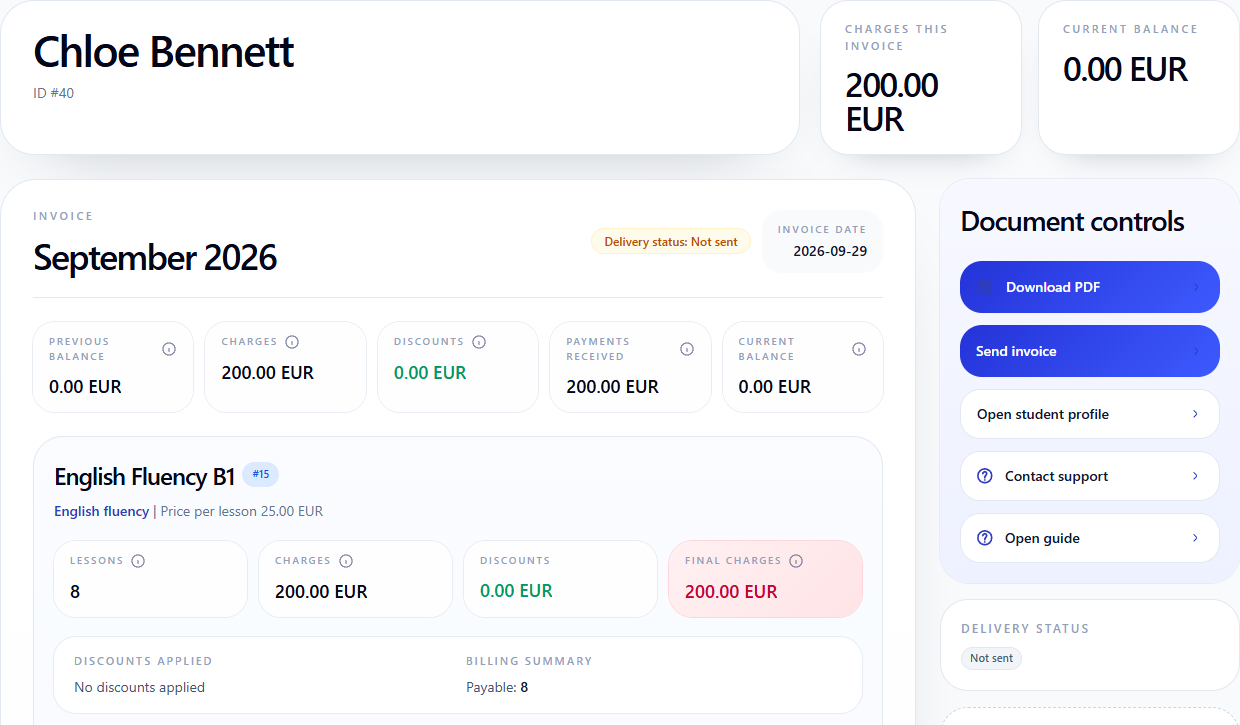
Record the payment after the school receives the money. The payment amount is stored separately from the lesson charges.
Apply the school's payment rules to each absence
During September, Chloe attends six lessons and misses two. The school charges for one absence as a regular lesson. The other absence is excused, with no lesson charge.
- six attended lessons: €150;
- one chargeable absence: €25;
- one excused absence with no charge: €0.
The September charges now total €175.
To make this adjustment, enable excused absences in the company's services. Selecting Excused removes the charge for that lesson. Regular keeps the lesson charge: marking a student absent does not, by itself, make the lesson free.

An absence mark alone is therefore not enough for billing. Staff also need to specify whether that particular missed lesson is chargeable under the school's policy.
The adjustment leaves €25 credit for the student
The school has received €200, while the revised lesson charges total €175:
€200 received − €175 charged = €25 credit for the student.
The existing September draft invoice automatically updates its charges from €200 to €175. The recorded payment remains €200.

The invoice displays this credit as a −€25 balance. Here, the minus sign means money in the student's favour, not a debt. Chloe owes nothing for September and has €25 credit to use in the next calculation.
Carry the credit into the next month's invoice
Chloe has another eight lessons at €25 each in October. Publishing the October schedule creates €200 in lesson charges. Her €25 credit carries forward from September, and no new payment has been recorded yet.
€200 for October − €25 credit = €175 to pay.

The October lesson price is still €25. The carried-forward credit is not a discount and does not change the course price. It reduces the amount the school needs to collect.
Staff do not have to remember the September absence when preparing the next invoice. The October calculation shows both the current month's charges and the balance carried forward.
Advance lesson billing is not an eight-visit package
Chloe pays in advance for specific lessons in the published schedule. The month's charges depend on the number of chargeable lessons, rather than a fixed monthly subscription.
A monetary credit does not automatically entitle her to a free make-up lesson. In this example, one lesson charge was removed and the resulting credit carried into the next month. If the school's policy also allows make-up lessons, consider that separately so the same absence is not compensated twice.
What to check before sending the invoice
Open the student's invoice and compare three things: chargeable lessons, recorded payments and the final balance. If an absence has changed the amount, check its billing treatment in Attendance.
The September invoice should show €175 in charges, a €200 payment and €25 credit. The October invoice should show €200 in charges and €175 to pay.
Set up this calculation
Step-by-step guides to attendance, recorded payments and student invoices.
Explore the wider billing workflow:
Lesson attendance
Record attendance and choose which absences are chargeable under your school's rules.
Open guideRecord student payments
Record an advance payment so it is included in the student's balance.
Open guideStudent invoices
Check lesson charges, payments and the balance carried into the next month.
Open guideTry advance billing with your school’s payment rules
Start with one student: publish a schedule, record the advance payment, then mark one chargeable and one non-chargeable absence. Open the current and next month's invoices to see how the charges and amount to pay have changed.