
Student Billing Software for Training Centers
Learn how training centers and language schools can create student invoices, record payments, track unpaid balances, and connect billing with lessons and attendance.
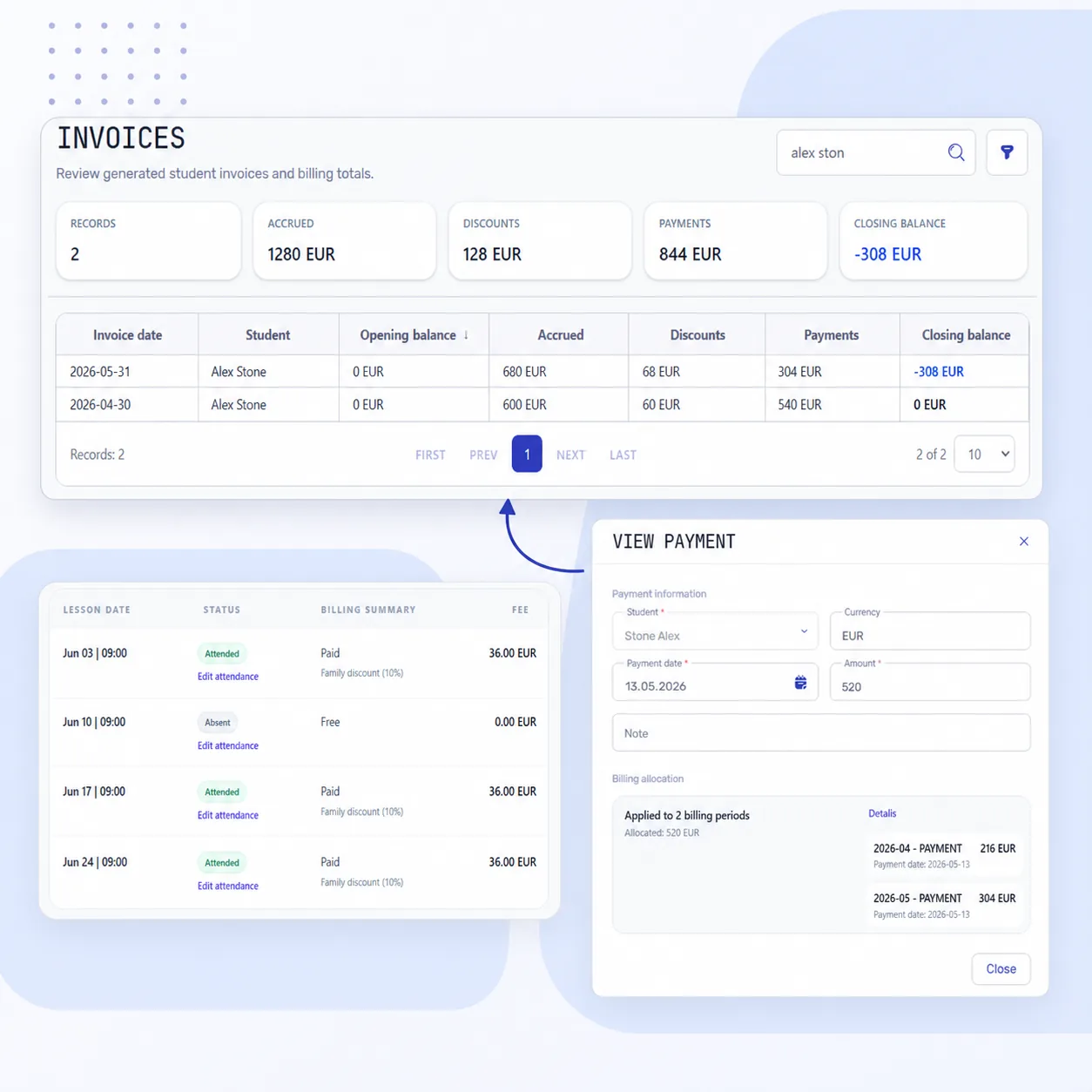
A training center needs more than an invoice PDF. Staff need to explain which lessons created the charges, which discounts applied, how much money arrived, and what the student still owes.
When lesson records and payments sit in separate spreadsheets, staff have to rebuild the student's account after each missed lesson or partial payment. Student billing software keeps student accounts connected to lesson charges, discounts and recorded payments, so staff can explain the debt or credit that remains.
When comparing language school billing software or managing student payments in a training center or tutoring business, use the checks below to choose a system that handles your everyday billing cases.
What should a student invoicing system make clear?
- Which lessons and period does the invoice cover?
- Which prices and discounts were applied?
- Did an attendance update change the charges?
- Has the invoice been sent to the student?
- Which payments were recorded, and which periods did they cover?
- Is there an unpaid balance or credit for future lessons?
- Can the student review their own invoices and payments?
- Do the invoice, student history, and report use consistent records?
Creating a document is only part of student invoicing. Staff should still be able to explain the amount after a lesson changes, a payment arrives, or a new month begins.
How to organize student billing
1. Set prices and student discounts
Configure prices for group and individual lessons and the billing period rules. Assign discounts to the student; where needed, limit them to a group or course and a date range.
This lets staff check a rule once instead of re-entering prices and discounts on every invoice. See the pricing workflow and discounts workflow.
2. Connect charges to scheduled lessons
In Intelligence Cloud, publishing the schedule creates the initial charges. Attendance status records whether the student attended; billing treatment determines whether the lesson is chargeable. These settings are independent: a missed lesson can remain chargeable, and an attended lesson can be free.
Before sending an invoice, check lessons that need a billing adjustment. Use the school's available excused-absence and transfer functions rather than maintaining a separate corrections spreadsheet.
Test three common cases: an attended, chargeable lesson; a missed lesson that remains chargeable under school policy; and a missed lesson with no charge. An attended lesson can also be marked free when appropriate.
See how to mark attendance and check the invoice result.
3. Check the invoice summary, then its June lesson rows
The invoice should make the period, lessons, prices, discounts, previous debt or credit, recorded payments, and remaining amount clear.
The full June 2026 invoice below identifies Alex Stone and shows 28 EUR of opening debt, 108 EUR in charges after the family discount, no recorded payment and 136 EUR due. The 12 EUR discount is already included in the 108 EUR charges; do not subtract it again.
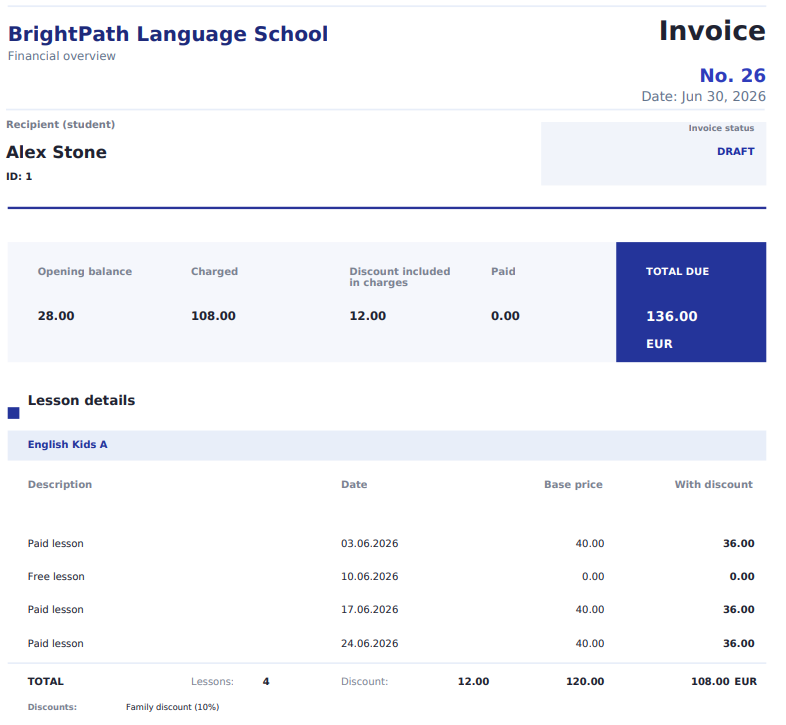
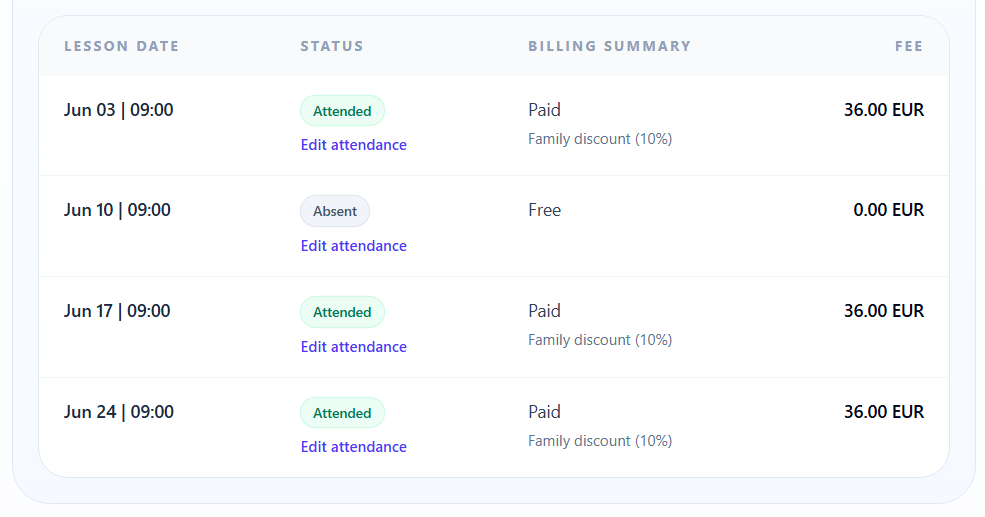
The document's lesson details show June 3, 10, 17 and 24, matching the four rows below.
These June rows show three chargeable lessons at 36 EUR after the family discount and one free lesson: 108 EUR in charges for the rows shown. Open the invoice summary for the same period to see the opening balance, recorded payments and the amount still to pay.
Keep the invoice period visible when moving between the summary and lesson details. Check the same student's recorded payments before explaining the final balance.
The screenshot's “Paid” label describes a chargeable lesson; it is not evidence that money was received. Charges, received payments, and the balance due are separate figures.
See how to check student invoices.
4. Send the checked invoice
Check the due date, email text, and payment instructions assigned to this student. Then send the invoice with its PDF. Delivery information helps staff see which document the school has sent.
Sending an invoice does not confirm that money has arrived. Record the received payment separately.
See sending student invoices by email and payment details profiles.
5. Record and check payments
The system should show both the amount received and its allocation: which period it covers, what debt remains, and whether any unused amount is available for future lessons.
A partial payment leaves the unpaid remainder visible. An advance payment or overpayment should remain traceable when the invoice changes.
If charges decrease after a payment arrives, check the resulting credit and how it is used in later calculations. Review allocations by period so the same payment is not subtracted twice.
See payments and balances, payment allocation, and an advance-payment example.
6. Give students access to their own records
Invite the student to the portal so they can review their own lessons, attendance, invoices, recorded payments and balance. Approve the invoice to make it available to that student; email delivery is a separate step. Internal drafts and other students' records are not accessible. The student can also change their avatar and interface language.
See student portal capabilities.
7. Compare the report figures
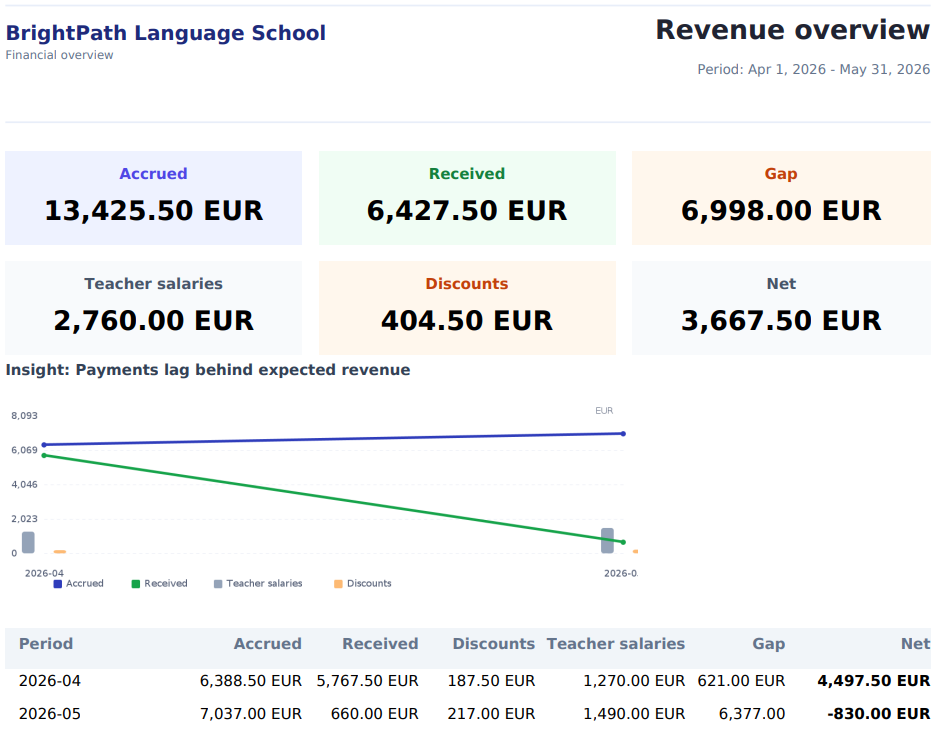
Compare charges, received payments, and unpaid balances separately. They answer different questions: how much was charged, how much arrived, and how much remains unpaid.
Check that the report and invoices cover the same period. Do not treat received money or the report's “Net” figure as accounting net profit: expenses, taxes, and other obligations require separate accounting.
See the reports workflow.
What to test in a student billing demo
Take one student through everyday cases:
- paying the exact invoice amount;
- a partial payment with an unpaid remainder;
- settling previous debt;
- an advance payment before the period ends;
- reducing charges after money has arrived;
- a student-specific discount;
- chargeable and free missed lessons;
- a lesson transfer, if the school uses that function;
- sending an invoice and viewing it as the student.
After each action, open the invoice and payment history. Check the result rather than relying on a feature list. For your own launch, use the billing checklist before going live.
When spreadsheets are no longer enough
A dedicated student billing system becomes useful when a school has several prices, mixed lesson formats, partial payments, debt, and credit. Frequent questions about invoice amounts, manual invoice delivery, and differences between reports and spreadsheets are further signs.
Ask for a complete example with a missed lesson, a discount, and a partial payment. Check whether staff can explain the balance without reconstructing the month manually.
How Intelligence Cloud handles student billing
The school publishes the schedule, checks attendance and billing treatment, applies prices and discounts, and reviews and sends the invoice. After recording a payment, staff can check its allocation and the remaining balance. The student portal and reports use the same financial records.
For tutoring businesses with individual lessons, small groups, and teacher payouts, see the tutoring center billing example.
FAQ
What is student billing software?
It connects lesson charges, discounts, invoices, recorded payments, and student balances. Student invoicing software may cover only creating and delivering the invoice document.
Can student invoices be generated automatically?
When evaluating an automated tuition billing system, ask how the first charge is created and checked. In Intelligence Cloud, publishing the reviewed schedule creates initial charges from the configured prices, discounts and billing treatment. Review the invoice before sending it, then record received tuition payments and check their allocation and the remaining balance.
Can the system track partial payments and credit?
Yes. Recorded payments are allocated in the student's financial records. Check the allocation by period and the remaining debt or credit.
Can students see every invoice the school creates?
No. Students can see their own approved or sent invoices. Internal drafts and other students' invoices are not accessible.
Does it replace accounting software?
No. Lesson billing, debt, and payment records support school operations but do not replace bookkeeping or tax accounting.
See the process
- Video: student charges and invoices.
- Video: payments and remaining balances.
- Student invoices.
- Discounts.
- Payments and balances.
- Reports.
Check billing for your school
Create a workspace, explore the demo data, and test the cases your school handles: a missed lesson, a discount, a partial payment, and an overpayment.
Related resources
Training center invoice checklist before going live
Check course prices, attendance, discounts, previous balances and payments against one student's invoice before starting live billing.
How to match student payments with invoices: automatic allocation
Learn how student payments are matched with invoices, previous debt, partial payments, overpayments, credit, and student balances in training center billing.
How to send student invoices by email
Check the amount, recipient and payment instructions, send the invoice PDF and find the result in delivery history.
How payment details profiles work
Learn how Intelligence Cloud uses payment details profiles so different students can receive different payment instructions in invoice emails and PDFs.
Attendance tracking software for schools: lessons and billing
Learn when training centers, language schools, and tutoring centers need attendance records connected to scheduling, billing, invoices, payments, teacher payouts, and reports.
Tutoring Center Billing Software for Attendance-Based Invoices and Payments
Lesson-based billing for tutoring centers with individual and small-group lessons. Calculate student invoices, track recorded payments, and explain every outstanding balance.