
Tutoring Center Billing Software for Attendance-Based Invoices and Payments
Lesson-based billing for tutoring centers with individual and small-group lessons. Calculate student invoices, track recorded payments, and explain every outstanding balance.
- Payable lessons16 lessons × €40
- €640
- Student discount16 lessons × €5
- −€80
- Lesson charges after discount€640 − €80
- €560
- Previous debtUnpaid balance carried forward
- +€224
Intelligence Cloud is tutoring center billing software for individual tuition and small-group courses. It calculates lesson-based student invoices from attendance, course prices, and discounts, then tracks recorded payments and outstanding balances.
The examples below show the actual product: first an invoice with a fixed discount and previous debt, then a separate student's payment split across two billing periods. They demonstrate the lesson-based billing workflow used by tutoring centers, language schools, and training centers.
Start a free workspace or review the billing scenarios to test with demo data.
A tutoring invoice example: why 560 EUR becomes 784 EUR due
Noah Brown's September invoice contains 17 lessons for English Kids A. Sixteen are payable and discounted; one is free. The course price is 40 EUR per lesson, and Noah has an active fixed discount of 5 EUR per eligible lesson.
- Original lesson charges: 16 x 40 EUR = 640 EUR.
- Student discount: 16 x 5 EUR = 80 EUR.
- Lesson charges after discount: 640 - 80 = 560 EUR.
- Previous unpaid balance: 224 EUR.
- Payments received in this invoice: 0 EUR.
- Debt to pay: 224 + 560 - 0 = 784 EUR.
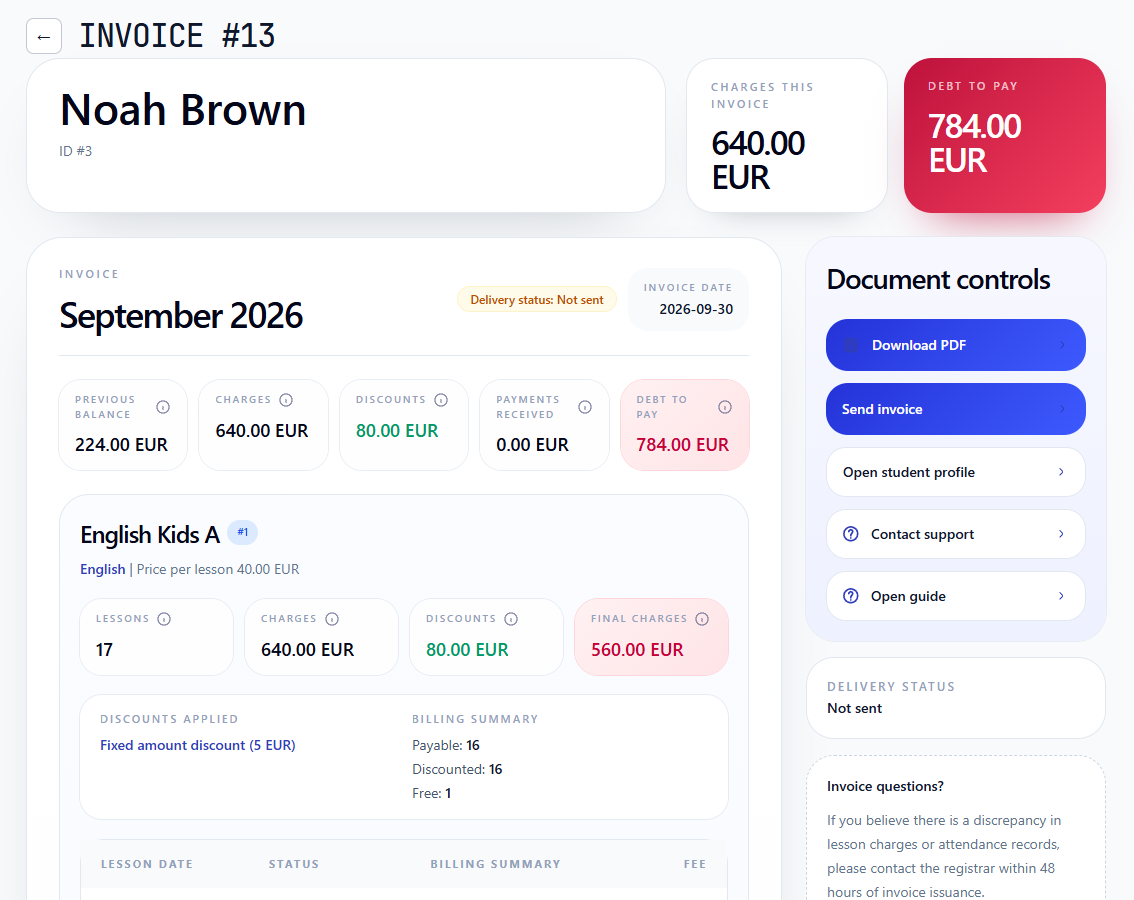
The 560 EUR is the current lesson charge after discount, not the total amount due. The previous balance explains the difference. The invoice keeps both figures visible, rather than forcing the administrator to reconstruct last month's debt in a spreadsheet.
This is also why a fixed discount needs context. In this example it means 5 EUR off each eligible lesson, not 5 EUR off the monthly invoice. The applied template and discounted lesson count explain the accumulated 80 EUR reduction.
For setup details, see course prices, student discount management, and the student invoice workflow.
Attendance-based billing: what should change the invoice?
A lesson on the calendar is not enough to determine the charge. The school also needs its outcome and billing treatment: payable, free, discounted, or transferred where applicable. An absence does not automatically mean that a lesson is free; the recorded billing decision must reflect the school's policy.
In Noah's example, the free lesson remains part of the lesson count but does not add another 40 EUR charge. The other 16 lessons supply the charge and discount totals. That distinction is difficult to preserve when attendance is copied into a separate invoice spreadsheet.
For individual tuition and small-group courses, test whether you can trace a changed amount back to the student, lesson date, course price, and attendance result. A rescheduled or excused lesson should be explainable from its records, not only from a note attached to the final total.
The attendance accounting overview explains the relationship in more detail. This video shows the attendance-to-invoice workflow in IC:
Partial payments: why a student can still owe money after paying
An invoice total and a payment amount do not always match. A payment may settle an older debt and cover only part of the current period.
This separate example follows Alex Stone in April and May, not Noah's September invoice. Alex's April charges after discount were 540 EUR. An earlier payment covered 324 EUR, leaving 216 EUR unpaid.
When the administrator records Alex's next payment of 520 EUR, Intelligence Cloud automatically allocates it across the open billing periods:
- 216 EUR closes April: 324 + 216 = 540 EUR paid against 540 EUR in charges after discount.
- 304 EUR goes to May: 520 - 216 = 304 EUR remains from the new payment.
- 308 EUR remains outstanding in May: 680 EUR in charges - 68 EUR discount - 304 EUR allocated payment = 308 EUR.
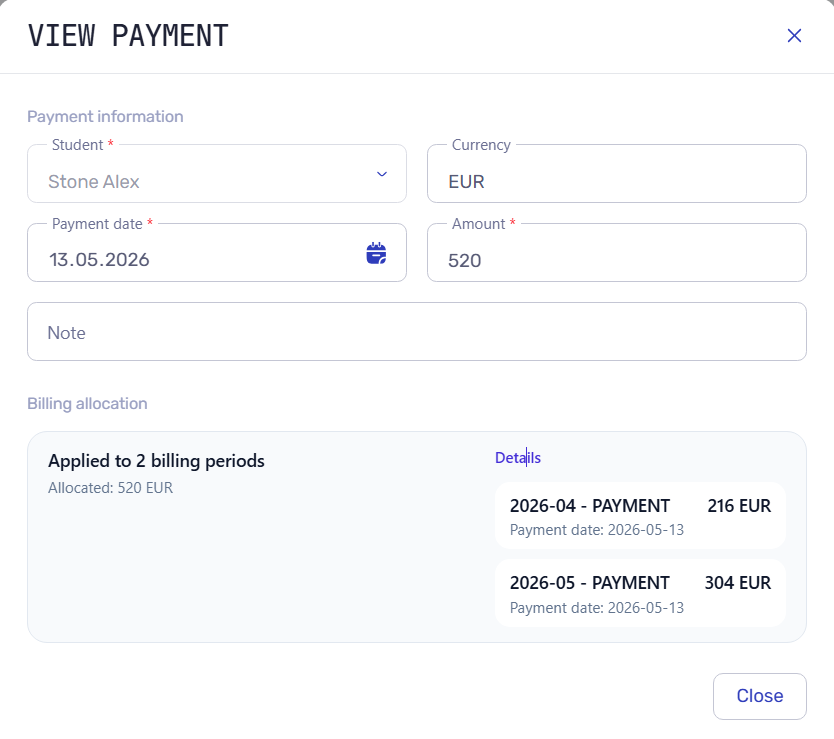
The answer to "Why do I still owe 308 EUR?" is in the allocation history: part of the payment settled April. It is not evidence that the 520 EUR payment was missed or that the student was charged twice.
Recording a payment and allocating it are distinct from collecting money through a payment provider. The workflow shown here starts with a received payment recorded by an administrator; it does not demonstrate automatic card charging or bank-feed reconciliation.
For the full example, including the resulting invoice balances, see payment allocation for training centers and the payments workflow.
Tutoring billing software vs tutoring invoicing software
Tutoring center invoicing software handles the document: its recipient, billing period, line items, payment instructions, and delivery. A tutor invoicing system also needs a reliable source for those line items when lesson outcomes and student arrangements vary.
Tutoring billing software connects that document to the records before and after it: what was chargeable, which discount applied, what was paid, and what remains outstanding. These are different questions, even when one product answers both.
A tutoring centre invoicing system should explain more than a month-end total. Ask the supplier to demonstrate one disputed charge and one partial payment. Can staff explain both from the product, or do they still need to open another spreadsheet?
What Intelligence Cloud automates, and what staff still review
Automation is useful only when its inputs are clear. In the workflow demonstrated here:
- Staff maintain the source records. Course prices and effective dates, student or group discount assignments, and lesson attendance must be correct. Software cannot infer a private agreement that was never recorded.
- Billing uses those records for the calculation. The invoice retains original charges, discounts, lesson details, payments, and previous balance. Staff can review the source of a questionable amount before sharing it.
- Staff choose when to share the invoice. IC supports an invoice PDF and invoice email with payment instructions. Sending a document is not the same as receiving a payment.
- Recorded payments are allocated to billing periods. The allocation history explains what was settled and what remains outstanding, as Alex's example shows.
For delivery setup, see sending student invoices by email and student payment details profiles.
Tutor payouts reuse lesson history, not the student's invoice total
Completed lessons also provide context for tutor payouts. Student charges and teacher earnings are separate calculations with their own prices or rates; a 5 EUR student discount should not be assumed to mean a 5 EUR reduction in the tutor's pay.
See how teacher payouts are calculated from completed lessons. For the broader schedule, teacher access, and administration workflow, explore tutoring business management software.
A tutoring center billing software checklist for your demo
When comparing tutor billing software, use your actual billing arrangements. These five checks are more revealing than a clean invoice with no exceptions:
- Lesson evidence: can you identify the payable and free lessons behind a charge, including individual and group tuition?
- Individual terms: can you see the active course price, the assigned discount, and when each applies?
- Balance explanation: can you distinguish current charges from previous debt, allocated payments, and credit?
- Invoice delivery: can staff review a readable PDF and the payment instructions before sending it?
- Correction review: after correcting a source record, can staff verify the resulting invoice and balance rather than editing a spreadsheet total?
Check other billing models separately. Fixed monthly subscriptions, prepaid lesson packages, combined family invoices, payment-before-booking, and automatic online collection are additional purchasing requirements, not features established by the examples on this page. If your tutoring business depends on one of them, ask for a demonstration of that exact workflow before choosing a system.
The scope demonstrated here is lesson-based invoicing, percentage and fixed-amount student discounts, recorded payments, allocation, and explainable balances. It is not a claim to replace statutory accounting or a payment processor.
Try the invoice, not just the feature list
Start with one student who has a discount and previous debt. Check the original lesson charges, the discount, and the amount due. Then review a payment that covers more than one billing period. You should be able to explain both results without calculating them again outside the system.
Start free with Intelligence Cloud and use the demo evaluation checklist to assess the workflow before entering real school data.
FAQ
What is tutoring center billing software?
It connects tutoring lessons and billing records so staff can create and explain student invoices, track recorded payments, and review debt or credit. The important distinction from a standalone invoice document is the link to lesson history and payment allocation.
Can tutoring centers generate invoices from attendance?
In IC, lesson and attendance records participate in invoice calculations alongside course prices and discounts. The recorded billing treatment matters: a scheduled or missed lesson should not be assumed to carry a particular charge without checking the school's policy and source records.
Can a tutor invoicing system handle partial payments?
IC records student payments and automatically allocates them across billing periods. In the Alex Stone example, a 520 EUR payment closes 216 EUR of old debt and applies 304 EUR to the next period. The remaining 308 EUR is still shown as outstanding.
How are fixed-amount student discounts calculated?
In the demonstrated lesson-based workflow, the fixed amount applies to each eligible discounted lesson. Noah's 5 EUR template applies to 16 lessons, producing an 80 EUR discount. The original 640 EUR charge and the resulting 560 EUR lesson charge remain visible separately.
Does IC collect online payments or only record them?
IC records payments received by your school and allocates them across billing periods. Staff enter a received payment; the allocation history then shows which charges it settles and what remains outstanding. The workflow shown here does not include online checkout or automatic card charging. Invoice PDFs and emails can include payment instructions, but sending an invoice does not itself collect money.
Does billing software replace accounting software?
No. The workflow described here manages operational lesson charges, student invoices, payment history, and balances. Statutory accounting, tax treatment, and payment processing should be evaluated separately.
Related reading
Related resources
How to test training center billing before going live
A practical checklist for testing lesson-based billing in a training center before using invoices, payments, discounts, and balances with real students.
How to send student invoices by email
Learn how Intelligence Cloud sends student invoice PDFs by email, uses invoice due dates, and inserts school payment details into the message.
How payment details profiles work
Learn how Intelligence Cloud uses payment details profiles so different students can receive different payment instructions in invoice emails and PDFs.
Attendance tracking and billing for training centers
Learn when training centers, language schools, and tutoring centers need attendance records connected to scheduling, billing, invoices, payments, teacher payouts, and reports.
Calculate Teacher Payouts from Completed Lessons
Learn how training centers, language schools, and tutoring centers can calculate teacher payouts from completed lessons, rates, attendance, cancellations, and payout statements.
Student fee and payment tracking for training centers
Practical guide to tracking student fees, payments, invoices, unpaid balances, previous debt, overpayments, and credit in training centers, language schools, and tutoring businesses.
Student Billing Software for Training Centers
Learn how training centers and language schools can create student invoices, record payments, track unpaid balances, and connect billing with lessons and attendance.