Calculate Teacher Payouts from Completed Lessons
Learn how training centers, language schools, and tutoring centers can calculate teacher payouts from completed lessons, rates, attendance, cancellations, and payout statements.
Teacher payout calculation becomes difficult when the school grows beyond a simple monthly total.
Teacher payout calculation software should connect completed lessons, attendance outcomes, teacher rates, cancellations, and payout statements so the school can explain each amount without rebuilding the month in a spreadsheet.
A small language school or tutoring center may start with a spreadsheet: teacher, lesson date, student, rate, and amount. That works while every lesson has the same rule and every teacher is paid the same way.
The calculation becomes harder when the center has group lessons, individual lessons, cancellations, substitutions, different teacher rates, attendance statuses, partial periods, and payout statements that teachers can review.
The practical question is:
How can the school calculate teacher payouts from completed lessons without rebuilding the result manually every month?
Teacher payout software should not only store a final salary number. It should explain which lessons were included, which rate was used, which lessons were excluded, and how the final payout statement was built.
This guide explains the general payout calculation model. For a product walkthrough with demo data, see the teacher payout workflow guide.
What teacher payout calculation needs to include
A useful teacher payout workflow starts with lesson records, not with a blank payroll spreadsheet.
The system should help the school connect:
- scheduled lessons;
- completed lessons;
- attendance and lesson outcomes;
- canceled or transferred lessons;
- teacher, group, student, and lesson type;
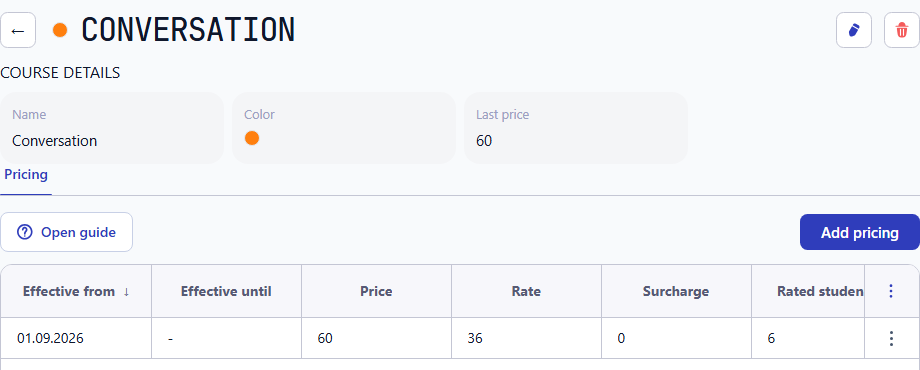
- teacher rates and payout rules;
- manual adjustments where the school allows them;
- payout period;
- payout statement lines;
- reports that explain the final amount.
The value is not only automation. The value is traceability.
When a teacher asks why a payout amount changed, the administrator should be able to answer from lesson history, not from memory.
Completed lessons vs scheduled lessons
Scheduled lessons show what was planned. Completed lessons show what actually happened.
That distinction matters for teacher pay.
Some schools pay teachers for every scheduled lesson unless it was canceled. Others pay only after a lesson is marked as completed. Some pay a canceled lesson if the cancellation happened too late. Some pay a different rate for a substitution or for a group lesson.
The system should make this policy explicit.
A practical flow looks like this:
- A lesson is scheduled with teacher, group or student, date, time, and lesson type.
- The lesson outcome is recorded after the class.
- Attendance explains which students were present, absent, transferred, or excused.
- The payout rule decides whether the lesson creates a teacher payout line.
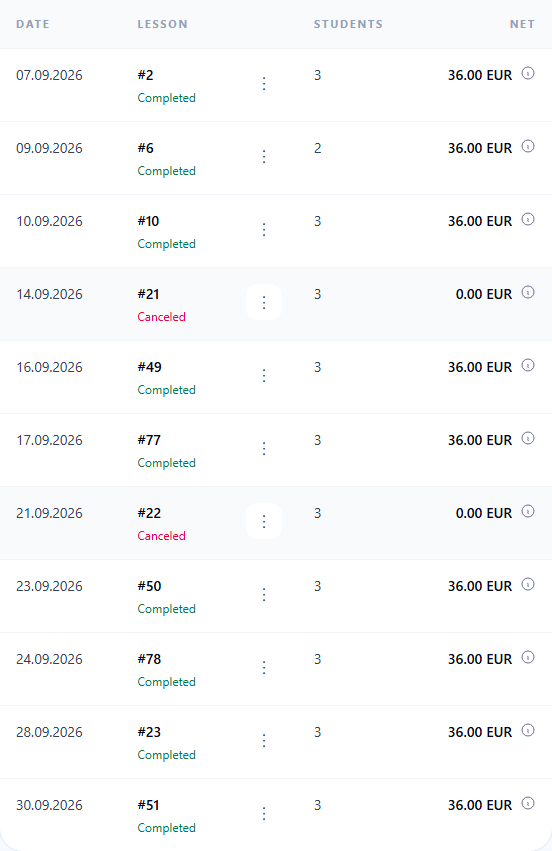
- The payout statement shows the lesson, rate, quantity, and amount.
This is why attendance accounting and the attendance workflow are part of the payout model. Attendance is not only a classroom record. It can also explain which operational events should affect billing, balances, and teacher payouts.
Teacher rates, lesson types, and payout rules
Teacher payout calculation usually depends on more than one rate.
A training center may pay different amounts for:
- individual lessons;
- group lessons;
- online and offline lessons;
- trial lessons;
- substitute teaching;
- lessons for different course levels;
- teacher-specific agreements;
- fixed rates for a period;
- percentage-based rules for selected programs.
The exact model differs by school. The important requirement is that the payout statement should show enough context to explain the result.
If a teacher rate changes in the middle of the month, the administrator should not need to remember which lessons used the old rate. If a canceled lesson is not payable, the reason should be visible. If a group lesson uses a different rule from an individual lesson, the statement should make that clear.
Teacher payout software vs teacher payroll software
Schools often use similar words for different jobs: teacher payout, teacher pay, teacher salary, teacher payroll, tutor payout, or teacher billing.
For a lesson-based education business, teacher payout software usually means the operational calculation: which completed lessons created payout lines and what amount should be reviewed.
Payroll software is broader. It may handle employment contracts, taxes, statutory reporting, bank files, and local compliance. Intelligence Cloud does not replace those accounting or statutory payroll responsibilities.
The practical role of Intelligence Cloud is earlier in the process: keep lesson history, attendance, teacher rates, payout rows, and payout statements connected so the school can review the operational amount before accounting or payment processing.
Example: calculate a teacher payout from completed lessons
Imagine a language school pays a teacher for completed lessons during June.
The administrator needs to review:
- all June lessons taught by the teacher;
- which lessons were completed;
- which lessons were canceled or transferred;
- whether each lesson was individual or group-based;
- which rate applied on the lesson date;
- whether any manual correction should be added;
- the final amount for the payout period.
A connected workflow would not start from a blank spreadsheet. It would start from lesson records that already exist in the schedule and attendance history.
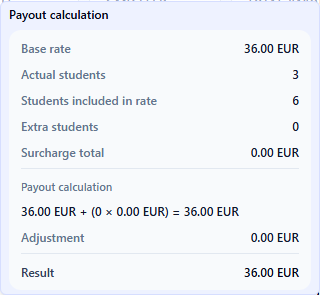
Basic formula: payable lessons × teacher rate + adjustments − non-payable or canceled lesson amounts = payout amount.
The teacher payout statement should then show each payout line:
- lesson date;
- course, group, or student context;
- lesson type;
- rate;
- quantity or duration;
- amount;
- status or note when the line needs review.
This gives the teacher and the administrator a shared source of truth. The statement is not only a total. It is an explanation.
Teacher payout statements and audit trail
A payout statement is useful only if it can be checked.
The school should be able to answer:
- Which lessons are included?
- Which lessons are excluded?
- Which rate was used?
- Did attendance affect the result?
- Did a cancellation affect the result?
- Was there a manual adjustment?
- Who can review the payout before payment?
This audit trail is especially important for language schools and tutoring centers because teacher payout questions often appear after the month has already closed. If the calculation was done in disconnected spreadsheets, the team may need to reconstruct old lesson context.
In Intelligence Cloud, the product-level teacher payout flow is explained on the teacher payouts feature page and in the teacher payouts workflow guide.
Teacher payout calculation checklist
When comparing teacher payout software or teacher billing software for a training center, test realistic cases.
Useful checks include:
- pay a teacher from completed lessons only;
- exclude a canceled lesson;
- include a late-canceled lesson if the school policy requires it;
- calculate individual and group lessons differently;
- change a teacher rate during the month;
- handle a substitute teacher;
- add a manual payout correction;
- generate a payout statement for one teacher;
- compare payout totals with lesson history;
- reuse payout data in reports.
The checklist is not about having the largest payroll system. It is about whether the school can explain the teacher payout amount without a parallel spreadsheet.
How this connects with student billing
Teacher payouts and student billing are different financial workflows, but they often depend on the same operational event: the lesson happened.
One completed lesson may affect:
- attendance history;
- student invoice lines;
- student balance;
- teacher payout rows;
- revenue and payout reports.
This does not mean every student billing rule should automatically become a teacher payout rule. Student billing and teacher payouts may have different policies.
But the system should not force the school to enter the same lesson twice. If the lesson record already exists, both workflows should be able to reuse it with their own rules.
For the student side of the same operational chain, see student billing software for training centers and tutoring center billing software.
What this does not replace
Teacher payout calculation does not replace accounting review, tax rules, employment law, or statutory payroll reporting.
The system should help the school prepare an explainable operational payout amount from lessons, rates, attendance, and adjustments. The school still needs to handle local legal, accounting, and payment requirements outside that operational calculation.
This boundary matters. It keeps the promise honest and helps the school understand where the product fits in the process.
FAQ
What is teacher payout calculation?
Teacher payout calculation is the process of turning completed lessons, teacher rates, lesson types, cancellations, and adjustments into payout lines and a final payout amount for a teacher.
How do you calculate teacher pay from completed lessons?
Start with completed lessons for the payout period, apply the correct teacher rate or payout rule for each lesson, exclude or adjust canceled lessons according to school policy, and review the resulting payout statement before payment.
What is the basic teacher payout formula?
A simple lesson-based payout formula is: payable lessons multiplied by the teacher rate, plus approved adjustments, excluding canceled or non-payable lessons according to the school policy.
Can teacher payout software use attendance records?
Yes, if the system connects attendance with lesson outcomes and payout rules. Attendance can help explain whether a lesson was completed, missed, transferred, or excluded from payout calculation.
Is teacher payout software the same as payroll software?
No. Teacher payout software usually calculates operational payout amounts from lesson history. Payroll software may handle statutory payroll, taxes, contracts, compliance, and payment processing.
Can this work for language schools and tutoring centers?
Yes. The same model is useful for language schools, tutoring centers, training centers, and other lesson-based education providers where teachers or tutors are paid from completed lessons.
What should a teacher payout statement include?
A useful payout statement should show lesson dates, lesson context, rates, quantities, amounts, excluded or adjusted lessons, and the final payout total.
Related reading
To understand the broader workflow, review:
- Teacher payouts feature page
- Teacher payouts workflow
- Attendance accounting software for training centers
- Student billing software for training centers
- Tutoring center billing software
- Reports feature page
Conclusion
Calculating teacher payouts from completed lessons is not only a finance task. It is an operational workflow.
The school needs reliable lesson history, clear attendance outcomes, teacher rates, payout rules, and payout statements that explain the final amount.
When these records stay connected, administrators spend less time rebuilding payout spreadsheets, teachers get clearer statements, and owners can review payouts together with revenue, attendance, and billing data.
Related resources
How to test training center billing before going live
A practical checklist for testing lesson-based billing in a training center before using invoices, payments, discounts, and balances with real students.
Attendance accounting software for training centers
Learn when training centers, language schools, and tutoring centers need attendance accounting software connected to scheduling, billing, payments, teacher payouts, and reports.
Student billing software for training centers
Practical guide to student billing software for training centers, language schools, tutoring centers, and educational businesses that need connected invoices, payments, attendance, and balances.
Tutoring Center Billing Software for Attendance-Based Invoices and Payments
Learn how tutoring centers can connect lessons, attendance, invoices, payments, student balances, discounts, and tutor payouts in one billing workflow.