
Student fee and payment tracking for training centers
Practical guide to tracking student fees, payments, invoices, unpaid balances, previous debt, overpayments, and credit in training centers, language schools, and tutoring businesses.
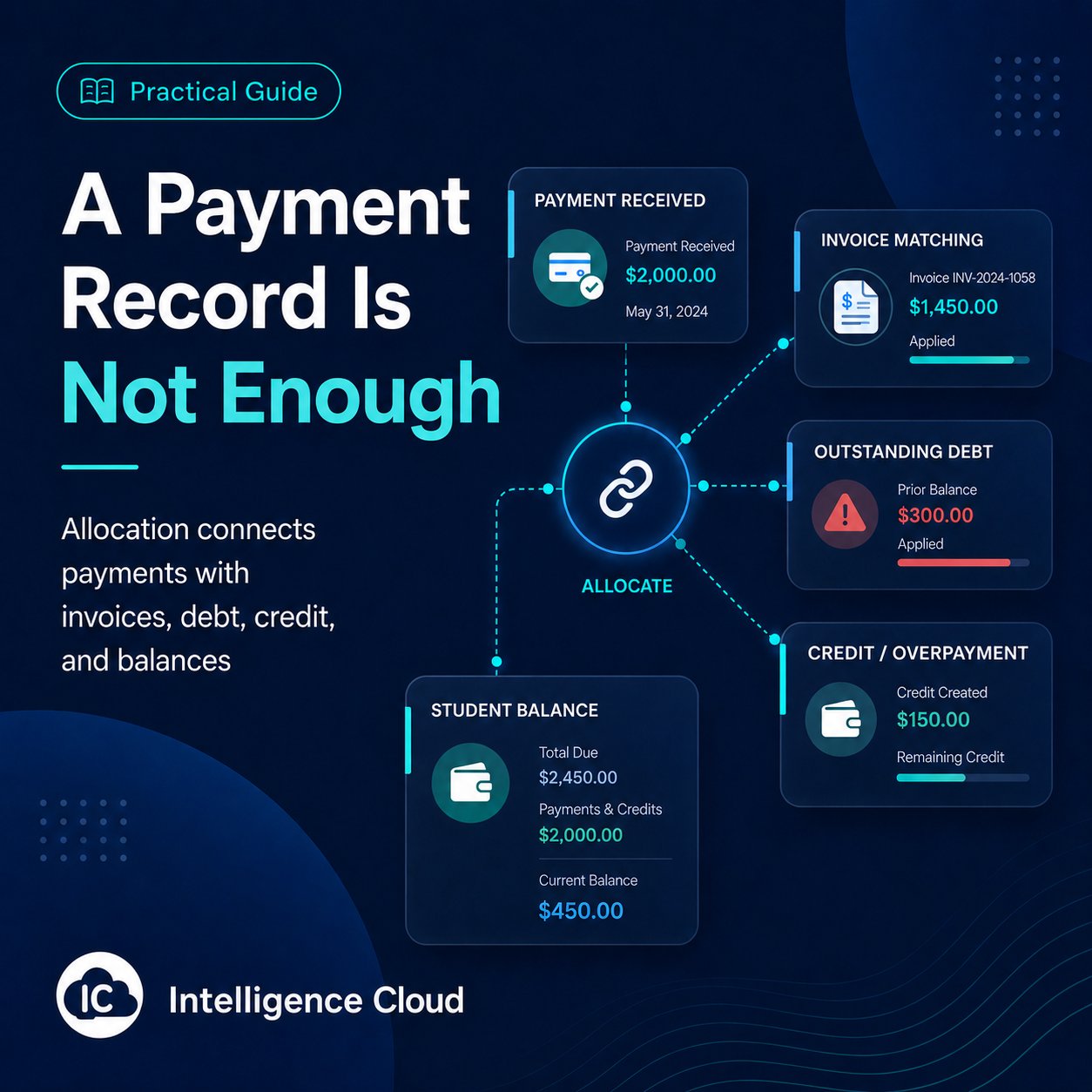
A student payment is not useful if the school cannot explain what it covered. Training centers, language schools and tutoring centers need to know whether a received payment settled previous debt, covered the current charges or left credit for a later period.
Review the invoice and payment history together. The payment date tells you when the school received money; the allocation shows which billing periods it covered.
Read the invoice, payment and previous balance together
Student tuition payment tracking: what did the payment cover?
Start with the amount and date of the received payment. Then check how much was applied to each invoice period and what remains unpaid or available as credit.
A student may pay this month while still owing money from the previous one. In Intelligence Cloud, staff record the received payment once and review the automatic allocation by billing period. The allocation history shows how much reached each period and which balance remains open.
Compare the same student's records:
- the recorded opening balance, including previous debt or credit;
- current lesson charges and discounts;
- the received payment's amount and date;
- charges covered in one or more billing periods;
- the remaining debt or credit.
For the mechanism behind those results, see how automatic payment allocation works. For the payment-entry controls, use the student payments workflow.
Alex's April and May reconciliation
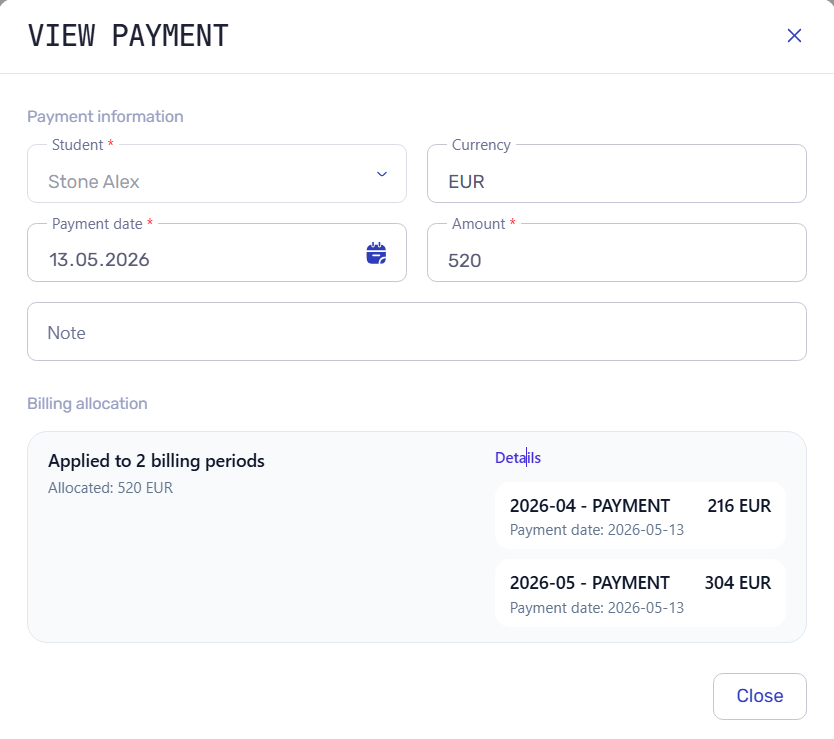
Alex Stone has 216 EUR left to pay for April. When staff record his 520 EUR payment on May 13, 216 EUR settles April and 304 EUR goes to May. April is now settled; May still has 308 EUR outstanding. Open both invoice periods to see what changed.
Reconcile the receipt with each invoice period
A student payment management system should show the received amount separately from the amount applied to each invoice. Open Alex's April and May invoices and compare each period's charges and payments. The 520 EUR receipt settles 216 EUR of April debt and applies 304 EUR to May, leaving 308 EUR unpaid in May.
In this example:
April
- Lesson charges before discount: 600 EUR.
- Discount: 60 EUR, leaving 540 EUR in charges.
- Earlier payment: 324 EUR.
- Allocation from the new 520 EUR receipt: 216 EUR.
- Total payments allocated to April: 540 EUR.
- Amount still unpaid: 0 EUR.
May
- Lesson charges before discount: 680 EUR.
- Discount: 68 EUR, leaving 612 EUR in charges.
- Earlier payment: 0 EUR.
- Allocation from the new 520 EUR receipt: 304 EUR.
- Total payments allocated to May: 304 EUR.
- Amount still unpaid: 308 EUR.
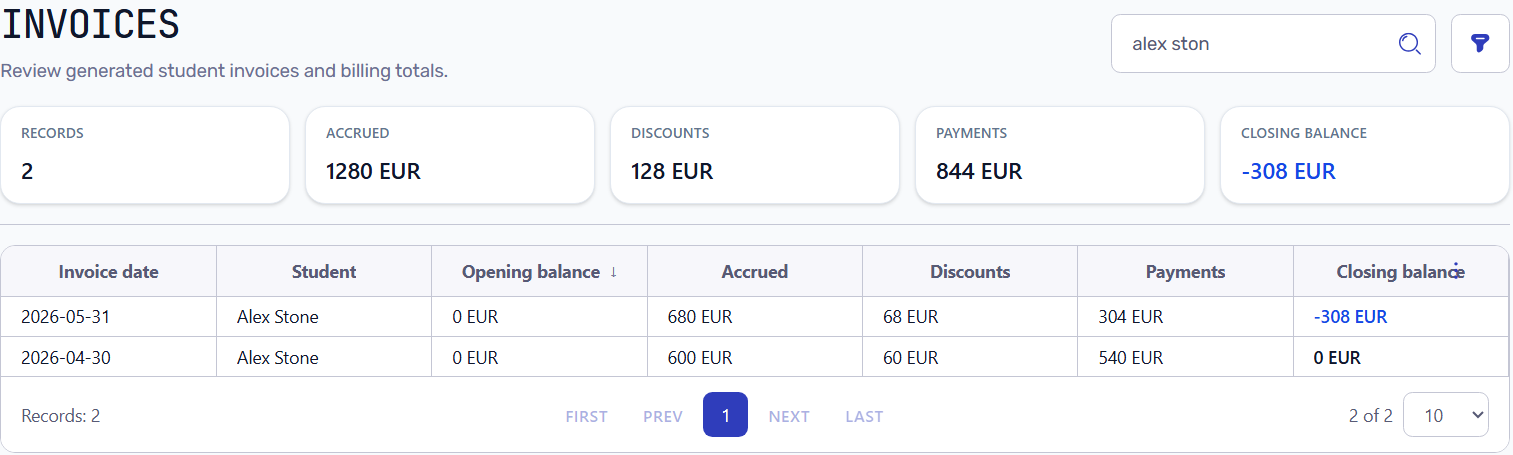
The invoice list shows May's unpaid amount as a closing balance of −308 EUR. The payment was not lost: 216 EUR of the receipt settled April, leaving 304 EUR for May. Keep the receipt amount separate from each period's allocation so it is not subtracted twice.
Check partial payments, advance payments and credit
For a partial payment, compare the charges with the amount allocated to that period. For example, a 300 EUR invoice with 120 EUR applied leaves 180 EUR unpaid. The received money remains visible even though the invoice is not fully covered.
For an advance payment, check the current balance and the next period separately. A payment received before next month's lessons does not necessarily all belong to that month if older debt remains. The advance-payment example follows a received payment, an attendance correction, credit and the next month's invoice.
For an overpayment, keep the unused amount visible as credit. In a simple case with no other debt, 220 EUR paid against 180 EUR in charges leaves 40 EUR credit. Review that credit again when the next invoice is calculated.
If attendance or billing treatment changes a lesson charge, reopen the invoice and allocation history. Check the lesson schedule, course price and student discount behind the change before explaining the new balance.
Can your school explain a payment, invoice and remaining balance?
Test an exact payment, a partial payment, previous debt, an advance payment, an overpayment and a charge changed after a missed lesson or discount. For each case, check that staff can identify the student and period, follow the recorded receipt into its allocations, and explain the remaining amount without rebuilding it in a spreadsheet.
Keep the history available for later corrections and student questions. Compare student invoices and operational reports for the same period instead of treating all money received as one invoice's payment.
For the broader lesson-to-invoice process, read Student billing software for training centers. For individual or small-group tuition, use the separate tutoring center billing example. Intelligence Cloud keeps these payment checks inside the student's operational history.
Related resources
Training center invoice checklist before going live
Check course prices, attendance, discounts, previous balances and payments against one student's invoice before starting live billing.
How to match student payments with invoices: automatic allocation
Learn how student payments are matched with invoices, previous debt, partial payments, overpayments, credit, and student balances in training center billing.
Student Billing Software for Training Centers
Learn how training centers and language schools can create student invoices, record payments, track unpaid balances, and connect billing with lessons and attendance.
Tutoring Center Billing Software for Attendance-Based Invoices and Payments
Lesson-based billing for tutoring centers with individual and small-group lessons. Calculate student invoices, track recorded payments, and explain every outstanding balance.