
How payment-dependent student discounts work
Learn how Intelligence Cloud applies or skips student discounts based on payment timing, payment allocation, and the discount rule configured for the school.
How payment-dependent student discounts work
Some training centers give a student discount only when payment is made on time. A common rule is simple: if the student has not paid by the 10th day of the billing period, the discount should not be applied to that period.
In Intelligence Cloud, this rule should not become a manual spreadsheet check. The system can evaluate payment timing, update the default discount decision for lesson rows, and keep the student invoice explainable.
This guide explains how the paid payment-dependent discount service works, where the rule is configured, and what administrators should check before relying on it.
What problem this solves
Without an automatic rule, administrators often have to check every student manually:
- who has an active discount;
- who paid before the cutoff day;
- whether the payment belongs to the current period or an older debt;
- which lesson rows should keep the discount;
- whether the invoice needs to be recalculated.
This is slow and easy to get wrong. It also creates disputes, because a student may see a discount in one month and lose it in another without a clear explanation.
A payment-dependent discount rule gives the school a consistent default decision while still allowing controlled manual exceptions.
What must be enabled first
Payment-dependent discounts are an additional service. The school should have this service purchased and activated before the rule appears in the discount setup.
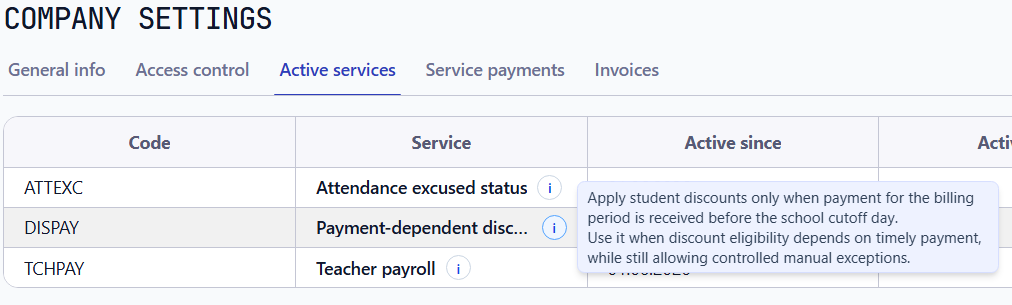
The active services table shows which optional workflows are enabled for the tenant. If the payment-dependent discount service is not active, the school can still use ordinary student discounts, but not the payment cutoff rule.
Configure the rule on the discount
The payment condition belongs to the discount rule itself. It is not configured separately for every student assignment.
In the discount form, choose the payment condition and set the cutoff day. For example, a cutoff day of 10 means that the system checks whether the student has a qualifying payment for the period on or before the 10th day of that period.
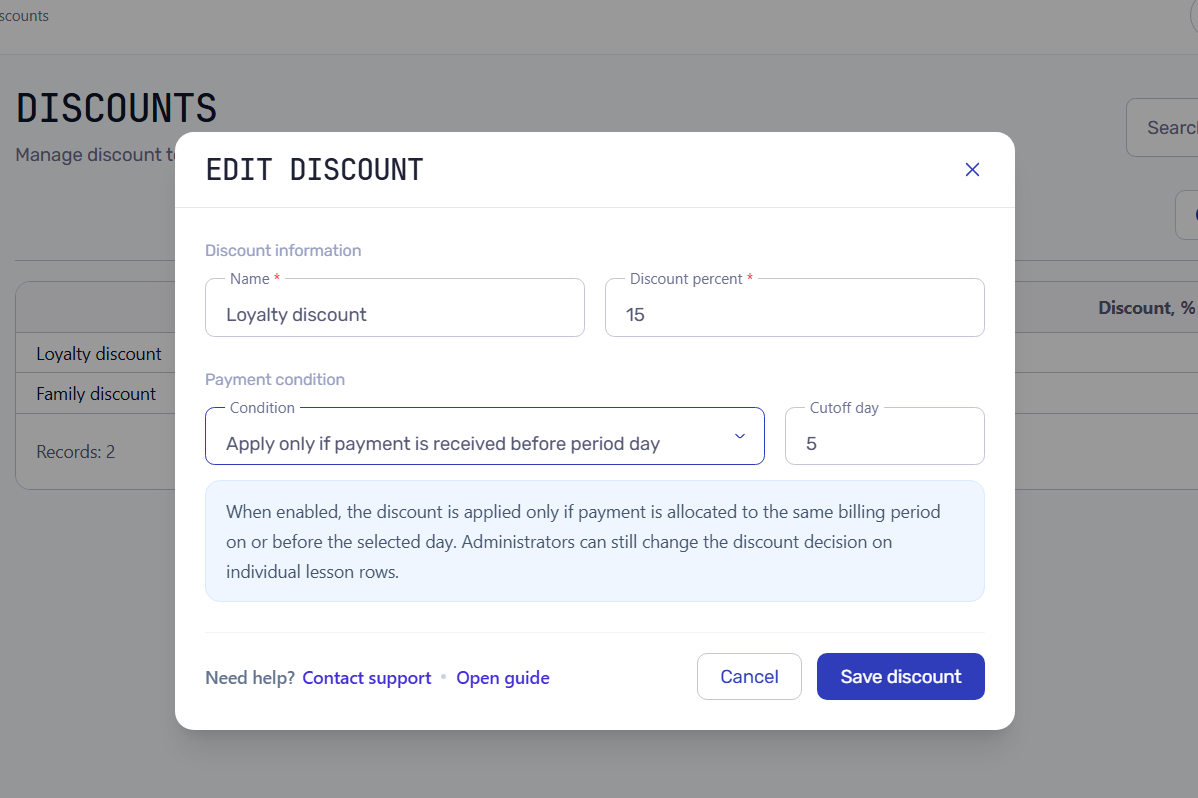
This keeps the user flow simple. Administrators still assign a discount to a student in the usual way, while the discount rule defines whether timely payment is required.
Assign the discount to a student
After the rule is configured, assign the discount to the student or group as usual. The assignment defines who can receive the discount and from which date it becomes active.
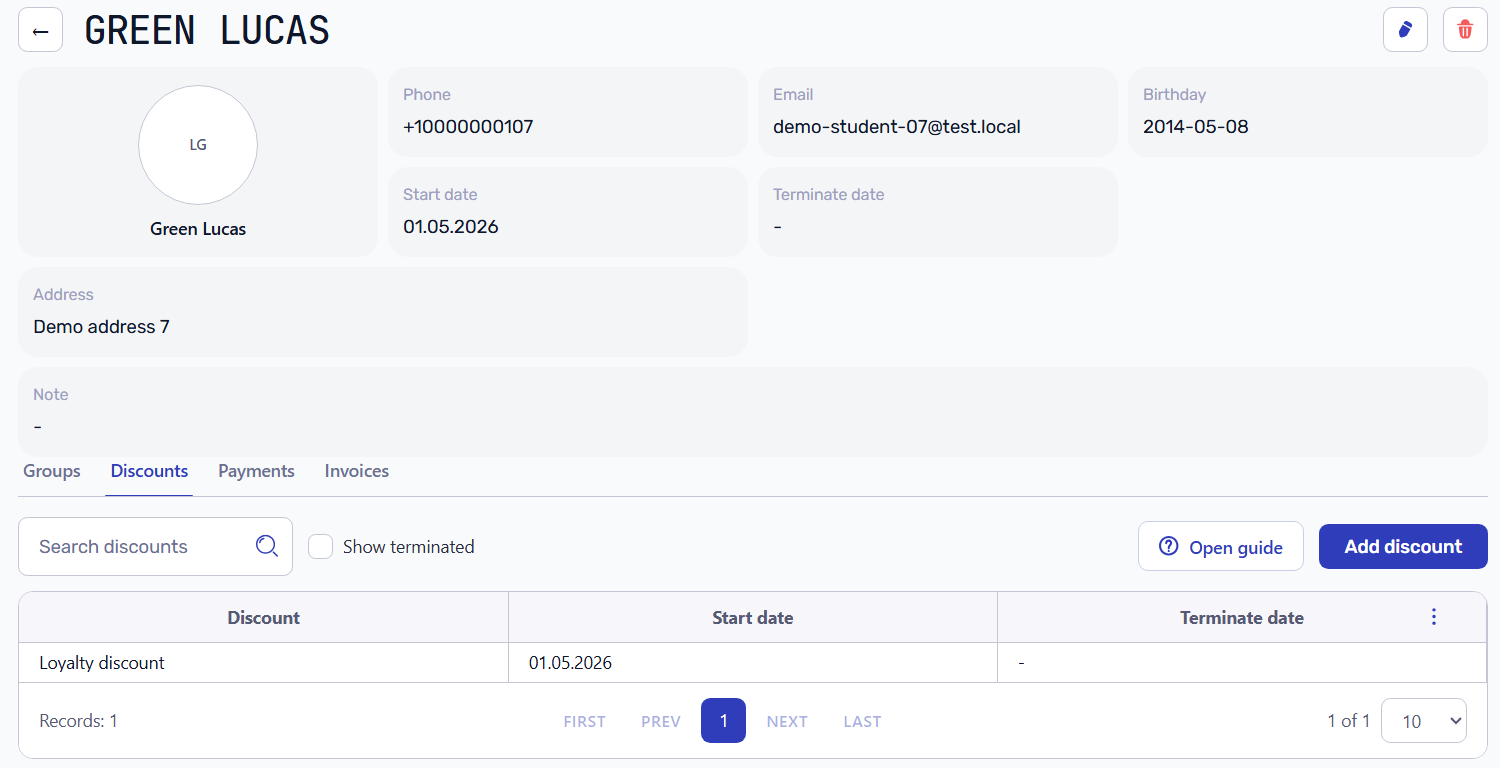
The student assignment does not contain its own cutoff day. If several students use the same discount, they all follow the same payment-dependent rule from the discount setup.
Basic rule
The first supported rule is:
> Apply the student discount only if the student has a payment allocated to the same billing period on or before the configured cutoff day.
Example:
- billing period: June 2026;
- cutoff day: 10;
- cutoff date: 10 June 2026;
- student discount: 10%;
- lesson price: 400 UAH.
If the student has a payment allocated to June on 9 June, the discount remains available for June lesson rows. If the first June allocation appears on 11 June, the automatic decision is to skip the discount for June.
What counts as payment
The rule uses payment allocation, not just the existence of a payment record.
A payment counts when:
- it belongs to the same student;
- it is allocated to the billing period being evaluated;
- its payment date is on or before the cutoff date;
- the allocation amount is positive.
This distinction matters because a payment can be used to close previous debt. If a student pays on 9 June but the system allocates that money to May debt, that payment should not activate the June discount.
For the broader payment model, see how automatic payment allocation works.
What does not count
The discount should not be activated by:
- payment allocated to another billing period;
- payment after the cutoff date;
- a payment record that has not been allocated yet;
- a refund or negative allocation;
- a note saying the student promised to pay.
The rule must be based on financial records, not on informal comments.
How the system updates lesson rows
Student invoices are calculated from lesson rows. Each attendance row has an Apply discount decision. Payment-dependent discount logic changes the default value of that decision for the billing period.
When the rule says the discount should apply, automatic lesson rows keep Apply discount enabled.
When the rule says the discount should be skipped, automatic lesson rows have Apply discount disabled.
After these decisions change, the affected student invoice should be recalculated so that lesson charges, discounts, and final balance stay consistent.
Manual exceptions
The rule is automatic, but it is not absolute.
An administrator may decide to keep or remove a discount for a specific lesson even when the payment rule would make the opposite decision. For example, a parent may contact the school, explain the situation, and the administrator may decide to keep the discount for that student.
In that case, the manual decision has priority:
- the system must not overwrite lesson rows changed manually by an administrator;
- invoice recalculation should preserve manual decisions;
- payment updates should only change rows that still follow the automatic policy.
When the rule is evaluated
The rule should be evaluated in three situations:
- After the cutoff date for the billing period.
- When a payment allocation is created or changed for the period.
- When the billing period is recalculated.
This is important for backdated payments. If an administrator records a payment later but the payment date is before or on the cutoff date, the system should be able to reevaluate the automatic decision.
Closed periods
Closed billing periods should remain stable.
If a period is already closed, the system should not silently rewrite discount decisions and invoice totals. Corrections for closed periods need a controlled correction workflow, not a background change that rewrites history.
Setup checklist
Before using payment-dependent discounts, check:
- the payment-dependent discount service is purchased and active for the school;
- the student has an active discount;
- the discount condition is set to payment before period day;
- the cutoff day is configured, for example 10;
- payment allocation is working for student invoices;
- draft invoices are recalculated after discount decisions change.
Troubleshooting
Why was the discount skipped?
Check whether the student has a payment allocation for the same billing period on or before the cutoff date. A payment for previous debt does not activate the current-period discount.
Why was the discount still applied?
Check whether the lesson row was manually overridden by an administrator. Manual decisions are preserved by design.
Why did the payment not change the discount?
Check whether the payment has been allocated and whether the period is still open. A payment record without allocation is not enough for this rule.
Can a partial payment activate the discount?
The first implementation treats any positive current-period allocation before the cutoff as enough to activate the automatic discount. If a school needs a minimum payment amount, that should be a separate future rule.
Related materials
- How automatic payment allocation works
- How to test billing before going live
- Student invoices and balances
- Discounts and pricing
Result
Payment-dependent discounts make student billing stricter without making daily administration heavier.
The school gets a consistent rule: timely payment keeps the discount, late or missing payment removes the automatic discount, and administrators can still make controlled exceptions when the real situation requires it.
Related resources
How to test training center billing before going live
A practical checklist for testing lesson-based billing in a training center before using invoices, payments, discounts, and balances with real students.
How automatic payment allocation works in training center billing
Learn how automatic payment allocation connects student payments with invoices, attendance-based charges, previous debt, overpayments, and balances.
Payment allocation for training centers
Practical guide to matching student payments with invoices, previous debt, overpayments, and balances in training centers, language schools, and tutoring businesses.
Student billing software for training centers
Practical guide to student billing software for training centers, language schools, tutoring centers, and educational businesses that need connected invoices, payments, attendance, and balances.