
Payment allocation for training centers
Practical guide to matching student payments with invoices, previous debt, overpayments, and balances in training centers, language schools, and tutoring businesses.
Payment allocation is the part of student billing that answers one practical question:
What exactly did this payment pay for?
For a small tutoring business, the answer may be obvious. A student receives one invoice and pays the same amount. The balance becomes zero.
For a growing training center, language school, or educational center, payment tracking becomes more complex. A student may have previous debt, a current invoice, a partial payment, a future-period payment, an overpayment, transferred lessons, discounts, or several open balance positions.
Without clear allocation, the payment exists, but the financial state is still unclear.
Why payment allocation matters
Payment allocation connects incoming money to the student's billing history.
It helps the school understand whether a payment:
- closed the current invoice;
- reduced previous debt;
- partially covered an invoice;
- created credit for a future period;
- paid for selected lesson lines;
- left a remaining balance;
- needs review by an administrator.
This is important because payment tracking is not only accounting. It affects communication with students, parents, managers, and owners.
If the balance is wrong or unclear, the team spends time explaining numbers instead of managing the school.
The difference between payment storage and allocation
Storing a payment means the system knows that money arrived.
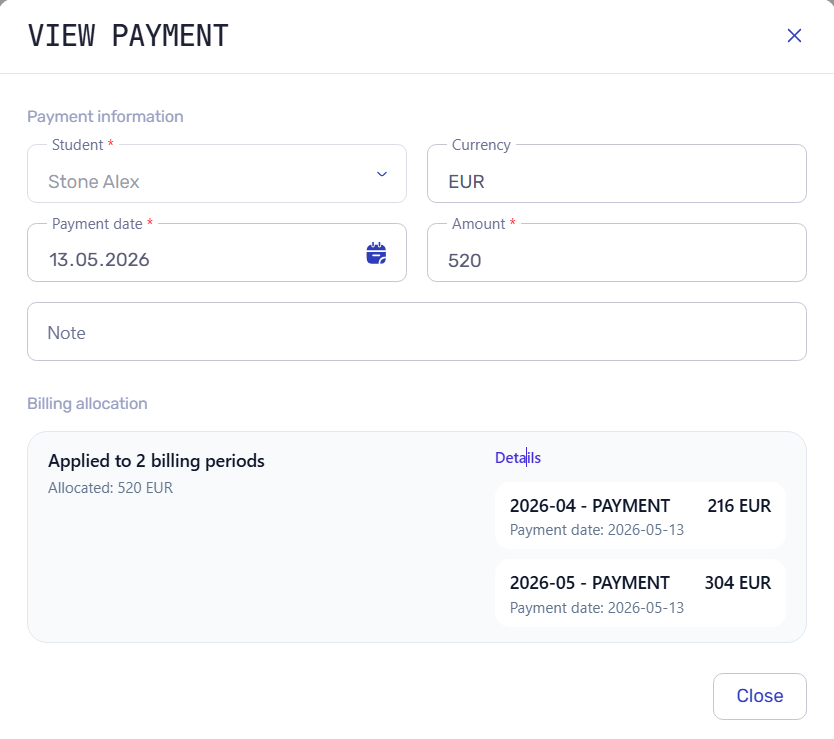
Payment allocation means the system knows how that money affects invoices, debt, credit, and balance.
For example, if a student pays 200 EUR, has 80 EUR of previous debt, and receives a current invoice for 150 EUR, the allocation can close the 80 EUR previous debt first, apply 120 EUR to the current invoice, and leave 30 EUR unpaid.
Without allocation, the administrator only sees a payment and still needs to calculate the result manually.
With allocation, the payment becomes part of the billing explanation.
Common payment allocation scenarios
Exact payment for the current invoice
This is the simplest case.
The student receives an invoice for the period and pays the same amount. The payment closes the invoice, and the balance becomes zero.
Even here, automatic allocation saves work because the administrator should not need to manually update the invoice status, payment list, and balance table separately.
Partial payment
A student may pay only part of the invoice.
In this case, the payment should reduce the unpaid amount, while the remaining debt stays visible.
Example: if the invoice is 300 EUR and the student pays 120 EUR, the remaining debt is 180 EUR.
This helps the school follow up without losing the fact that some money was already received.
Previous debt
Previous debt is one of the main reasons payment allocation becomes important.
A student may pay this month while still owing money from the previous one. The school needs a clear rule:
- should the payment close older debt first;
- should it apply to the current invoice;
- should the administrator decide manually;
- should the payment be split between old and current balances?
The rule may differ by school policy. The important part is that the decision should be visible.
Future-period payment
Some students or parents pay in advance.
For example, a parent pays for next month before the current month is fully closed. If there is also previous debt, the team needs to understand whether the payment creates future credit or closes older debt.
This scenario is easy to lose in spreadsheets because payment timing and billing period are not always the same thing.
See also: How automatic payment allocation works.
Overpayment and credit
If the student pays more than the open amount, the extra money should remain visible as credit.
Example: if the invoice is 180 EUR and the student pays 220 EUR, the remaining 40 EUR should stay visible as credit.
Credit is especially common in course businesses where parents pay ahead, buy packages, or transfer money before the final invoice is ready.
Payment after attendance changes
In lesson-based education, attendance can change the amount owed.
A missed lesson may be billed, excused, transferred, or canceled. A discount may apply to some lessons but not others. A teacher substitution may affect payout reporting.
When attendance changes the invoice, payment allocation should use the updated billing state. Otherwise, administrators may apply money to an invoice that no longer reflects the lesson history.
How to match payments with invoices
A practical allocation workflow should follow a repeatable sequence.
1. Identify the student
The payment must belong to the correct student account.
This sounds obvious, but it matters in schools where one parent pays for several children, students have similar names, or payments arrive from bank transfers with limited notes.
2. Check open balances
Before applying the payment, the system should know what is open:
- previous debt;
- current invoice;
- future invoice or planned credit;
- existing overpayment;
- manual adjustment.
3. Apply the school rule
The school needs a consistent allocation rule.
Common approaches:
- oldest debt first;
- selected invoice first;
- current period first;
- manual allocation by administrator;
- mixed allocation when policy requires it.
The system should support the rule clearly enough that the team can explain it.
4. Update the invoice and balance
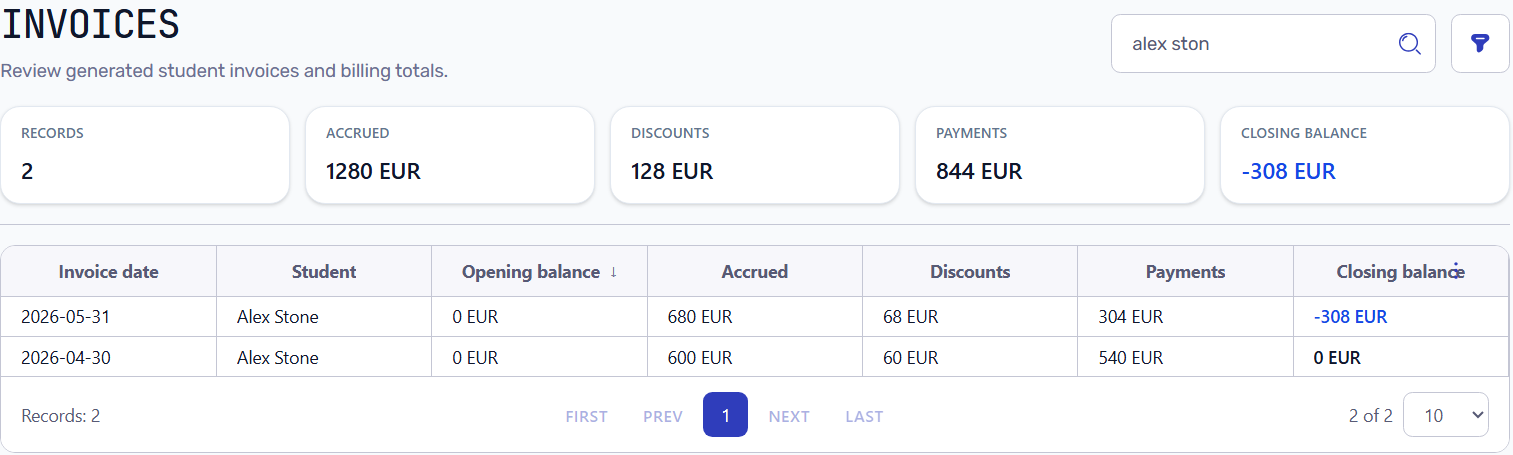
After allocation, the invoice status and student balance should change together.
The result should answer:
- what was paid;
- what remains unpaid;
- whether credit exists;
- why the balance has this value.
5. Keep the history
Payment allocation should leave a trace.
Administrators and owners should be able to review how the payment affected the financial state later. This is important for disputes, corrections, refunds, and monthly review.
What administrators should check
When testing payment allocation, do not test only perfect payments.
Use realistic cases:
- exact payment;
- partial payment;
- payment with previous debt;
- payment with future credit;
- overpayment;
- payment after missed lessons;
- payment after a discount;
- payment for a student with several invoice lines.
For each case, check:
- can the payment be connected to the right invoice or debt;
- does the balance make sense;
- can the administrator explain it without a spreadsheet;
- does the owner see the same financial picture;
- do reports use the same payment data.
How payment allocation connects to the billing workflow
Payment allocation should not be isolated from billing.
It depends on:
- scheduling, because lessons create billing context;
- attendance, because lesson outcomes may affect charges;
- invoices, because payments need something to close;
- pricing, because prices and discounts shape invoice lines;
- reports, because owners need revenue and debt visibility.
For the broader financial model, read Student billing software for training centers.
How Intelligence Cloud approaches payment allocation
Intelligence Cloud keeps payment allocation inside the student finance workflow.
The goal is to connect payments with invoices, previous debt, overpayments, credit, attendance-based charges, and reports in the same operational model.
This helps administrators avoid manual reconciliation and gives owners a clearer view of what was invoiced, what was paid, and what remains open.
Conclusion
Payment allocation is not only a technical accounting detail.
For a training center, language school, tutoring center, or other educational business, it is the logic that keeps payments connected to invoices, debt, credit, and student balances.
When allocation is clear, administrators can explain balances faster, owners get better debt visibility, and the billing process becomes less dependent on manual spreadsheets.
Related resources
How to test training center billing before going live
A practical checklist for testing lesson-based billing in a training center before using invoices, payments, discounts, and balances with real students.
How automatic payment allocation works in training center billing
Learn how automatic payment allocation connects student payments with invoices, attendance-based charges, previous debt, overpayments, and balances.
Student billing software for training centers
Practical guide to student billing software for training centers, language schools, tutoring centers, and educational businesses that need connected invoices, payments, attendance, and balances.