
Student billing software for training centers
Practical guide to student billing software for training centers, language schools, tutoring centers, and educational businesses that need connected invoices, payments, attendance, and balances.
Student billing in a training center is not just sending an invoice.
A private education business usually needs to connect lessons, groups, teachers, prices, attendance, discounts, payments, debt, credit, and monthly reports. This is true for many training centers, language schools, tutoring centers, course businesses, and educational centers with recurring lessons.
The practical question is simple:
How can the school keep student invoices, payments, attendance, and balances aligned without rebuilding everything in spreadsheets every month?
Student billing software should help answer that question with one connected workflow: schedule, attendance, invoice, payment, balance, and report.
What student billing needs to track
A useful billing system for an educational business needs more than a list of payments.
It should understand:
- students and student groups;
- courses, lesson types, and prices;
- scheduled lessons;
- attended, missed, transferred, or canceled lessons;
- discounts and free lessons;
- invoice lines;
- partial payments;
- previous debt;
- overpayments and credit;
- current student balance;
- revenue and debt reports.
If these parts are kept in separate files, the team may still record data, but it becomes hard to explain the result. A parent asks why the balance changed. An administrator checks one spreadsheet. The owner checks another report. The invoice does not match the payment note. The attendance journal says one thing, but the student balance says another.
The value of student billing software is not only automation. It is consistency.
Why spreadsheets break
Spreadsheets often work at the beginning. A small tutoring center can list students, lessons, and payments manually for some time.
The problems start when the school grows:
- students attend different groups;
- lessons are rescheduled;
- some missed lessons are billed and others are not;
- discounts apply to selected students or courses;
- a parent pays partially;
- another parent pays in advance;
- old debt remains open;
- a teacher substitution changes payout data;
- reports need to show revenue, debt, and student activity.
Each exception creates another manual rule. After a few months, billing depends on the memory of one administrator instead of a clear financial model.
That is risky for training centers, language schools, and other lesson-based education providers because billing is connected to trust. Students and parents need clear invoices. Owners need reliable revenue data. Administrators need a process they can repeat.
The connected billing workflow
A stronger workflow starts before the invoice.
Schedule creates expected lessons
The schedule defines what was planned: group, teacher, lesson time, student list, and lesson type.
For billing, this matters because the invoice should not be created from memory. It should be based on known planned lessons.
See the scheduling workflow for the product-level flow.
Attendance confirms what happened
Attendance turns planned lessons into actual lesson outcomes.
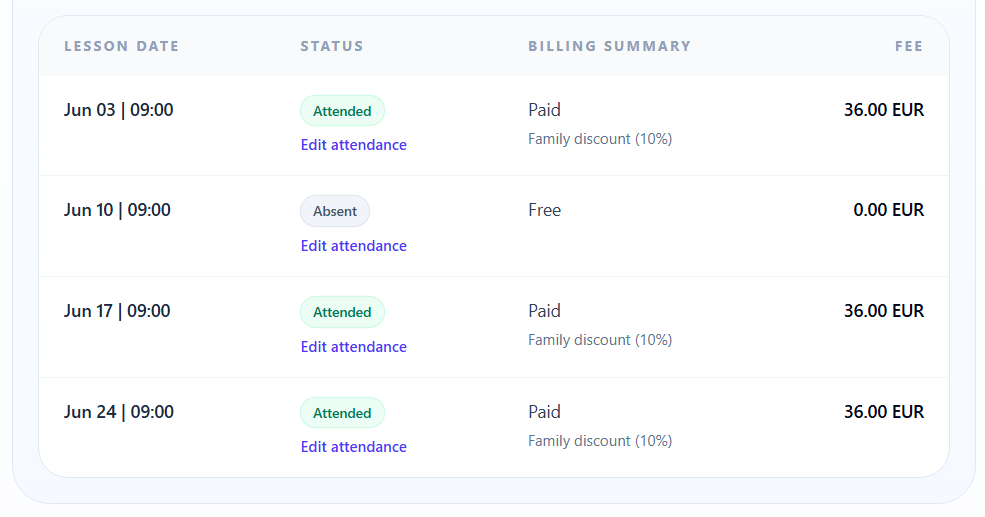
For some schools, every scheduled lesson is billed. For others, the attendance status changes the invoice. A missed lesson may be billed, excused, transferred, or excluded depending on school rules.
This is why attendance accounting is part of the billing model, not only a classroom record.
See the attendance workflow for a practical example.
Invoice calculates what should be billed
An invoice should explain the amount owed.
For a training center, invoice lines may come from:
- regular group lessons;
- individual lessons;
- attended lessons;
- missed billable lessons;
- transferred lessons;
- discounts;
- manual adjustments where the school allows them.
The key requirement is traceability. An administrator should be able to explain why the invoice amount exists.
See the student invoices workflow.
Payment allocation closes invoice lines
When a payment arrives, the system should not only store the money. It should explain what the payment changed.
Did it close the current invoice? Did it reduce previous debt? Did it create credit for a future period? Did it only cover part of the balance?
This is where payment allocation becomes important. Read the related guide: Payment allocation for training centers.
Balance shows debt or credit
The student balance is the result of invoices, payments, debt, credit, and adjustments.
It should be clear enough for:
- administrators who answer student or parent questions;
- owners who monitor debt;
- finance users who check payments;
- managers who prepare monthly reports.
A balance that cannot be explained from invoice and payment history becomes another spreadsheet problem.
Reports summarize the financial picture
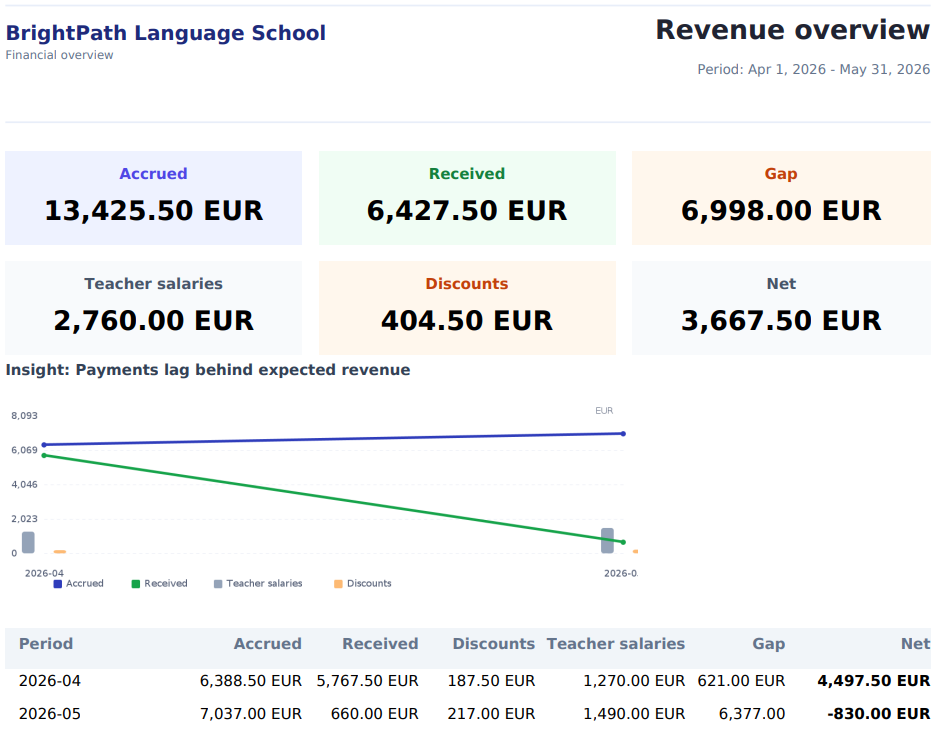
Billing data should feed reports without rebuilding the numbers manually.
A school owner usually needs to see:
- invoiced revenue;
- received payments;
- unpaid debt;
- overpayments or credit;
- revenue by group, course, or period;
- attendance-related billing risk.
See the reports workflow and the student finance feature page.
Attendance-based billing
Attendance-based billing is useful when lesson outcomes affect what the student owes.
This can happen in language schools, tutoring centers, exam preparation courses, dance schools, child development centers, and other educational businesses where lessons are scheduled repeatedly.
Examples:
- attended lessons are billed;
- missed lessons are billed according to the school policy;
- excused absences are not billed;
- transferred lessons move to a later period;
- canceled lessons do not create a charge;
- discounts apply only to selected lesson lines.
The exact rules differ by business. The important point is that the rule should be applied consistently.
If attendance and billing are disconnected, administrators may need to manually compare the attendance journal, invoice file, payment list, and student balance. That is slow and error-prone.
Invoices and payment tracking
Student invoice software should make each invoice understandable.
A good invoice workflow answers:
- which student is billed;
- which period or lessons are included;
- which prices were used;
- which discounts were applied;
- which previous debt is still open;
- which payments were received;
- what balance remains.
Payment tracking should then connect the incoming payment to that financial state.
This is especially important when payments are not perfect:
- partial payment;
- delayed payment;
- advance payment;
- overpayment;
- payment that should close older debt;
- payment made before the invoice is finalized.
If the payment is stored separately from the invoice, the team still has reconciliation work. If it is allocated inside the billing workflow, the balance becomes easier to explain.
Discounts, pricing, and exceptions
Most educational centers have exceptions.
One student has a loyalty discount. Another has a sibling discount. A course has a fixed monthly price. Individual lessons may use a different rate. A missed lesson may be transferred. A free lesson may be added as compensation.
The billing system should not hide these rules in notes. It should keep them visible enough that the invoice can be checked.
Useful internal checks:
- Are course prices configured?
- Are student discounts active only where they should apply?
- Are free lessons visible?
- Are attendance statuses defined?
- Are transferred lessons handled consistently?
- Can the invoice preview be explained before sending it?
See the pricing workflow and the discounts feature page.
What to check before going live
Before replacing spreadsheets, choose several realistic student scenarios and test them end to end.
Use at least:
- one student with a simple monthly invoice;
- one student with missed lessons;
- one student with a discount;
- one student with partial payment;
- one student with previous debt;
- one student with overpayment or credit;
- one student with transferred lessons.
Then check:
- the schedule is correct;
- attendance statuses are clear;
- invoice lines match the lesson logic;
- discounts are applied correctly;
- payments affect the expected invoice or debt;
- the student balance is explainable;
- reports use the same data.
This is also part of the billing check before go-live.
How Intelligence Cloud approaches student billing
Intelligence Cloud is designed for lesson-based education businesses where scheduling, attendance, invoices, payments, and reports need to stay connected.
The product approach is to keep billing close to the operational workflow:
- schedule creates the lesson context;
- attendance records what happened;
- invoices use lesson and attendance data;
- payments update balances;
- reports reuse the same financial data.
This helps training centers, language schools, tutoring centers, and other private education providers reduce manual reconciliation and keep billing easier to explain.
Related workflows
To understand the full billing model, review these pages:
- Scheduling workflow
- Attendance workflow
- Student invoices workflow
- Payments and allocation workflow
- Pricing workflow
- Reports workflow
- Student finance feature page
Conclusion
Student billing software should not be limited to invoice creation.
For a training center or language school, billing is connected to lessons, attendance, prices, discounts, payments, balances, debt, and reports.
When these parts work together, administrators spend less time reconciling spreadsheets, owners get clearer financial visibility, and students or parents receive invoices that can be explained.
Related resources
How to test training center billing before going live
A practical checklist for testing lesson-based billing in a training center before using invoices, payments, discounts, and balances with real students.
How automatic payment allocation works in training center billing
Learn how automatic payment allocation connects student payments with invoices, attendance-based charges, previous debt, overpayments, and balances.
Attendance accounting software for training centers
Learn when training centers, language schools, and tutoring centers need attendance accounting software connected to scheduling, billing, payments, teacher payouts, and reports.