
Lessons need manual checking
Completed lessons, cancellations, attendance notes, and student counts are checked from calendars, chats, and spreadsheets.
For language schools, tutoring centers, and training centers: calculate teacher and tutor payouts from completed lessons, attendance context, teacher rates, student counts, cancellations, and payable rules without rebuilding payroll in spreadsheets.
No card required. No migration needed to test the payout flow.
Completed lessons
A payout is only easy to trust when it starts from the same scheduled lessons and attendance records your team already uses for student invoices, balances, and reports.
Completed lessons, cancellations, attendance notes, and student counts are checked from calendars, chats, and spreadsheets.
Teacher rates can depend on lesson type, group, student count, or date, and become hard to verify when payroll is calculated outside the school workflow.
When payout statements are recreated manually, teachers and administrators have less visibility into the lessons and rates behind the amount.
Teacher payout software should calculate from lesson history, not guess at month end.
Keep schedules, attendance, teacher rates, payable lesson counts, cancellations, student invoice context, and payout statements connected in one operational workflow.
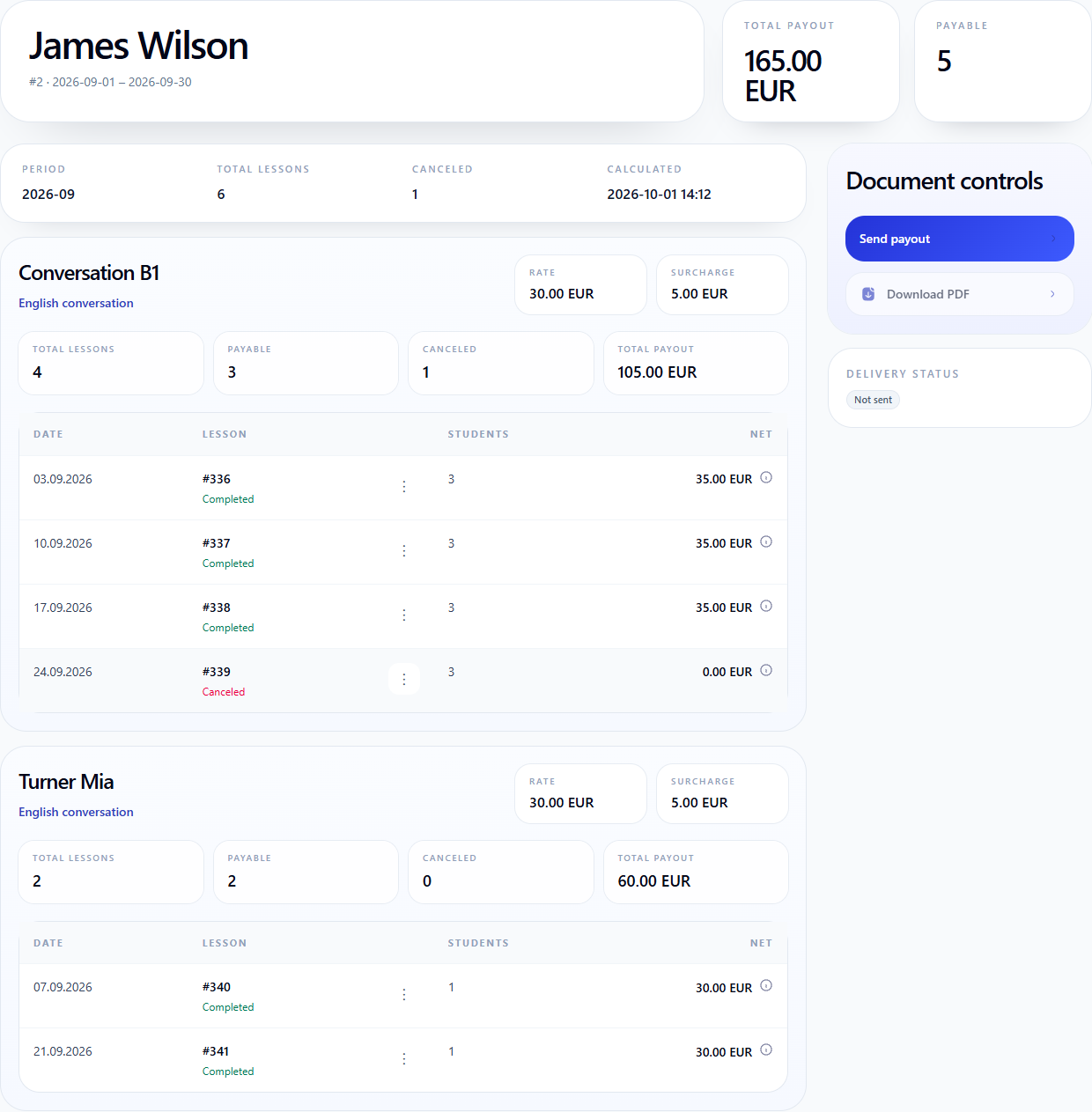
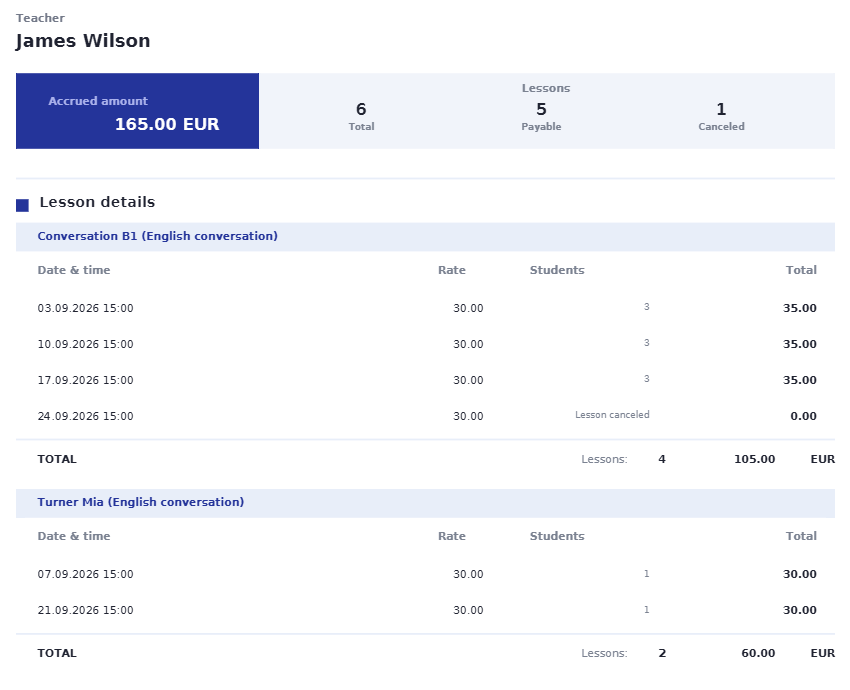
Follow James Wilson's demonstration statement: EUR 105 from group lessons plus EUR 60 from individual lessons. Review extra-student pay, a canceled lesson at zero, the teacher's own account and the matching PDF.
Teacher Payout Statements Explained: Group and Individual Lessons
The same records that support scheduling, attendance tracking, student billing, and reports can also explain how much a teacher or tutor should receive.
Use lessons that actually happened, with date, group, course, teacher, and student count visible.
Apply teacher rates and payable lesson logic without losing the reason behind each payroll line.
Review the completed lessons, attendance context, rates, cancellations, and payable rules that produced the final amount.
Schools often search for teacher billing software when they need to calculate how much a teacher or tutor should be paid for completed work. In a training center, that calculation usually depends on lesson history, attendance, cancellations, student counts, rates, and payable rules.
Teacher payout software should go further than a manual billing spreadsheet. It should explain where the payout amount came from, keep the student billing context nearby, and give the teacher a readable statement without changing the accounting system.
See each teacher's payout period, calculated amount, and lesson count before the final statement is shared.
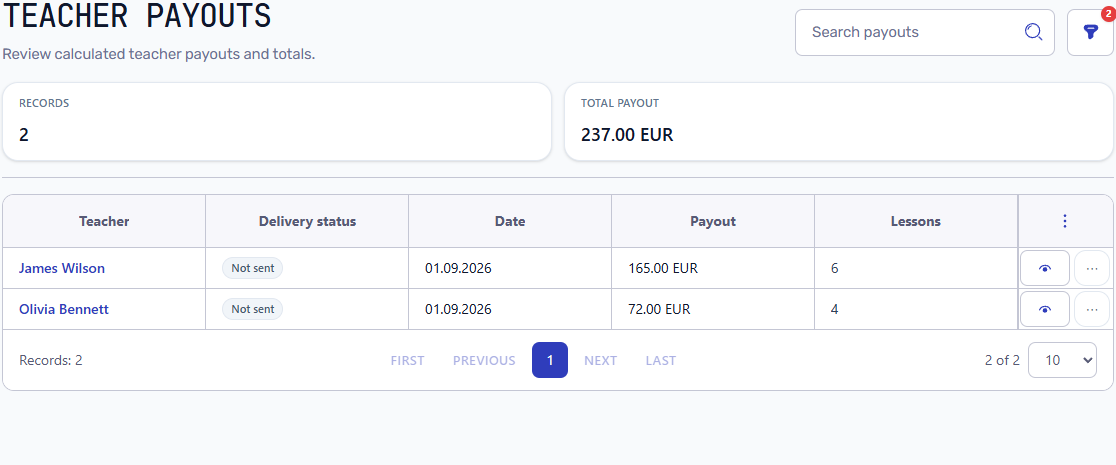
Typical payout question
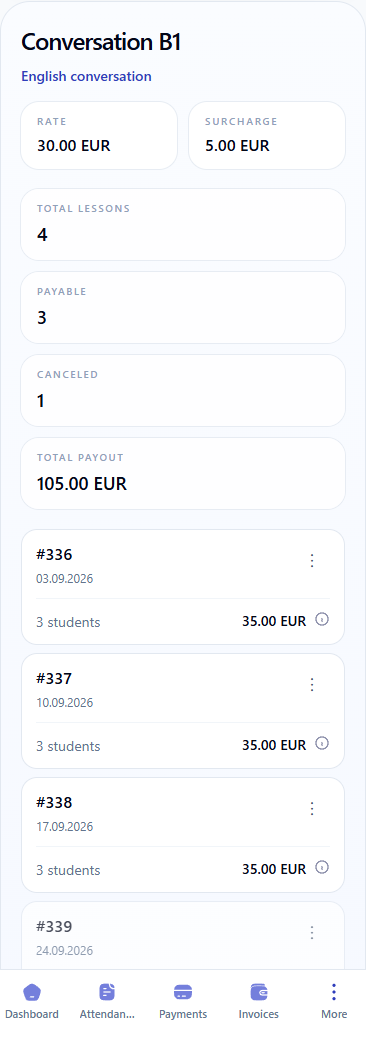
In this demonstration, James Wilson has 105 EUR from three group lessons and 60 EUR from two individual lessons. A canceled group lesson stays visible at zero: 105 + 60 = 165 EUR.
Group lessons are grouped by group and individual lessons by student, with the course, rate and subtotal visible in each block. Open Payout calculation beside an amount to check the base rate, student count, supplement and result.
Download a PDF with separate group and individual-student blocks, lesson dates, rates, cancellations and subtotals that reconcile to the accrued amount.
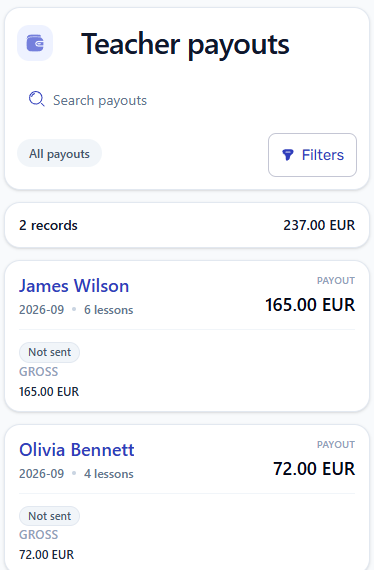
Administrators can review payout totals, open teacher details, and check lesson rows from a mobile screen during daily operations.
Scheduling creates lessons, attendance confirms what happened, student billing uses the same lesson facts, and reports reuse the same payout data.
Planned and completed lessons become the timeline used for payout calculations.
Attendance and lesson status help explain which lessons should be payable.
Student invoices and teacher payouts can be checked against the same completed lesson history.
Revenue and profitability reports can include teacher payout totals from the same records.
Workflow guides
Use these guides to connect payout statements with lesson history, teacher rates, attendance, student billing, and reports.
Teacher payout software helps a training center calculate what teachers or tutors should receive from completed lessons, rates, attendance context, cancellations, and payable rules.
Teacher billing software is often used as a search phrase for calculating amounts owed to teachers. Teacher payout software focuses on the same need, but also explains the lesson history, rates, and statement behind the final amount.
Yes. Completed lessons give the payout calculation a reliable operational source: date, group, teacher, student count, lesson status, attendance context, and rate logic.
They can, depending on the center's payable rules. The important point is that cancellations, attendance context, and payable lesson counts remain visible when the payout is reviewed.
No. It helps calculate and explain teacher payout statements from school operation records. Accounting systems may still be used for statutory accounting, taxes, or external financial reporting.
Start with demo data to see whether completed lessons, attendance context, rates, payable lessons, cancellations, and PDF statements match your school process.