
An administrator manages lessons and students
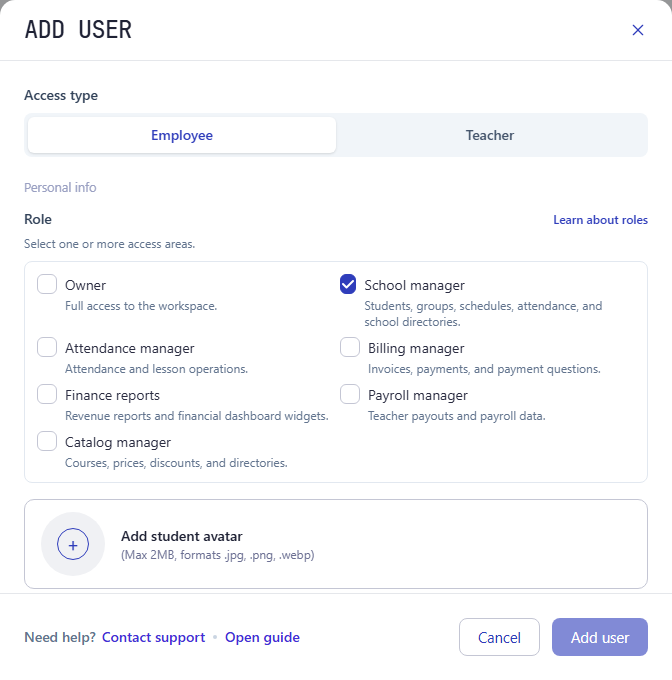
School manager opens the schedule, attendance, and core directories. This role alone does not grant access to invoices, financial reports, company settings, or employee access management.
Choose which areas each employee works with: attendance, invoices and payments, financial reports, teacher payouts, or the catalog. Combine several access areas when one person handles more than one job.
For training centers, language schools, and tutoring centers.
Access areas
Select several areas in Role to combine their permissions. For example, someone who records attendance and payments needs both Attendance manager and Billing manager.
| Access area | Available sections |
|---|---|
| School manager | Schedule, attendance, students, groups, teachers, branches, classrooms, courses, discounts, and the birthday report. |
| Attendance manager | Schedule and attendance, plus groups, students, and teachers. |
| Billing manager | Invoices and payments, plus students and groups. |
| Finance reports | Revenue reports and revenue by group. |
| Payroll manager | Teacher payouts, plus teachers and groups. |
| Catalog manager | Courses, prices, and discounts, plus branches, classrooms, teachers, and groups. |
Each area opens the corresponding sections. It is not a general switch between viewing and editing. Individual features also depend on the services enabled for your company.
Assign access based on what a person does, rather than their job title alone.
School manager opens the schedule, attendance, and core directories. This role alone does not grant access to invoices, financial reports, company settings, or employee access management.
Combine Billing manager with Finance reports. If the same person also handles teacher payouts, add Payroll manager.
Teacher access is linked to their teacher profile. They see their own lessons, groups, and payouts and record attendance for their lessons. Student invoices, payments, and company financial reports are not available. Teacher access cannot be combined with employee roles in one account.
Owner grants full workspace access, including company settings and employee access management. Assign this role to people who need that level of responsibility.
Separate access areas help you share responsibility for teaching operations and finances. Decide who needs these records:
Decide who manages the schedule, records attendance, registers payments, and checks reports.
The owner opens Company settings → Access control, adds an employee, and selects their roles. Teachers receive separate access linked to their existing teacher profile.
Check the access status after sending an invitation. Update roles when responsibilities change. When an employee leaves, use Block or Delete on their record in Access control.
See the tasks employees perform in the sections you give them access to.
Student portal software
Invited students can access their own lessons, attendance, sent invoices, payment details, current balance, and profile through the connected student portal.
Instructions
Step-by-step instructions for owners and teachers.
Create your Intelligence Cloud workspace and choose access around your team's responsibilities.