
How to attract students to a tutoring business: from inquiry to payment
A missed inquiry can mean a lost student and lost revenue. Capture inquiries in a CRM and follow up promptly to turn more interest into paid enrollments.
Use the 12-point checklist to review how you handle tutoring inquiries. Download a copy for your team.
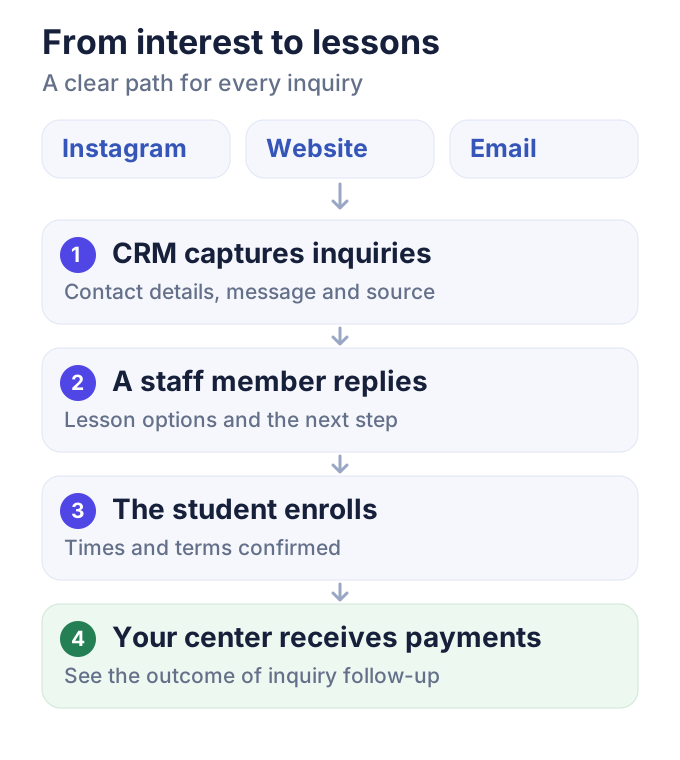
A parent asks about math lessons for her daughter on Instagram. Another family fills in your website form. A third emails about lesson times. These people are already interested in your center. The next step is to help them find the right tutoring option.
You have invested advertising money, staff time or the trust of families who recommend you to bring them this far. An unanswered message or a forgotten call can leave that investment without a return.
A CRM helps grow your tutoring revenue through everyday work: capturing inquiries, replying promptly and helping more families enroll their children. Here is how to organize that journey in a tutoring center.
In this guide:
- Where your center loses future revenue
- How to attract suitable tutoring inquiries
- How automatic lead capture works in a CRM
- How to turn an inquiry into an enrollment
- How inquiries help you fill a new group
- How to track enrollments, payments and revenue
- Tutoring inquiry checklist: where are you losing students?
Where your center loses future revenue
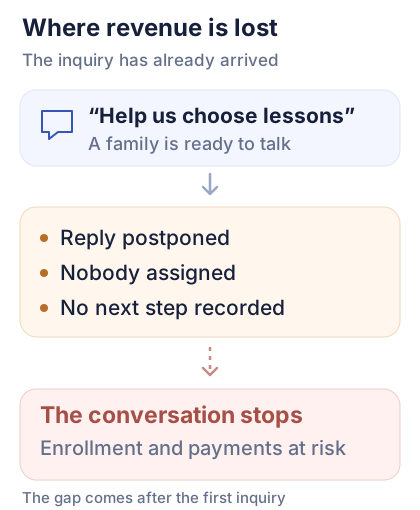
An administrator replies to parents, welcomes students and changes the schedule. It is easy to read a message and put the reply off. When an agreement stays in a chat or in someone's memory, the conversation continues only if that person remembers it.
Do any of these situations sound familiar?
- A parent asks about prices. A staff member sends the price list but never asks what help the child needs or when they can attend.
- Two people receive a website inquiry. Each assumes the other will reply.
- A parent asks for an evening call. Nobody records the follow-up.
- A child attends a trial lesson. The family gives feedback, but nobody discusses regular lessons.
- There is no suitable group yet. When a new group opens, the parent is forgotten.
Behind each inquiry may be a student ready to start. Owners can see the advertising spend, but often cannot see how many opportunities disappear after the first contact.
Before increasing your advertising budget, look at what happens to the inquiries you already receive. A shared inquiry list should show who is responsible, what was discussed and what happens next.
How to attract suitable tutoring inquiries
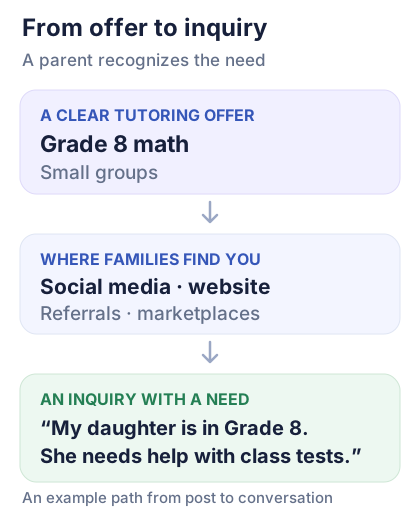
Marketing a tutoring business starts with a clear offer. A parent needs to recognize their child's need, see a suitable lesson format and understand how to contact you.
For example: “Grade 8 math in small groups. We work through difficult topics and help students prepare for class tests. Tell us what your child finds difficult and we will help you choose a class.”
This tutoring advertisement explains who you help and how to begin the conversation. A specific subject, level and format tell a family more than a broad promise of “quality education.”
Social media and Instagram
Introduce a tutor, share a short explanation or answer a common parent question. End the post with a clear invitation to describe what their child finds difficult or ask for help choosing a class.
Keep the context of the post with the inquiry when the channel allows it. Your staff can continue the conversation more easily when they know which offer caught the parent's attention.
Search and your website
On each subject page, explain the subject, school grade or level, lesson format, location and contact options. For an in-person center, the neighborhood and travel time matter. For online lessons, explain available times and how students join.
SEO for tutoring centers helps families find these pages when they search for lessons in that subject. Keep the inquiry form short: contact details and a brief description of what the child needs help with are enough to start. You can discuss the rest with the family.
Referrals and partnerships
Ask happy families to recommend your center to people they know. Give them a short description of the lessons and a convenient contact link. You can also arrange referrals with professionals who serve a similar audience.
During the first conversation, ask how the parent found you. This helps distinguish a family referral from a paid advertising response.
Tutoring marketplaces
Tutoring marketplaces are one option for independent tutors finding students. They can also be a channel for a center when the platform allows teams or organizations to list their services.
Check the platform's terms, inquiry costs and contact options. Choose a few channels your team can handle, then compare suitable inquiries and enrollments.
Three examples for your tutoring business
- An in-person center. Offer “Grade 8 math near your child's school. Help with the topics they find difficult.” Put your neighborhood, address and lesson times on the subject page. Share the link in a local parent community if its rules allow it. Invite parents to send their child's grade and preferred times. Track how many families can attend your center, enroll and make a payment.
- Online tutoring. Share a short explanation of a difficult topic by one of your tutors. Invite parents to ask about online lessons: “Is your child struggling with equations? Tell us their grade and where they get stuck.” Link to the lesson format, available times and time zone. Compare posts by relevant learning inquiries and subsequent payments.
- A new group. Make a specific offer: “New small group for Grade 8 math. Tuesdays and Thursdays at 6 p.m. Tell us which topics your child needs help with.” Share it on your website and social channels, and ask existing families to pass it on. Contact families on your waiting list and check whether they are still interested. Track confirmed places and first payments by source.
Adapt these examples to your center's classes and availability. Save the inquiry source and any paid placement costs so you can see which channels lead to enrollments and revenue. A post creates interest; a timely reply helps turn that interest into an enrollment.
How automatic lead capture works in a CRM
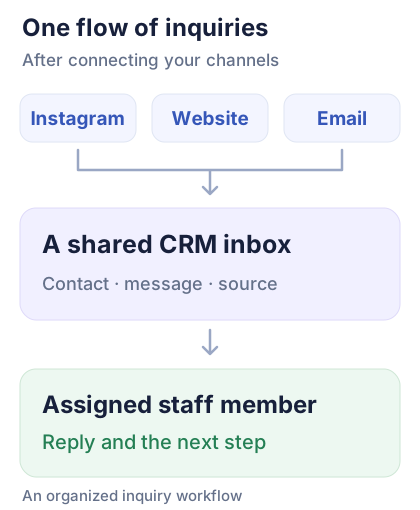
Families contact you through the channels they prefer. Connected channels send inquiries to a shared CRM inbox: a website form, an advertising lead form, an email or a message from a supported messaging service.
Save contact details, the original message, the time and the source with each inquiry. A staff member can then see it and take ownership. Automatic lead capture reduces manual copying between chats and spreadsheets.
Instagram Direct messages, advertising lead forms and emails reach a CRM in different ways. Check the connections you need when choosing a system. For example, Meta's lead generation guide describes sending advertising leads to a CRM. Check messaging support separately for the channel you use.
After connecting a channel, send a test inquiry. Check that both the contact details and the message appear and that the responsible person can see the new inquiry. Staff can add calls, in-person conversations and inquiries from other channels to the same list manually.
Centralizing inquiries shows your team who is waiting for a reply and which conversations need follow-up. Another message from the same parent becomes part of their contact history. Check that the contact details match before merging records.
How to turn an inquiry into an enrollment
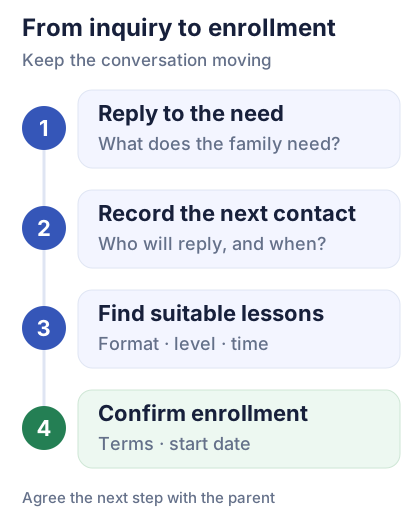
Consider Anna, who asked on Instagram about math for her daughter Sofia in Grade 8. Sofia needs help with current topics, and lessons after 5 p.m. suit the family.
Give a useful first reply
A useful reply helps a parent move forward. The staff member asks what the child needs help with, explains the tutoring options and offers the next step.
For example: “Hi Anna, thanks for getting in touch. You mentioned that Sofia needs help with Grade 8 math and can attend after 5 p.m. Which topics is she finding difficult? I will check suitable groups and get back to you by noon tomorrow.”
The parent can see that their message has been read and someone is helping them find a suitable group. An automatic acknowledgment can confirm receipt; a reply like this continues the conversation about learning.
Assign an owner and schedule the next follow-up
After the conversation, the record might say: “Assigned to Maria. Sofia, Grade 8 math. Tuesdays and Thursdays after 5 p.m. suit the family. Check places and reply to Anna by noon tomorrow.”
Your team can see who owns the inquiry, what was promised and when to contact the family again. Overdue follow-ups help an owner spot inquiries that need attention.
Offer suitable lessons
The staff member finds a group or an individual lesson option. If a trial lesson would help the family decide, arrange it and then discuss their experience and the tutor's recommendation.
Confirm the format, schedule, price and start date. Agree on any follow-up with the parent. A decision not to enroll, or a request to revisit the conversation later, is also a clear outcome.
A practical goal for a CRM: every open inquiry has a next step, and your team can see the agreements made.
How inquiries help you fill a new group
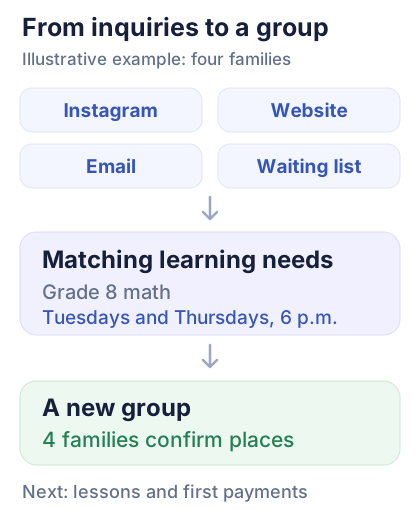
Suppose Daniel asks through the website about math for his son, and Helen sends an email. Their children, like Sofia, are in Grade 8 and can attend in the evening. Another family has been waiting for a group since last month.
In separate chats, these are four unrelated conversations. In a shared inquiry list, your staff can spot similar needs and check whether one group would suit them.
The diagram is an illustrative enrollment example. Before starting the group, staff check the students' levels, tutor availability, lesson times and each family's confirmation.
Your center offers Tuesdays and Thursdays at 6 p.m. Parents confirm places, receive the payment terms and agree on the first lesson date. If the times do not suit a family, keep their inquiry for another option.
Keeping inquiries together helps you see demand, fill available places and offer a new group. Check when each inquiry arrived: a family that contacted you months ago may need a different solution now.
After enrollment, the next steps are the lesson schedule, invoices and payment records.
How to track enrollments, payments and revenue
As an owner, you need to know which channels bring students and where the journey to payment breaks down.
Start by tracking:
- How many new inquiries arrive and their sources.
- How many are waiting for a useful first reply.
- Which inquiries have a follow-up due.
- How many people confirm enrollment.
- How many students make a first payment.
- Why other families decline or postpone lessons.
Count messages, families and students separately. One parent may contact you through two channels or ask about two children. Decide what you are counting before comparing results.
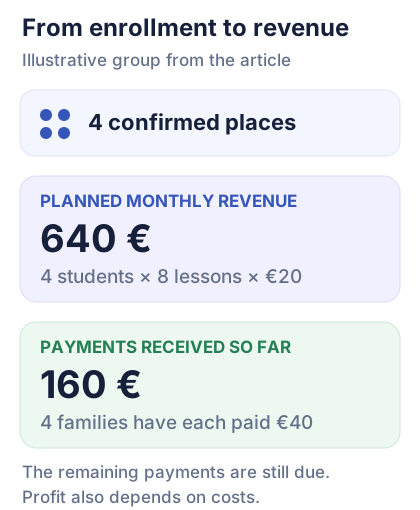
Return to the group in our example. Illustrative calculation: four students, eight lessons in a month and €20 per lesson for each student. With every place filled and all lessons paid for, the group's planned monthly revenue is €640.
If each family has paid €40 so far, you have received €160. The remaining payments are still to come. Profit also depends on tutor pay, premises and other costs.
This makes the connection between inquiries and revenue visible: interest becomes confirmed places, followed by payments. A CRM helps organize the first part of that journey; lesson, invoice and payment records show what happens next.
Tutoring inquiry checklist: where are you losing students?
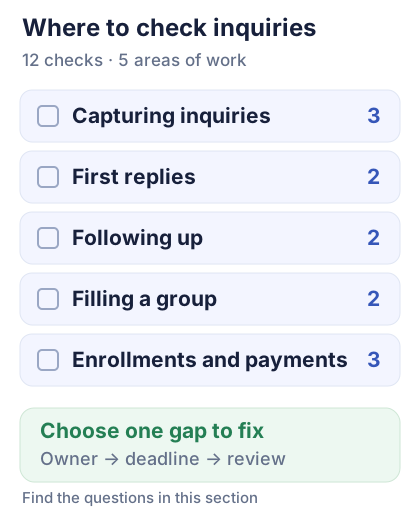
Choose a recent period and review the inquiries your center received. Mark each check as working or needing a change. Your CRM, messages and team notes are enough to see where an interested family might be left waiting.
Capturing inquiries
1. Does every channel feed the shared list or get checked by a staff member? Compare Instagram messages, website forms, emails and calls with your working list.
2. Does each inquiry include contact details, the original message, time and source? Open a few records: is there enough information to reply and understand the family's need?
3. Have you sent and checked a test inquiry through every connected channel? Send one and confirm that both the message and contact details arrive.
First replies
4. Does a named person own each inquiry, with cover when they are away? Check who handles inquiries arriving on days off or during staff leave.
5. Does the first useful reply help the family choose a class? Check whether the reply addresses what the child needs help with and offers a clear next step.
Following up
6. Are the outcome, next step and due date recorded after a conversation? Find promises to check places, call in the evening or suggest another time.
7. Is a follow-up agreed after a trial lesson? Check whether each family has been invited to discuss regular lessons.
Filling a group
8. Can you find similar inquiries when opening a new group? Bring together requests by subject, level and suitable times, including the waiting list.
9. Are the level, tutor and times checked before offering a place? Compare what was offered with the actual lesson arrangements.
Enrollments and payments
10. Are confirmed enrollments and first payments recorded separately? Choose a few new students and check both the enrollment and the payment received.
11. Are repeat messages from one family kept out of the new-client count? Match contacts across channels and separately note how many children the parent asked about.
12. Can the owner see unanswered inquiries and reasons for declining? Open inquiries without replies, overdue follow-ups and closed conversations.
What to change first
Record the date and who carried out the review. Choose one point where inquiries are being lost, assign someone to make the change and set a deadline and review date.
In the next comparable period, check unanswered inquiries, confirmed enrollments and first payments. Record the amounts received and reasons for declining. The file below includes the same 12 checks and space for team notes.
Related resources
How to start a tutoring business
Starting your tutoring practice or center? Define your offer, prices and first ways to reach students.
Tutoring Center Billing Software
Students have enrolled. See how to connect their lesson schedule, invoices and recorded payments.
Start using school software without moving all your data
Already running lessons with records in several places? Start with one manageable workflow.
From enrollment to clear payment records
Once a family confirms a place, your center schedules lessons, issues invoices and records payments. Explore how Intelligence Cloud connects the lesson schedule with student invoices and payments. Open the demo data without registering.