
Music school management software for lessons, invoices and teacher pay calculations
Plan individual and group lessons, automatically generate student invoices and see how lesson changes affect balances and teacher earnings.
Start free: set up your school. Open demo: explore sample data.

A connected music-school example
From a month’s lessons to a clear student balance
In this worked example, Mia takes a weekly piano lesson and a small-group theory class. These music-school sample records connect the schedule, her invoice and her teacher’s earnings.
01
Plan the month
€240
Four piano lessons at €40 and four theory classes at €20. Publishing the schedule creates Mia’s invoice automatically.
02
Account for a change
−€20
Mia misses one theory class. The school removes only her €20 charge; the group lesson still goes ahead.
03
See the updated amount
€220
Mia’s invoice updates automatically. Her teacher, Grace, still earns the fixed €15 for that group lesson.
Automatic music lesson billing in action
Intelligence Cloud updates the student’s invoice automatically when the school waives a missed lesson’s charge, without a separate invoice correction. In this group-lesson example, the teacher still earns the agreed fixed fee because the class takes place.
Music lesson scheduling
Keep individual instrument lessons and group classes on one timetable. Assign a teacher and room to each lesson and prepare the next week or month around your regular teaching times.
- Plan private lessons for individual students alongside theory, ensemble or other group sessions.
- Copy a repeating schedule and check for double-booked teachers or rooms before publishing.
On this day, Grace teaches Mia’s piano lesson at 16:00 and the theory group at 17:00 in the same studio.
Explore class scheduling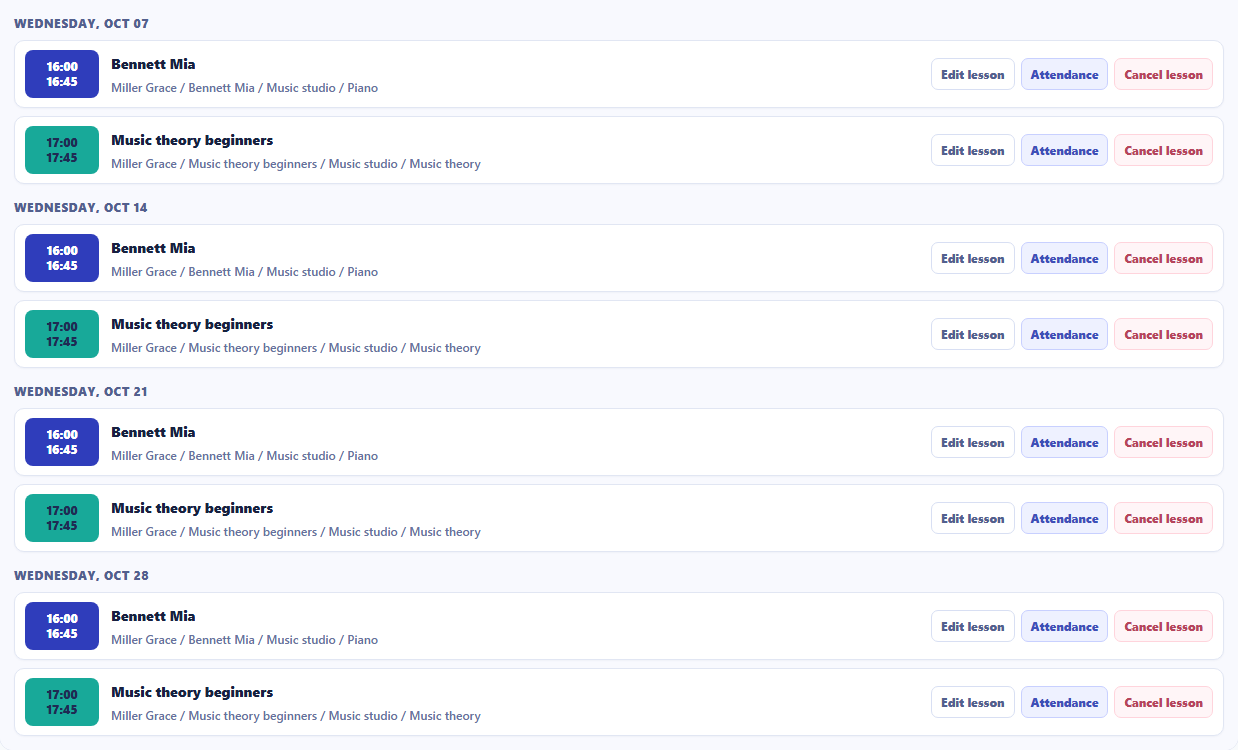
Music lesson billing and student balances
Intelligence Cloud calculates charges from planned music lessons and your school’s prices, then prepares each student’s invoice. See the lesson charges, discounts, received payments and the amount due together.
- Bill for a month of individual and group lessons using their respective prices.
- When you save the school’s decision to waive a lesson charge, the student’s invoice updates automatically.
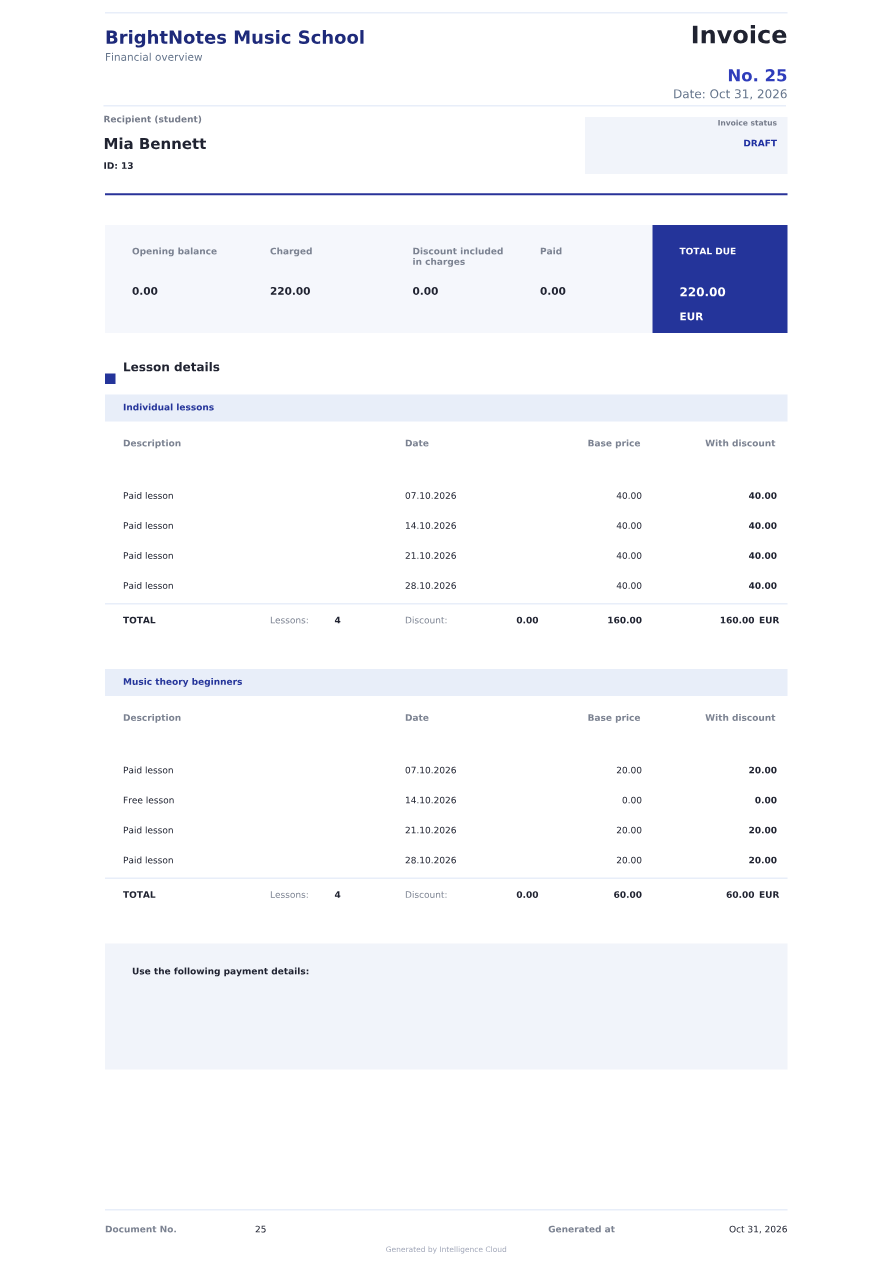
Mia’s October charges: 4 × €40 for piano + 3 × €20 for theory = €220. The school waived one theory lesson; with no previous balance or payments, €220 is due.
Explore student billingTeacher earnings for your music school
See which lessons and agreed rates make up each teacher’s earnings. Keep student charges separate from the teacher’s calculated earnings.
- Review the lessons, dates and rates behind the statement total.
- Review the statement, then prepare the teacher’s payment through your usual process.
Grace’s statement: four individual piano lessons at €24 each + four group theory lessons at a fixed €15 each = €156. The group class still goes ahead, so waiving Mia’s charge leaves Grace’s earnings unchanged.
See how teacher earnings are calculated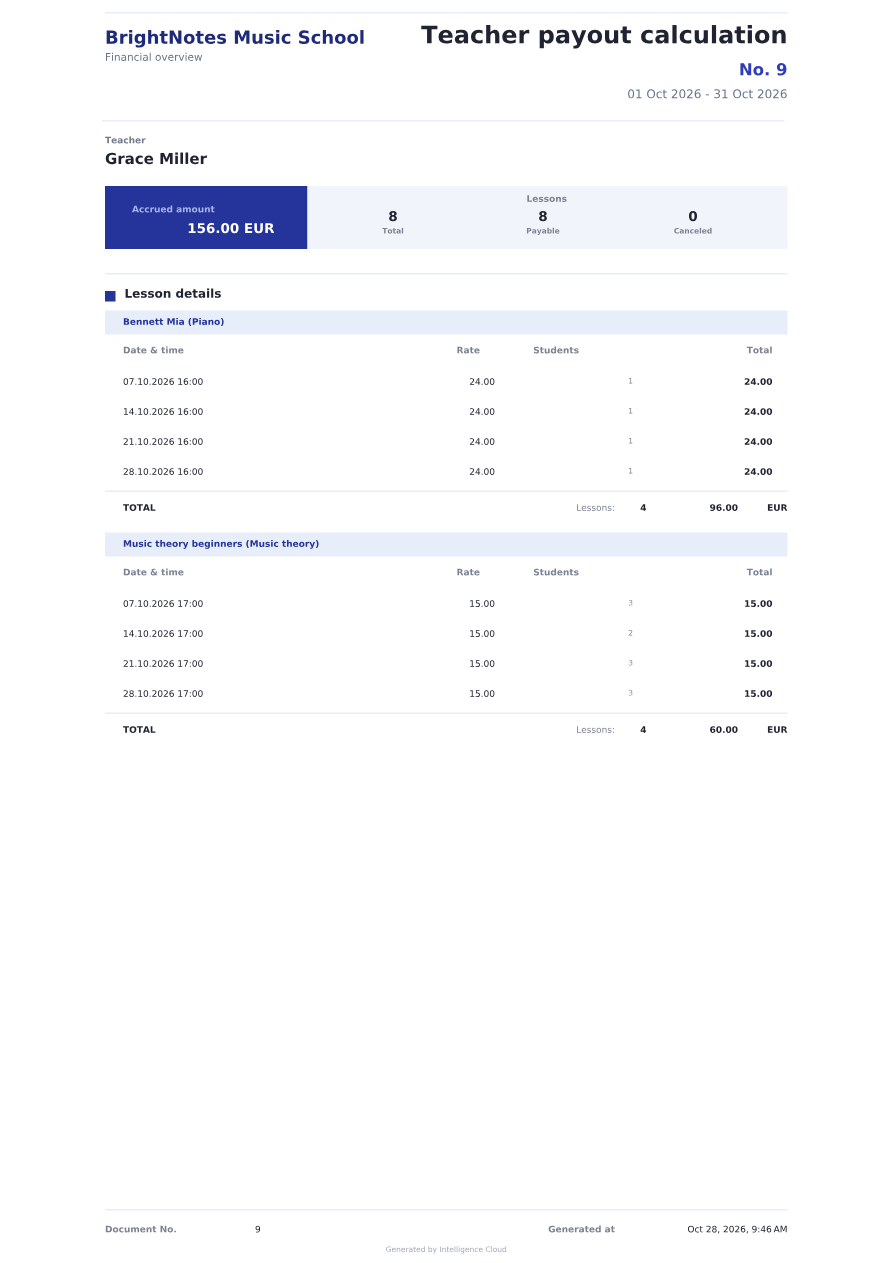
Student portal for your music school
In their personal account, students can check their own lessons and attendance, and review invoices shared by your school, including the amount due and invoice PDF.
Explore the student portalExplore the workflow
Take a closer look before you try it
Follow the product guides to see how the connected records work.
Plan and publish lessons
Prepare a repeating timetable, check teachers and rooms, then publish the finished schedule.
Read the scheduling guideCheck a student invoice
See the lesson charges, discounts, payments and balance that explain the amount due.
Explore student invoicesExplain teacher earnings
Follow a worked statement from lesson rates to the teacher’s calculated earnings.
Read the teacher earnings guideQuestions from music schools and studios
Can I manage individual and group music lessons together?
Yes. Schedule a lesson for an individual student or a group, with its teacher, lesson type, time and room. Both formats appear on the timetable and feed into the relevant student charges and teacher earnings.
How are student invoices created?
Publishing the lesson schedule creates the initial charges using the applicable prices. The system brings them into each student’s invoice, where you can review discounts, payments and the balance before sending it.
What happens when a student misses a lesson?
Your school decides whether to charge for a missed lesson. When you save a decision to waive the student’s charge, their invoice updates automatically. In this example, the group class still goes ahead and Grace’s fixed rate is €15 per group lesson, so her earnings stay the same.
How is teacher pay calculated?
Teacher earnings are calculated from the agreed rates for each lesson. Here, Grace earns €24 per individual piano lesson and a fixed €15 per group theory lesson. The teacher statement shows the lesson amounts and their total.
How can I try the software for my music studio?
Open the demo to explore the product with sample data, or start free to set up your own school. Use the linked guides to check scheduling, invoices and teacher earnings before moving your current records.
Try music school software for lessons, billing and teacher pay
Start free to set up your own school, or open the demo to explore scheduling, student invoices and teacher pay calculations with sample data.