
Scheduling and Billing Software for Language Schools and Training Centers
How connected scheduling and billing software helps education businesses turn approved lessons and attendance records into explainable invoices, payments, balances, payouts, and reports.
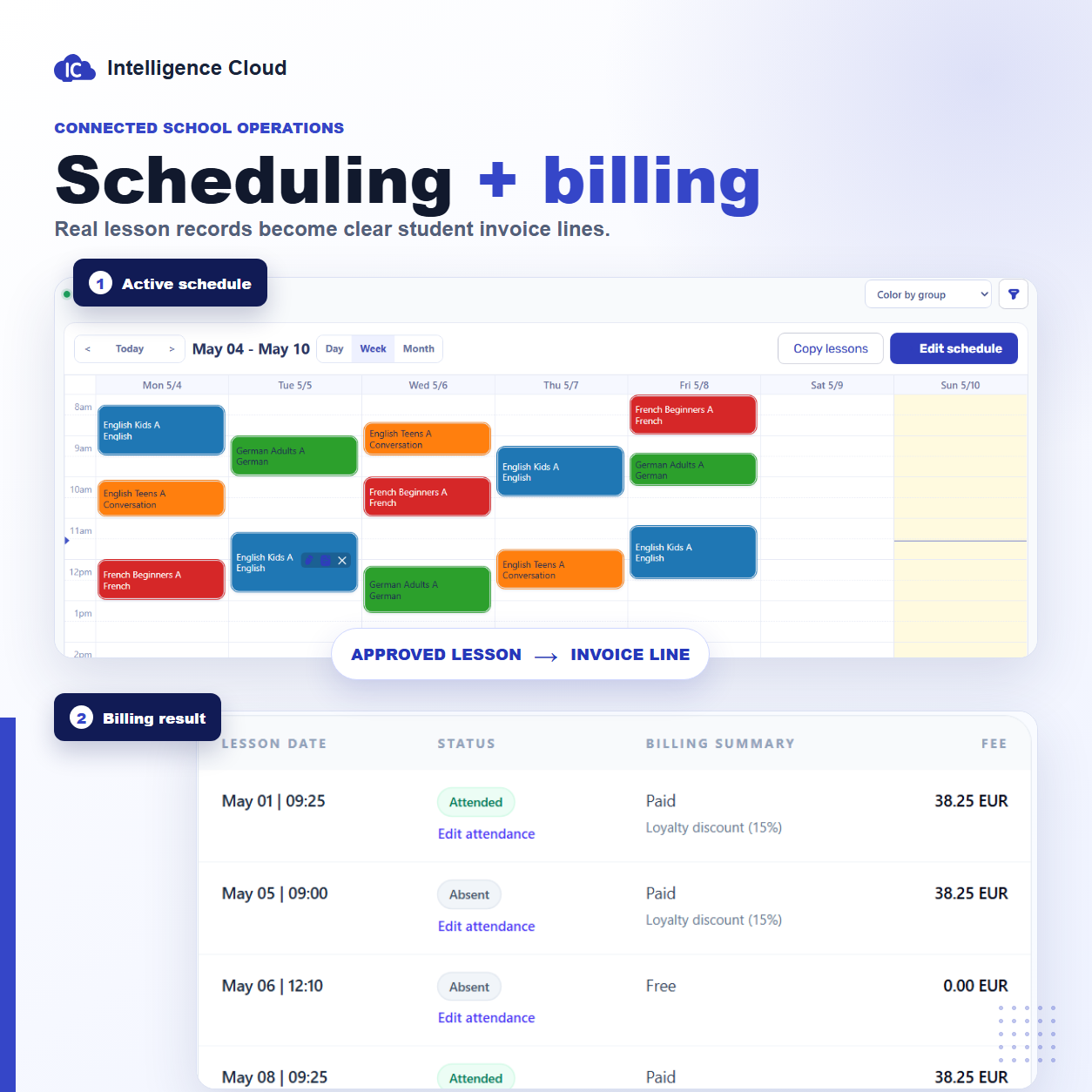
Scheduling and billing software is most useful when a lesson does not have to be reconstructed before it can appear on an invoice.
Many language schools and training centers begin with a shared calendar for classes and a separate invoicing tool for money. Both tools can work correctly on their own. The difficulty starts when an administrator must repeatedly explain which lessons happened, which students attended, which price applied, and why the current invoice or balance changed.
A connected system keeps that context attached to the operational record. The schedule says what was planned. Attendance says what happened. Billing uses the approved lesson, student, price, discount, and attendance data. Payments then update the balance, while reports and teacher payout statements reuse the same history.
What is scheduling and billing software?
Scheduling and billing software combines two responsibilities that are often handled separately:
- planning group and individual lessons with students, teachers, rooms, dates, and times;
- creating and explaining student charges, invoices, payments, debt, credit, and balances.
The connection matters more than simply opening both functions in one application. A useful system should preserve the identity of the lesson as it moves from planning into attendance and financial records.
For example, a confirmed group lesson should already carry the course, students, teacher, date, and pricing context needed by the next step. Staff should not have to copy the same information into an invoice spreadsheet at the end of the month.
Why separate scheduling and invoicing tools create reconciliation work
A scheduling-only tool can show an accurate calendar but still leave the billing team without the information needed to explain an amount. An invoicing-only tool can produce a professional PDF but still depend on manually prepared lesson totals.
This gap creates recurring questions:
- Was the lesson only planned, or was it completed?
- Was the student present, absent, or excused?
- Did a canceled or rescheduled lesson remain billable?
- Which course price and student discount applied?
- Did a correction change only the invoice, or also the teacher payout and report?
When the answers live in different calendars, spreadsheets, chats, and invoice documents, staff must reconcile them by hand. The cost is not only data entry. It is the time spent checking exceptions and answering students, parents, teachers, and owners.
Scheduling-only, invoicing-only, or connected software?
The right approach depends on how much operational context the school needs to preserve.
Scheduling-only software
Scheduling-only software is suitable when the main problem is calendar organization. It may handle recurring classes, teacher availability, rooms, conflicts, and timetable changes well.
The limitation appears when finance is managed elsewhere. The administrator may still need to count lessons, interpret cancellations, apply prices, and transfer totals into another system.
Invoicing-only software
Invoicing software is useful for creating documents, due dates, payment instructions, and delivery history. It can be enough when every student receives a simple fixed invoice that does not depend on lesson records.
For lesson-based billing, however, the invoice still needs a reliable source. If lesson dates, attendance outcomes, previous debt, discounts, and corrections are assembled manually, the document is only the final output of a spreadsheet process.
Connected scheduling and billing software
Connected software uses the same operational records across both sides. The schedule establishes lesson context, attendance records the result, and billing can use those facts to construct explainable invoice rows and balances.
This approach is most relevant for language schools, tutoring businesses, and training centers with changing schedules, mixed group and individual lessons, attendance-based billing, partial payments, discounts, or lesson-based teacher pay.
How the schedule becomes an invoice
A reliable scheduling-to-billing workflow normally follows these steps:
- The administrator creates group or individual lessons in a draft schedule.
- Teacher, room, and time conflicts are resolved before the schedule is approved.
- Approved lessons become the source for daily attendance records.
- Attendance and billing rules determine how each lesson should affect the student invoice.
- The invoice explains lesson rows, prices, discounts, previous debt, payments, and the amount due.
- Recorded payments update invoice status and the student balance.
- Completed lesson history also supports teacher payout statements and operational reports.
The scheduling video below shows the first part of this chain: creating a group lesson, detecting a conflict, approving the schedule, and reusing the confirmed lesson record in connected workflows.
For the product-level steps, use the class scheduling workflow, attendance workflow, and student invoice workflow.
What should happen when the schedule changes?
Schedule changes are where disconnected tools become expensive.
A draft change should not silently alter financial history. A confirmed reschedule, cancellation, teacher substitution, or attendance correction should remain visible enough that staff can understand its downstream effect.
Before choosing software, test cases such as:
- a lesson moved to another day before approval;
- a teacher or room conflict found during planning;
- a completed lesson corrected after attendance review;
- a canceled lesson that should not be charged;
- an absence that remains billable under the school's policy;
- a price or discount exception for one student;
- a lesson that affects both the student invoice and teacher payout.
The system does not need to apply the same policy for every school. It does need to preserve enough context to make the chosen policy repeatable and explainable.
Scheduling and billing software checklist
When comparing systems, check the complete workflow rather than counting screens.
Scheduling and lesson control
- recurring and one-off lessons;
- group and individual classes;
- teacher and room conflicts;
- draft review and approval;
- rescheduling, cancellation, and substitution history;
- mobile access to the daily schedule.
Student billing and balances
- invoice rows connected to lesson records;
- attendance-based billing treatment;
- course prices and student discounts;
- previous debt, partial payments, and overpayments;
- payment allocation and explainable balances;
- invoice email and PDF delivery.
Connected operational results
- teacher payouts based on completed lessons and rates;
- reports that reuse schedule, attendance, invoice, and payment data;
- role-based access for administrators, teachers, and finance staff;
- a student portal where invited students can review approved lessons, attendance, invoices, and payment history.
The checklist should be tested with the school's real exceptions, not only an ideal month in a sales demonstration.
What connected software does not replace
Scheduling and billing software should not be confused with every financial or communication system a school may use.
It does not automatically replace:
- statutory accounting, tax returns, or payroll compliance;
- a bank, card processor, or online payment gateway;
- marketing email campaign software;
- an LMS for teaching content, assignments, and assessments;
- a public class marketplace or self-service booking platform.
Its role is operational: keep lesson, attendance, invoice, payment, balance, payout, and report data connected before those results move into accounting or other specialist systems.
How Intelligence Cloud connects scheduling and billing
Intelligence Cloud class scheduling software separates draft planning from approved operational records. Staff can create lessons, review conflicts, and approve the schedule before it becomes the source for attendance and downstream calculations.
The attendance and billing workflow records what happened in the lesson. Student billing software then keeps invoices and balances connected to lesson, pricing, discount, and payment history. The same completed lesson data can support teacher payout calculations and financial and operational reports.
For a deeper financial explanation, read Student billing software for training centers. For a broader automation view, continue with Course automation software for training centers.
FAQ
What is scheduling and billing software?
Scheduling and billing software connects class planning with student invoices and balances. It keeps lesson, student, teacher, attendance, pricing, and payment context available across the operational workflow.
What is the difference between scheduling and invoicing software?
Scheduling software organizes classes, teachers, students, rooms, dates, and times. Invoicing software creates and sends financial documents. Connected scheduling and invoicing software preserves lesson context so invoice amounts can be traced back to the records that produced them.
Can class scheduling software generate invoices?
Only if it includes or integrates with a billing workflow. A calendar alone does not know enough about attendance rules, prices, discounts, previous debt, payments, and balances to explain a student invoice.
How does attendance affect billing?
Attendance records what happened in a scheduled lesson. Depending on the school's rules, a present, absent, excused, canceled, or transferred lesson may produce a different charge or no charge at all.
Is connected software useful for language schools?
Yes. Language schools often combine recurring groups, individual lessons, teacher and room constraints, attendance rules, student discounts, monthly invoices, and lesson-based teacher payouts. These workflows benefit from shared lesson records.
Does scheduling and billing software replace accounting software?
No. It manages operational lesson and billing records. Accounting software remains responsible for statutory bookkeeping, tax, and financial compliance.
Conclusion
The practical value of scheduling and billing software is not that a calendar and an invoice screen appear in the same product.
The value is that an approved lesson remains understandable as it moves through attendance, student billing, payment history, balances, teacher payouts, reports, and student access. That connection reduces manual reconciliation and makes changes easier for the school to explain.
Related resources
How to test training center billing before going live
A practical checklist for testing lesson-based billing in a training center before using invoices, payments, discounts, and balances with real students.
Attendance tracking and billing for training centers
Learn when training centers, language schools, and tutoring centers need attendance records connected to scheduling, billing, invoices, payments, teacher payouts, and reports.
Calculate Teacher Payouts from Completed Lessons
Learn how training centers, language schools, and tutoring centers can calculate teacher payouts from completed lessons, rates, attendance, cancellations, and payout statements.
Course automation software for training centers
How course automation software helps connect schedules, groups, students, payments, notifications, reports, and management decisions.
Student Billing Software for Training Centers
Learn how training centers and language schools can create student invoices, record payments, track unpaid balances, and connect billing with lessons and attendance.